Five Components for Building a Company Agent Harness
- Cargo
- Machine Learning
- Shipped
- Shipper
- Robert Brown
- Readers
- 358
LangChain’s internal agents combine workplace chat, identity controls, shared and personal memory, sandboxed code execution, and scheduled runs.
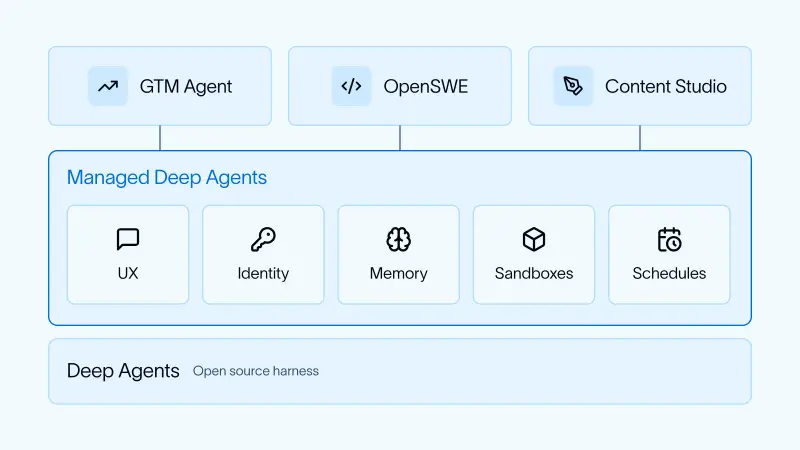
Company agents become useful when they can work inside existing processes, handle the right permissions, and keep running when nobody is actively prompting them. LangChain describes a common setup behind three internal agents for sales, engineering, and marketing: a workplace interface, identity rules, memory, sandboxed code execution, and scheduled or event driven runs.
The design is less about one universal agent than about the infrastructure around several agents. Each can take different actions, but they share the same basic operating model. That makes the account of their deployment useful to teams weighing how an agent should interact with colleagues and company services.
Three agents, one operating pattern
LangChain’s GTM Agent monitors and responds to email, handles new qualified leads, prepares daily briefs, answers account questions, and can run outbound activities. OpenSWE works on and drafts pull requests, and reviews pull requests as they arrive. Content Studio creates marketing materials, including blog posts, images, presentations, and videos, using the company’s style and positioning.
The range of work matters: these systems aren’t limited to answering questions in a chat window. They can act on software repositories, business tools, and content workflows. That makes the harness’s choices about access and identity central to how the agents operate.
Meet people in their existing workspace
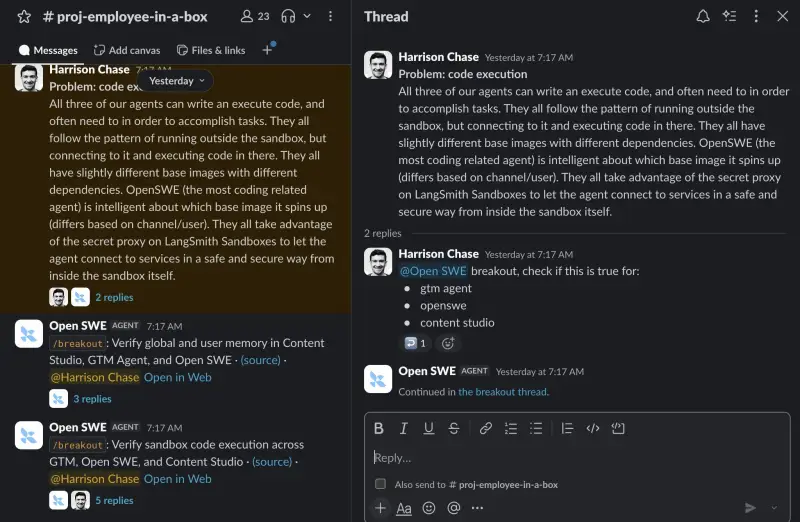
All three agents are available through their own Slack apps. People can message one directly or tag it in a channel, where colleagues can also see how others use it. That shared visibility can make an agent’s activity easier to follow and give teams examples of useful requests.
Channel conversations create a practical interface problem: an agent’s response or work can interrupt a discussion among people. LangChain addressed this with a way to move an agent interaction into its own thread within the channel. The agent remains part of the shared workspace, while its exchange gets room of its own.
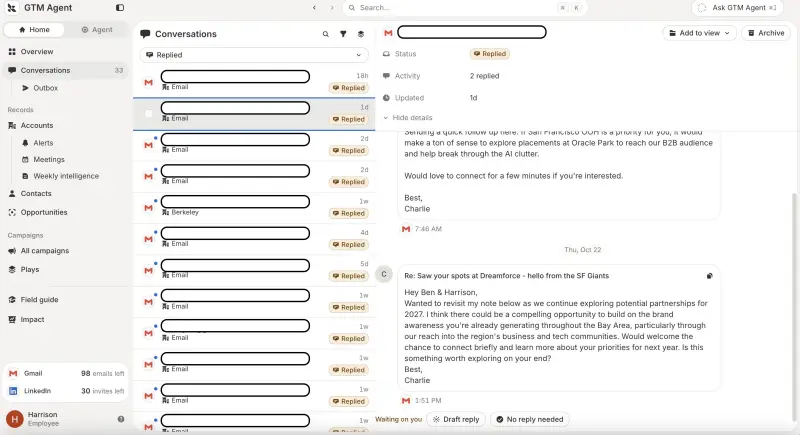
Slack isn’t a good fit for every task. Reviewing a few proposed emails can work in a direct exchange, but tracking a large backlog through chat messages becomes cumbersome. For that workflow, LangChain built a separate interface. The practical lesson is to treat chat as an entry point, not as the only place an agent can present work.
Choose whose identity an action uses
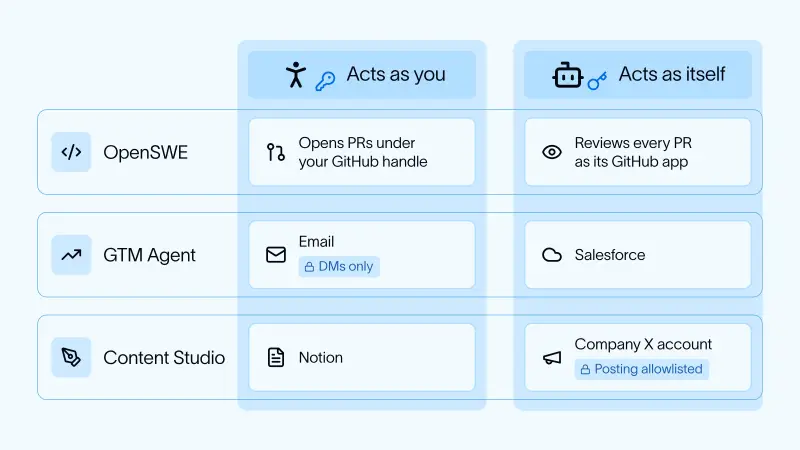
The hardest design question, in LangChain’s account, is who an agent represents when it acts. The agents use both approaches, depending on the service and context. LangChain’s identity documentation and connection guidance describe those controls.
OpenSWE uses the invoking person’s identity when directly messaged, so a pull request can be opened under that person’s GitHub handle. When it runs in the background to review code, it uses its own GitHub app identity instead.
The GTM Agent uses a fixed identity for some Salesforce access, avoiding the need for every user to sign in. Content Studio similarly uses a person’s identity for some Notion actions. For company account operations such as Twitter, it uses fixed credentials; access to particular operations is restricted to a whitelisted group. Other users may be limited to reading or drafting.
These distinctions tie permissions to context. A system that can act as a user in a private conversation may need narrower access in a shared channel; work performed automatically may need an agent identity that can be recognized separately. The examples show that “the agent’s permissions” aren’t necessarily one setting. They can vary by tool, action, and how a run was started.
Separate shared memory from personal memory
Each agent has two memory levels: global memory that applies across users, and user memory that applies to an individual. The agent chooses which facts to save at which level. This gives teams a way to distinguish organizational context from details specific to a person.
LangChain describes memory as its least explored area, with further work planned. That caveat matters for builders: the structure is in place, but the account doesn’t establish how reliably agents select, update, or retrieve facts over time. Those behaviors will shape whether stored context helps future work or creates confusion.
Run code in a sandbox with access to services
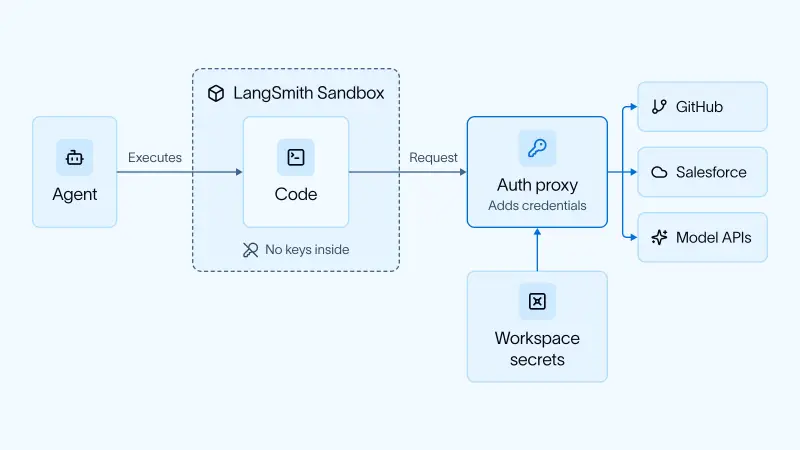
All three agents can write and execute code. Their agents run outside a sandbox, connect to it, and execute code inside. Each uses a base image with dependencies suited to its tasks; OpenSWE can select an image based on the channel or user.
Code in the sandbox can still need to reach authenticated services. LangChain uses a secret proxy with LangSmith Sandboxes to let code make those connections without placing the secrets directly in the sandbox. Further setup details are available in the documentation for adding a sandbox to Managed Deep Agents.
Make runs event driven and scheduled
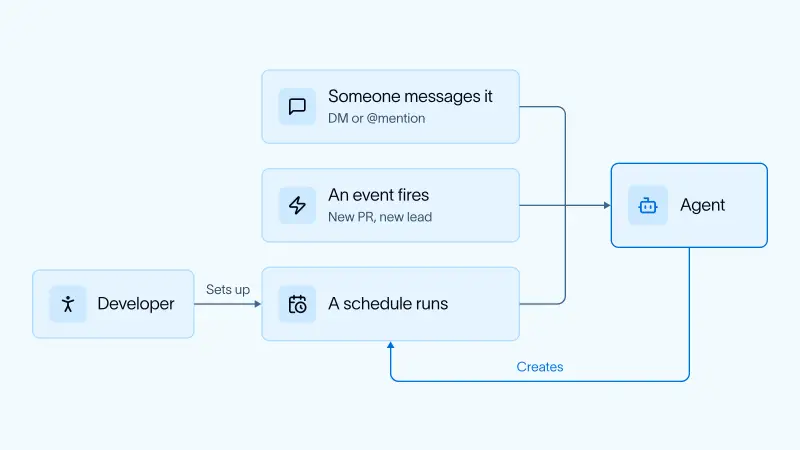
A large share of agent runs happen without a person starting them in the moment. Some are triggered by events configured by the agent developer: OpenSWE, for example, reviews a pull request when one is created. Others are set up by users. A request for a daily GTM brief led the agent to create a recurring schedule using a cron schedule.
This shifts the harness from a request and response tool toward a system that monitors for work and carries out recurring tasks. It also makes the trigger, identity, and destination part of the design: teams need to know what starts a run and which credentials it will use.
A shared foundation with room for custom behavior
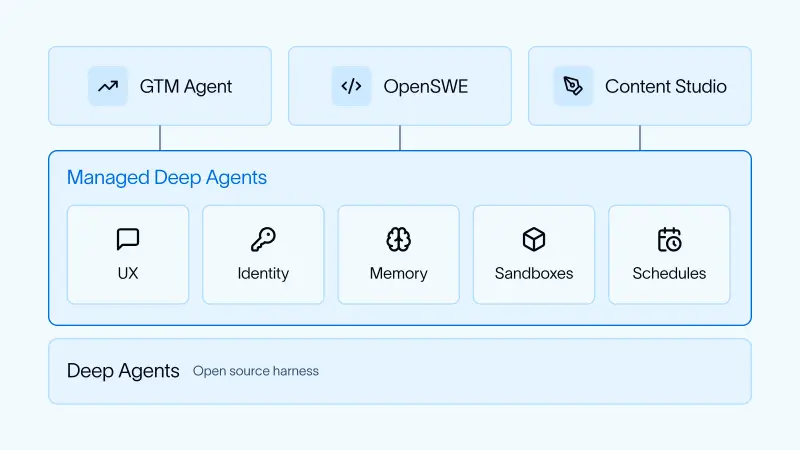
LangChain built the three agents on Managed Deep Agents, which sits on the open source Deep Agents harness. Managed Deep Agents supplies channels, schedules, sandboxes, memory, and identity features, while allowing teams to customize agent behavior. Its overview and quickstart describe the platform.
The pattern’s clearest takeaway is that deploying company agents means designing the surrounding system as carefully as the agent’s task logic. Workplace access, service credentials, memory scope, code execution, and background triggers all affect what the agent can do and how its work fits into a team. LangChain’s examples offer a concrete starting point; memory behavior and the right interface for each workflow remain areas teams will need to refine in practice.


