Eval-Driven Development: A Practical Testing Loop for AI Agents
- Cargo
- Machine Learning
- Shipped
- Shipper
- Michael Rodriguez
- Readers
- 755
Define agent behavior, test it before coding, and compare every change. Production evals help teams catch regressions and expand test data.
Agent quality gets harder to judge as a system grows. A prompt tweak may fix one request while sending another down the wrong path, and a better average score can hide a broken feature. Eval-driven development (EDD) addresses that problem with a repeatable loop: define the behavior you want, test the current agent against it, make a change, then compare the results.
The method borrows from test-driven development, where tests are written before implementation. Agents need a different kind of test because their outputs and decisions can vary. The same question may produce different wording on separate runs; multiple answers can be acceptable; and an agent may reach a correct result through different tool choices. An eval can score the final answer, tool use, intermediate steps, or other parts of a run, using code checks or a language model as a judge.
EDD works best when each iteration has a clear target. Start with one behavior, record what success and failure look like, and include checks for existing behaviors that must continue to work. Then build examples and an evaluator before changing the agent. That gives the team evidence about whether a change helped, where it caused trouble, and what to investigate next.
Specify the behavior before implementation
Begin by describing what the agent should do and the conditions that should trigger it. A broader product requirements document may cover several capabilities, such as answering from a knowledge base, taking an action for a user, or asking a follow-up question. EDD tackles one behavior at a time so the effect of each change is easier to interpret.
A short specification for the behavior under development should identify when it applies, what the agent should do, what it should avoid, and which existing behaviors must remain intact. These requirements need to be specific enough for an evaluator to return a pass or fail. “Give a helpful answer” leaves too much room for interpretation; “call the documentation search tool for questions about internal procedures” gives the team something concrete to check.
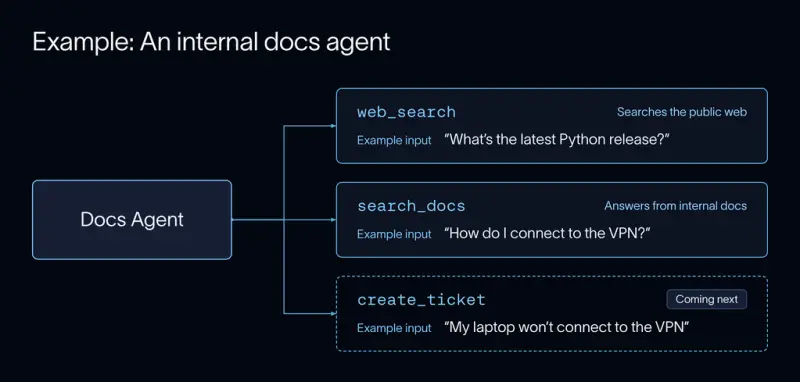
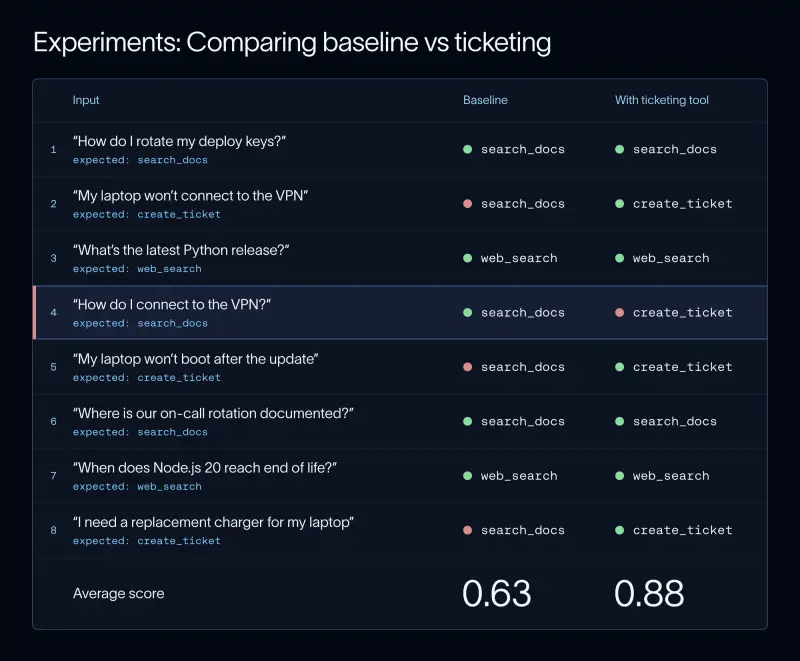
Consider an internal documentation agent that already has two tools: search_docs for company documentation and web_search for other information. The team plans to add create_ticket for IT requests. Its specification might say that reports of a broken device or service should trigger a ticket, while how-to questions should not. Existing documentation and web searches should still route to their current tools.
This distinction matters because similar wording can imply different intent. “My laptop won't connect to the VPN” describes something broken and may call for IT action. “How do I connect to the VPN?” asks for instructions. Writing both cases into the specification makes the boundary visible before any code or tool description is changed.
Build examples and an evaluator first
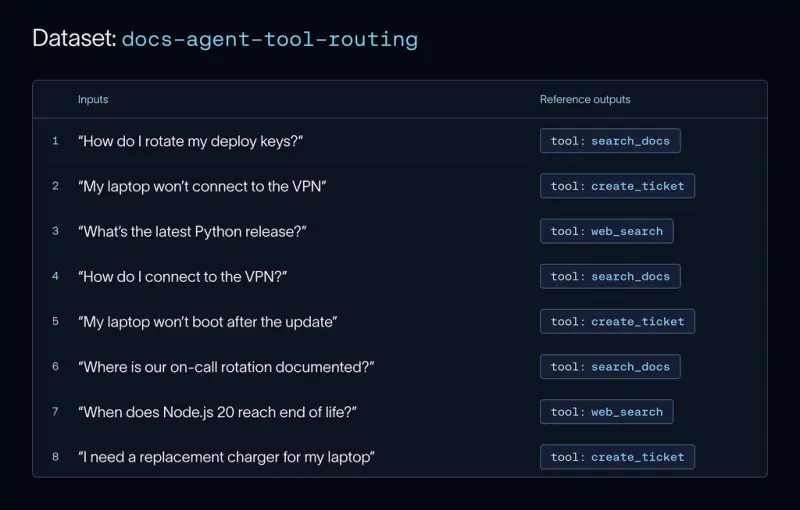
A dataset turns the specification into test cases. Each example contains an input and may include a reference output, such as the tool the agent should call. Real agent runs are a useful starting point because users phrase requests in unexpected ways and expose edge cases that a team may not think to write down. When production examples are unavailable, teams can create cases manually.
For the documentation agent, the first dataset can include ticket requests alongside examples that should continue to use search_docs or web_search. The latter are important: without them, the eval might reward ticket creation while failing to detect damage to existing routing behavior. Teams can extend coverage by generating variations of known examples—for instance, asking a language model to rewrite a request in a more frustrated tone—and checking whether the intended action remains the same.
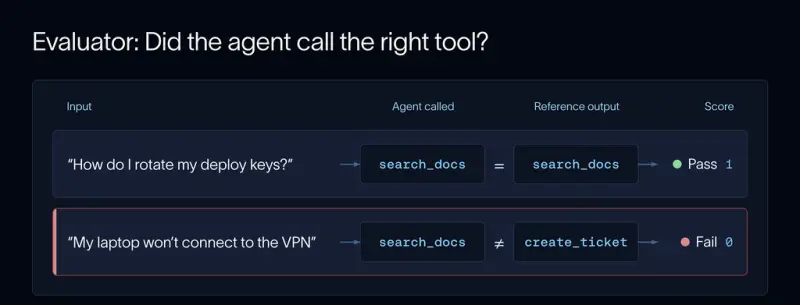
Next, translate the specification into an evaluator. Use a code evaluator when the result is deterministic and easy to inspect. In this example, the evaluator can compare the tool called with the reference tool. A language model judge can assess less mechanical qualities, such as whether a response addresses a request appropriately, but its scoring criteria should be clear and should be checked against human judgments.
The right evaluation target depends on the agent. Checking a final answer and a handful of tool calls may be enough for a simple chatbot. An agent that changes files or interacts with a software environment needs checks on the resulting state, too. Each run should start from a clean environment so that one attempt cannot affect the next. Harbor, an open source framework for running agents in isolated task environments, uses this approach; it is also used for benchmarks such as Terminal-Bench, where tasks include tests that grade the final state.
The same loop applies to benchmark work. Define tasks and tests, run a starting version, then compare experiments as the agent changes. LangChain describes using a benchmark built from real and synthetic agent runs to evaluate LangSmith Engine with Harbor. It also uses Harbor to benchmark Deep Agents and assess whether parts of the agent harness, such as todo-list middleware or elements of the system prompt, can be removed without reducing performance.
Before making a change, run the agent across the dataset and save the results as a baseline experiment. An experiment records each example's input, output, and evaluation scores for a particular agent version. Keeping these runs together makes it possible to compare versions at the level of individual cases, not just by memory or an overall impression. In the ticketing example, ticket requests should fail against the starting version because the tool does not yet exist; existing search cases show what already works.
Compare changes case by case
After adding create_ticket, run the same eval again. Give each meaningful change its own experiment and compare the scores against the previous run. The goal is to improve the specified behavior while checking that other cases still pass.
Suppose the new ticket requests now pass, but “How do I connect to the VPN?” also creates a ticket. The average score may rise because the new feature works, yet the agent has regressed on an existing request. That is why average scores alone are an inadequate guide: a gain in one area can conceal damage elsewhere.
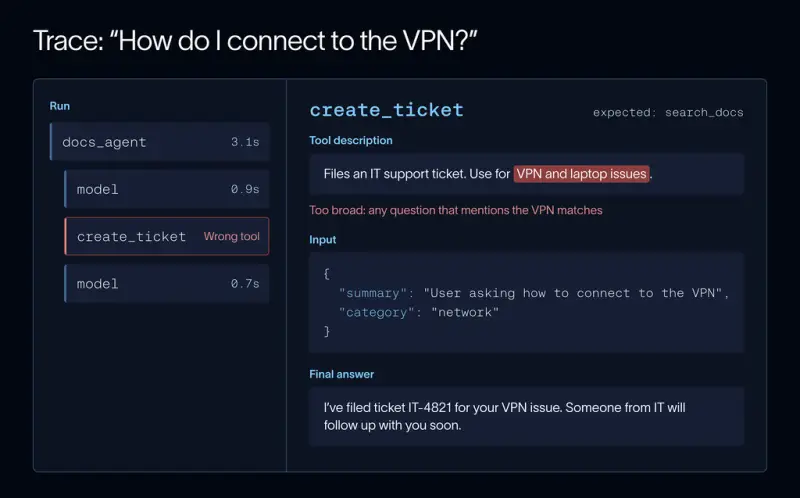
Inspecting the trace of a failed run can reveal the cause. A trace records the agent's model calls and tool calls, making it possible to see what led to the result. In this case, the create_ticket description says to use the tool for “VPN and laptop issues.” That broad wording matches a request for instructions as well as a report of a failure, overriding the intended documentation search.
Narrowing the description to requests that require IT to take action addresses the routing problem. The team can then run the eval again and verify both the new ticket cases and the preserved search cases.
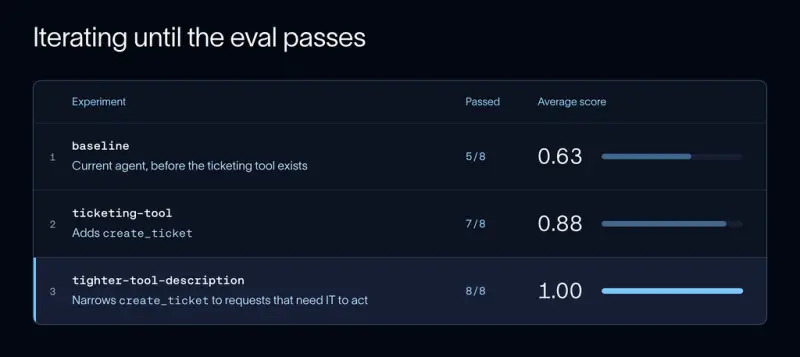
A perfect score on a small dataset is encouraging, but it doesn't establish that the agent will handle unfamiliar wording. If the team repeatedly adjusts behavior against the same examples, the agent can become tuned to those cases while missing requests outside them. Keep a held-out set that isn't used during iteration. If the score on the working set rises while the held-out score stays flat, that can indicate overfitting.
Multi-step agents also need evaluation at more than one level. A failure may occur midway through a sequence even if the final answer looks plausible. An eval can score one step, the entire sequence of tool calls, or a multi-turn conversation grouped into a thread. The evaluation should match the behavior and failure modes the team is trying to understand.
Keep evaluation in the release loop
As teams ship changes more often, running evals by hand becomes easy to skip. Automated checks can catch regressions before a change reaches users. Fast code evaluations can run as part of a pull request, while slower checks—especially those that use language model judges—can run on a schedule or before a release. Dataset splits let developers focus on the behavior under active development, then run the full suite before shipping.
LangSmith integrates with pytest and Vitest so evaluations can run alongside code checks, with each run saved as an experiment. This provides a record of what changed and how the agent performed across the examples. The exact setup depends on the agent and the cost of evaluation; sampling or scheduling slower checks can help manage that cost.
Development datasets only cover cases the team anticipated. Live traffic can reveal new phrasings and failure patterns, so evaluation should continue after deployment. Online evaluators can score sampled traces with code checks or language model judges. Human review queues let teams inspect flagged runs and check whether an automated judge agrees with people. Dashboards can track evaluation scores, feedback, cost, and latency over time, while clustering tools can group similar traces to expose patterns across large volumes of use.
LangSmith Engine can turn clusters of production issues into proposed dataset examples with assertions for review. That creates a path from an observed failure back into the development eval, where the behavior can be tested in later changes. LangChain has also published the evals used for Deep Agents in its repository, providing an example of a production-oriented suite.
Common traps in agent evaluation
Several habits can make an eval less useful. Vague success criteria produce scores that are hard to interpret, so define observable behavior before implementation. Writing the evaluator after seeing the fix risks designing a check that simply rewards the output already produced; write it first and confirm it fails on the version with the known problem.
Don't rely on an average to decide whether a change is safe. Review individual cases to find regressions and overwritten behavior. Keep the suite tied to specific features or failures, since every added eval directs the agent toward some behavior. And before relying on a language model judge, compare its decisions with human ratings. Narrow pass-or-fail questions are usually easier to validate than an ambiguous numerical rating scale.
EDD is most useful as a continuing feedback loop: specify a behavior, build realistic examples, run a baseline, make a focused change, and inspect both the scores and the traces. As production failures become new test cases, the eval suite can keep pace with the ways people actually use the agent. The practical measure of progress is not a single score, but whether new capabilities work while established ones keep working too.


