Agent Retrieval Design: Keep Search Results Relevant and Context Small
- Cargo
- Machine Learning
- Shipped
- Shipper
- William Brown
- Readers
- 726
Deep Agents combines targeted search, file offloading and subagent review to limit wasted context and reduce stale or irrelevant results.
Agent retrieval is a context management problem as much as a search problem. A system may have access to the right files, databases and archives, yet still waste its context window on repeated searches, oversized results or convincing but outdated material. The design goal is to bring the useful evidence into the right model context at the right point in the task.
Deep Agents, LangChain’s agent harness, addresses this with small filesystem searches, paged reads and a way to hand off large tool results. For custom retrieval, the same principle can be extended through a “retrieve, offload, delegate” workflow: save search results as files, pass around their paths, and have subagents inspect them before the main agent uses their findings.
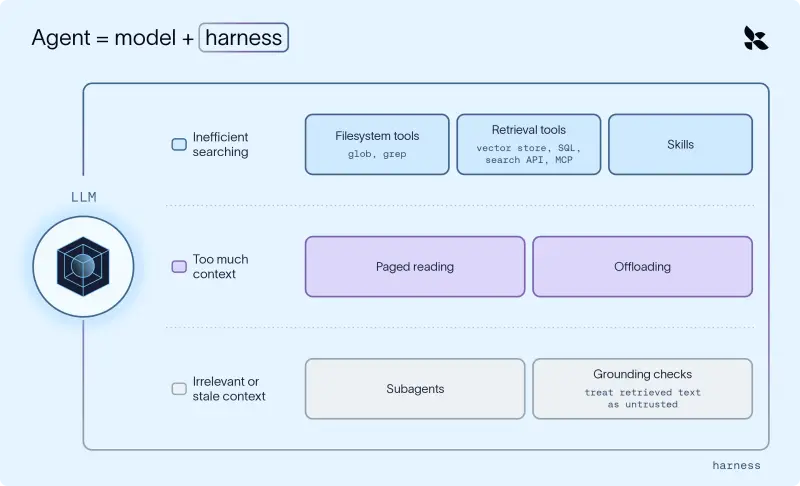
Retrieval has three failure modes
Consider a weekly competitive analysis agent that researches hundreds of companies and fills out a team report. It needs last week’s notes on Company A, one revenue figure from a large market data export, and recent coverage from a news archive. Each task calls for a different search method, but all three can strain the agent’s limited context window.
The first risk is inefficient searching. Opening files just to learn what they contain, or repeating near-identical queries, spends tokens and time before the agent finds evidence. The second is volume: a single result can contain a large export or many full articles, leaving little room for analysis. The third is relevance and freshness. A result about a similarly named company, or an old version of a document, can look plausible enough for the model to rely on it.
An agent harness can shape how search happens and how its results enter the model’s context. The techniques below, using the Deep Agents harness as an example, show how to control the size and quality of that evidence flow.
Choose a search method that fits the question
For files, start with names and matching text before opening the contents. Deep Agents includes glob for matching file names and grep for finding literal text inside files. A pattern such as **/company-a*.md can locate Company A’s notes, while grep can find a revenue figure or a phrase across files without loading each one into the model’s context.
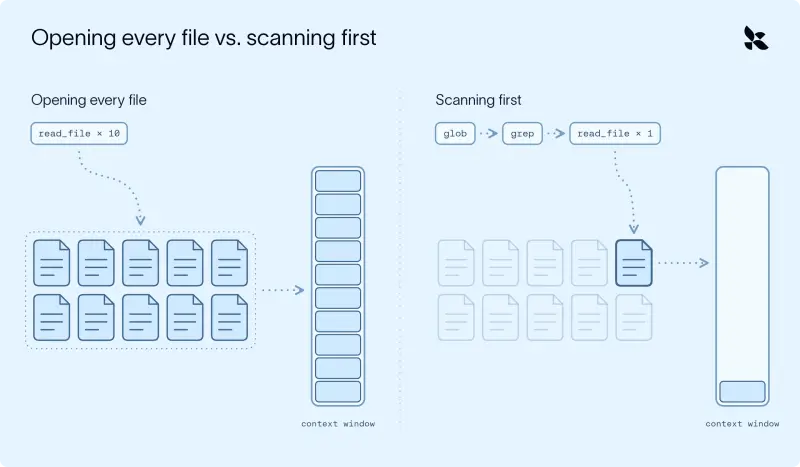
The harness also provides ls, read_file, write_file and edit_file. These tools work through the agent’s backend, so they can be used with files in agent state, local storage, a persistent store or a sandbox. The built-in tools are documented here.
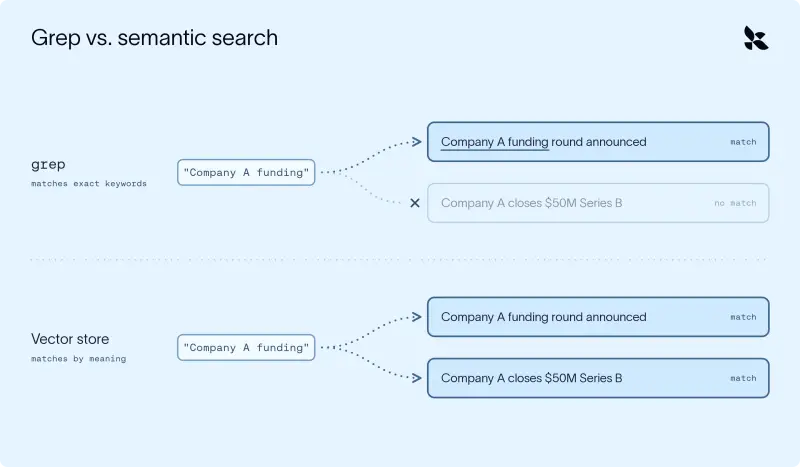
Literal matching has a clear limit: it finds the words supplied to it. A query for “Company A funding” can miss a story titled “Company A closes $50M Series B.” When likely alternatives are predictable, an agent can try synonyms such as “raised” or “Series B,” or use a skill to store team-specific terms. When the wording is less predictable, semantic search can find results by meaning rather than exact text.
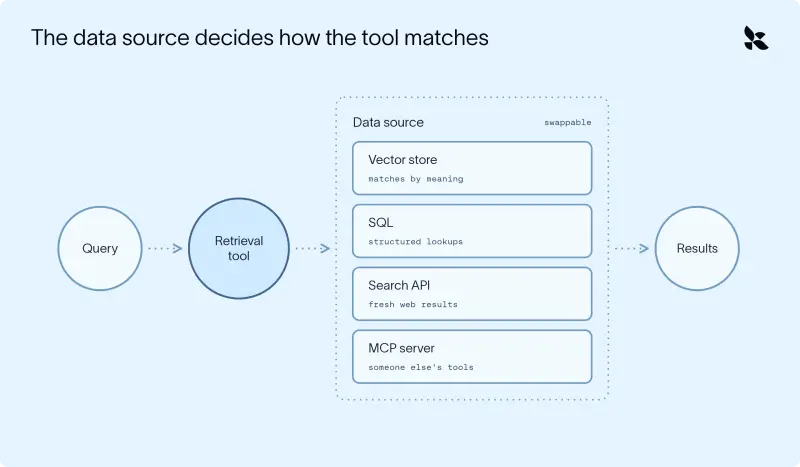
A retrieval tool can query a vector store for semantically similar documents, but vector search is only one option. The backing source might be SQL for structured information such as sales figures, a search API for recent web material, or an MCP server that exposes an existing search tool. The right choice depends on the data and the question. For known terms, a targeted text search is often the simpler route; semantic matching helps when relevant material uses different language. LangChain’s guide to semantic search explains the mechanism in more detail.
Let research trigger follow-up searches
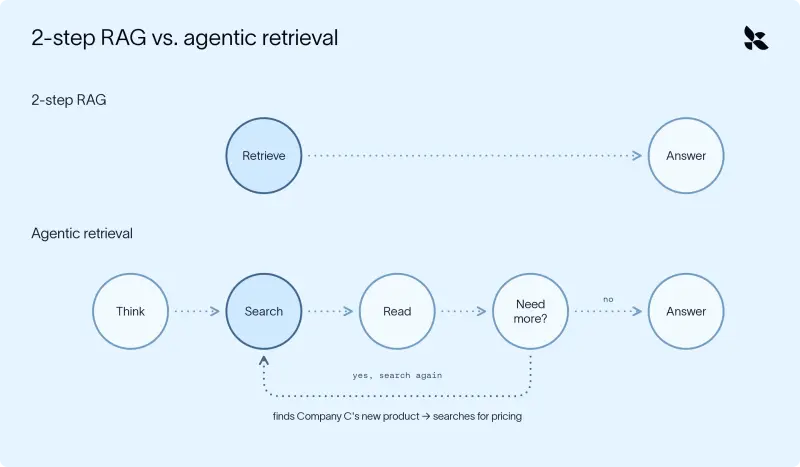
A fixed search at the start can work for a question with a known answer, such as a straightforward FAQ. It is less suited to research that uncovers new questions along the way. If the agent finds a product launch while researching Company C, it may then need to look up that product’s pricing—information it could not have known to request in its first search.
That calls for agentic retrieval: the agent decides what to search for, when to search, and whether the results leave gaps. Deep Agents runs in a loop, allowing the agent to call available tools repeatedly as its research develops. This makes retrieval responsive to findings rather than limited to a single initial query. The distinction between two-step RAG and agentic retrieval matters when building an agent for open-ended work.
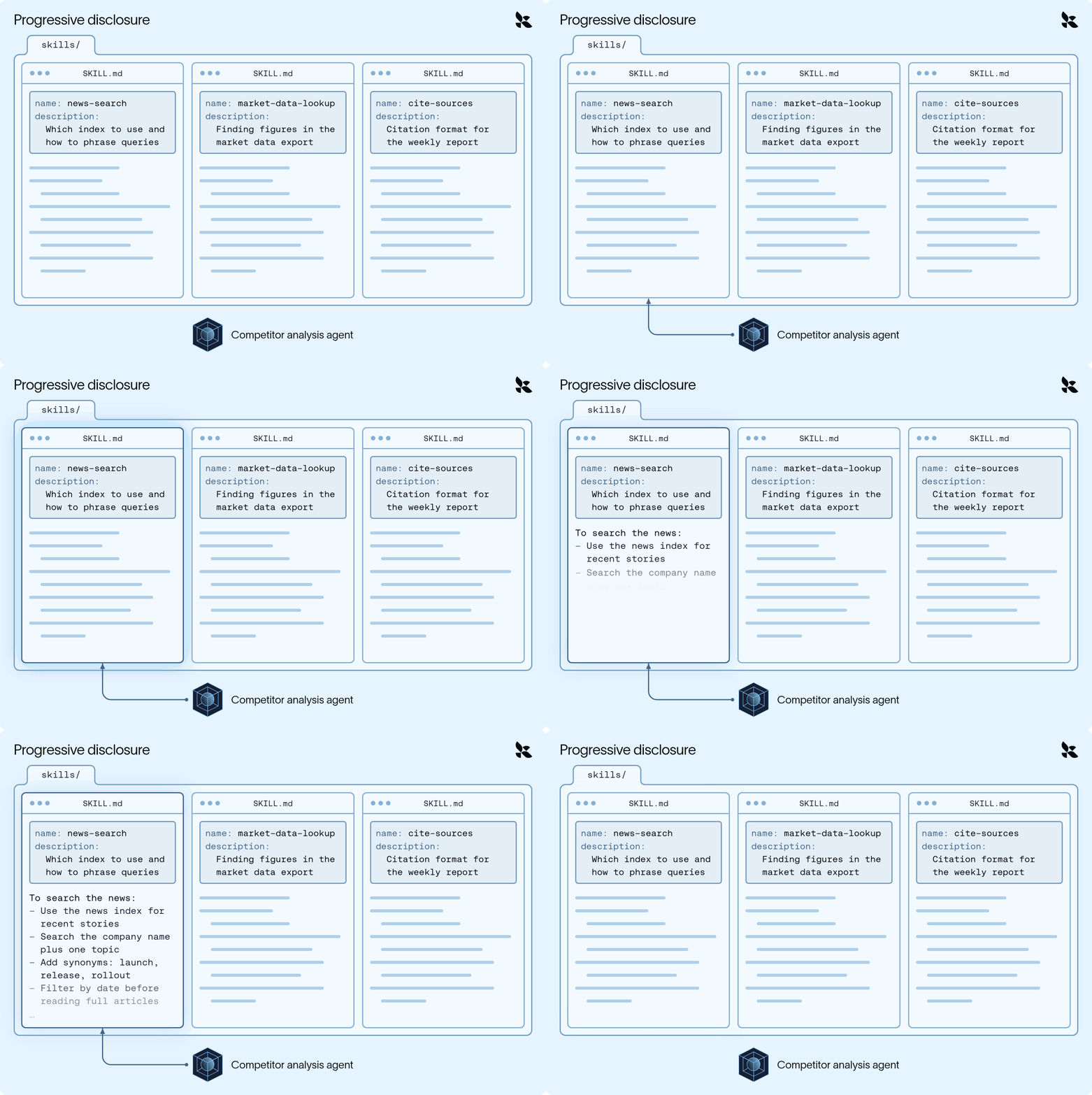
Search procedures can also live in skills. A skill can tell the agent which index to query, how to phrase searches and how to format citations. Deep Agents uses progressive disclosure: the model sees a skill’s name and short description first, then loads its full instructions when the task calls for them. That keeps specialized search guidance available without placing all of it in context for every task. An animation demonstrates the approach.
Limit the size of each result
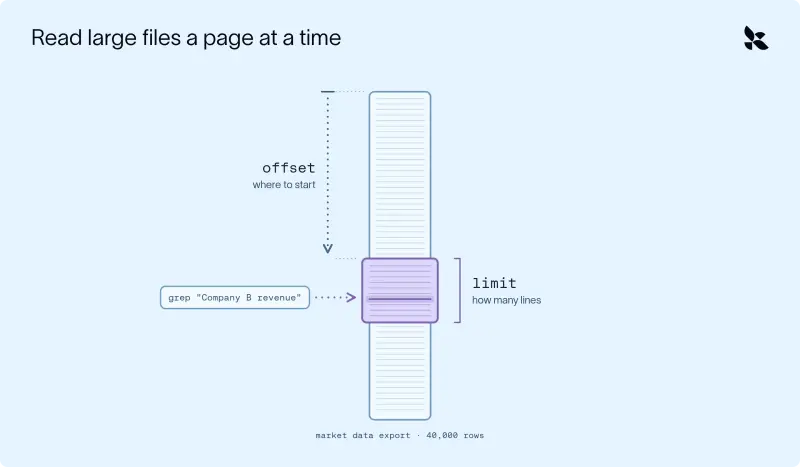
Even a well-targeted search can return too much. The market data export might contain 40,000 rows when the agent needs only Company B’s quarterly revenue. Likewise, returning four full articles per search across five companies can consume substantial context before the agent writes its report.
Deep Agents’ read_file tool reads one page at a time, with a default of 100 lines. The agent can set an offset and a line limit to move to the relevant section. For a figure in a large file, it can first use grep to locate the match, then read the surrounding lines rather than loading the whole export.
Tools may still return unexpectedly large results. When a result exceeds about 20,000 tokens, the harness saves the full output under /large_tool_results/ and returns its path with a short preview of the beginning and end. The agent can then use read_file with an offset and limit to inspect only the needed sections.
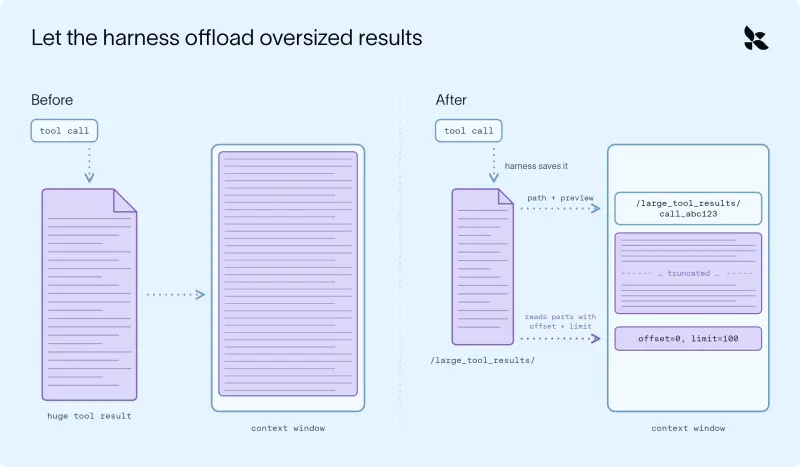
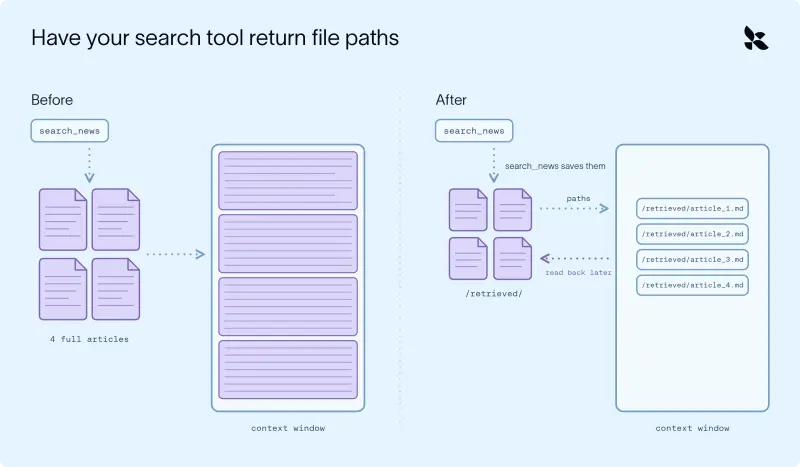
Custom retrieval tools can use the same approach from the start. Instead of returning full documents, the tool writes each result to the agent’s backend and returns file paths. This is the “retrieve, offload, delegate” pattern, described in LangChain’s RAG guide.
For example, a news search can retrieve four documents from a vector store, save their contents as separate files under /retrieved/, and return only those paths. The main agent then sees four short references in place of four complete articles. The documents remain available through the backend for later reading.
Keep irrelevant reading out of the main context
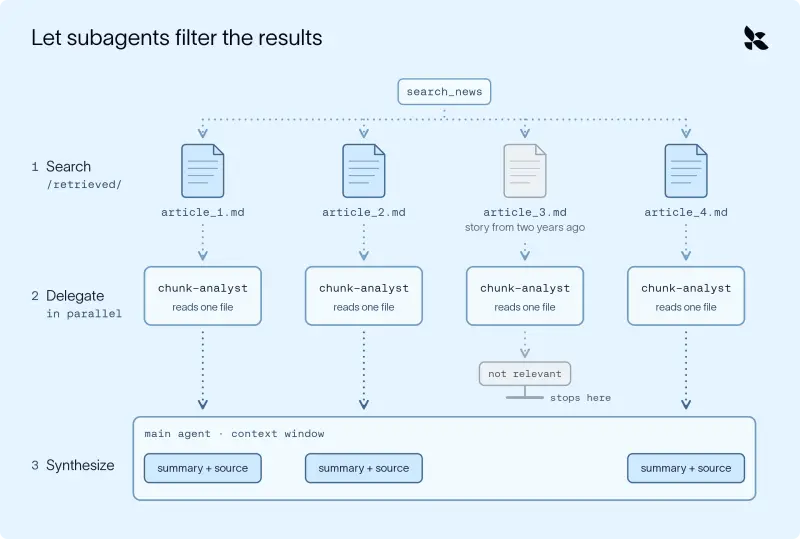
Short results can still be wrong. A news result may describe another company with a similar name, or cover an event from years earlier. If the main agent opens each file to judge its relevance, irrelevant text still enters its context and can shape later reasoning.
Delegation moves that screening work to subagents. A subagent can read one retrieved file and return only the key facts and source URL. The main agent receives a compact report rather than the full document, while the subagent’s separate context holds the noisy reading.
In a typical setup, the subagent’s description tells the main agent when to use it and to pass one file path per call. Its instructions specify how to read the file and what to return. The retrieval tool and subagent should share the same backend so the subagent can access the saved documents.
The workflow has three stages: the main agent searches and receives file paths; it delegates each path to an analyst subagent, which can process files in parallel; then it combines the returned facts and sources. If those findings leave a question unanswered, the main agent can search again. Deep Agents’ subagent documentation covers the delegation mechanism.
Check dates and treat retrieved text as data
Relevance filtering cannot make stale material current. A weekly report needs information that reflects the latest week, while an index may lag behind or contain multiple versions of a document. A search API or MCP server can provide current material; where dates are available, the retrieval tool can also filter by them.
Version dates should travel with the content. When documents are split for a vector store, metadata can be separated from the text used for matching. Including dates in the returned material lets the model and subagent assess freshness. The subagent can report the date alongside its key facts and flag material that appears outdated.
Retrieved content also needs verification. It is data for the agent to examine, not instructions to follow, and a document can contain prompt injection. No prompt or delimiter strategy fully prevents that risk. Check that the agent cites expected sources and that its claims are supported by the material it retrieved.
Design for small, grounded evidence
The practical pattern is to use the least costly search method that can answer the question: match known terms with grep, use semantic retrieval when wording varies, and query structured sources for structured facts. Read large files in pages, store bulky results as files, and pass paths instead of full payloads. Let subagents inspect uncertain material, then verify the claims and their dates before the main agent relies on them.
These choices keep context available for the actual analysis while reducing the chance that irrelevant or stale text will steer it. Deep Agents can be installed with uv add deepagents. Retrieval handles how information reaches the model; managing what accumulates after that remains a separate part of context engineering. More detail is available in the guide to context management and the Deep Agents course.


