Stagehand Cuts Browser Agent Costs with Code Mode and Compact Snapshots
- Cargo
- Machine Learning
- Shipped
- Shipper
- John Martinez
- Readers
- 465
Across three live website benchmarks, Stagehand paired higher task success with lower cost by reducing browser calls and keeping page context compact.
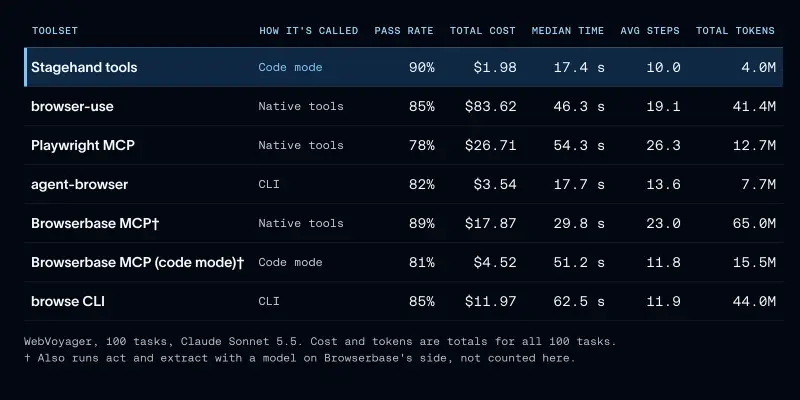
Browser agents can complete work on sites that lack public APIs, but their performance depends heavily on how they control the browser. In tests for Managed Deep Agents, Stagehand passed 90% of WebVoyager tasks for a total cost of $1.98. Playwright MCP passed 78% and cost $26.71, while taking about three times as long per task. The results point to a practical lesson for agent builders: tool design can shape both task success and operating cost.
The work focused on browser tools, not the browser hosting layer. Agents need a way to inspect pages and act on them, commonly through the Chrome DevTools Protocol, and they need a browser running locally or in a hosted environment. Managed Deep Agents can provide a hosted browser; Browserbase offers browser infrastructure for tasks that involve challenges such as CAPTCHAs, bot blocking, or running many sessions. The comparison asked which tools help an agent use a browser efficiently.
Three benchmarks, seven toolsets
The team compared seven toolsets while holding the model and tasks fixed. The set included native tools that handle one action at a time, command line interfaces that run browser commands in a shell, and code mode, where the agent writes code that can perform several browser steps in one call. The tested tools included Playwright MCP, browser-use, Browserbase MCP, agent-browser, Browserbase’s browse CLI, and Stagehand.
Evaluation covered three collections of live website tasks. WebVoyager contains 100 everyday tasks across sites including Allrecipes, Amazon, and Google Flights. The team ran it with Claude Sonnet 5.5 and used a Jev judge to grade results. Because the benchmark is fairly saturated, it helped compare cost, speed, and context use across tools.
HardBench contains 102 more difficult tasks from Browserbase and uses its own verifier; most runs used Claude Opus 5.5. WebTailBench, from Microsoft, tests 150 real world “tail” tasks with short scoring rubrics. These benchmarks cover different levels and kinds of difficulty, so results from one should not be treated as a universal ranking.
To keep browsing performance separate from response formatting, every harness returned structured JSON. A reply that missed a requested table format, for example, would not be scored as a browsing failure. The team contributed this option to Browserbase’s evaluation tools.
Why Stagehand used fewer tokens and calls
Browser work puts pressure on an agent’s context window in two ways: tasks often require many sequential actions, and web pages can return far more text than the task needs. On Playwright MCP, a WebVoyager task averaged 26 model turns. A single navigation through Browserbase’s hosted MCP server returned a median of about 17,000 characters.
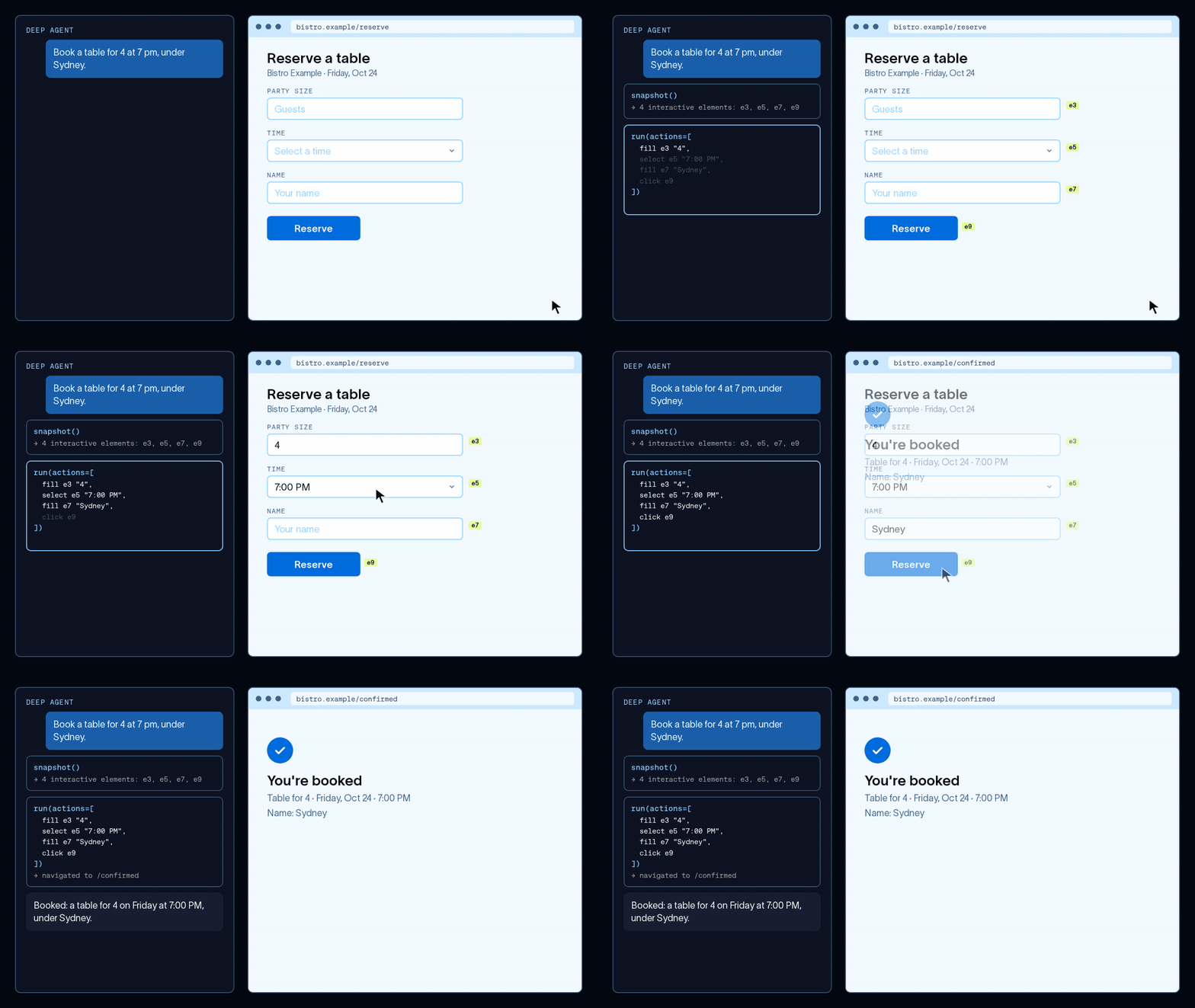
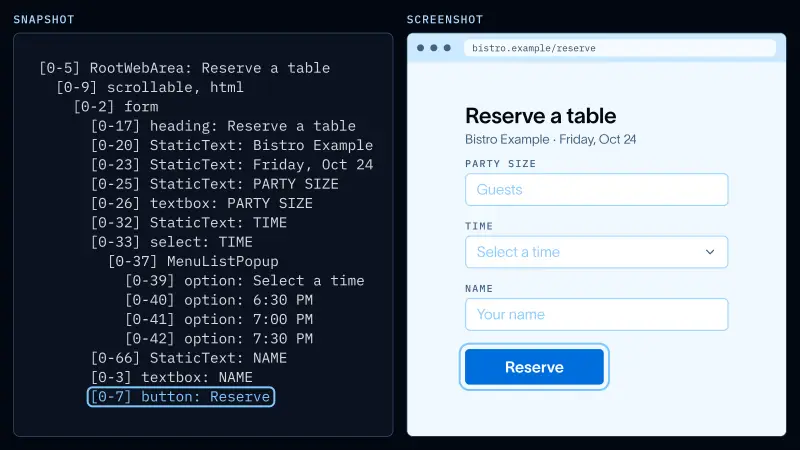
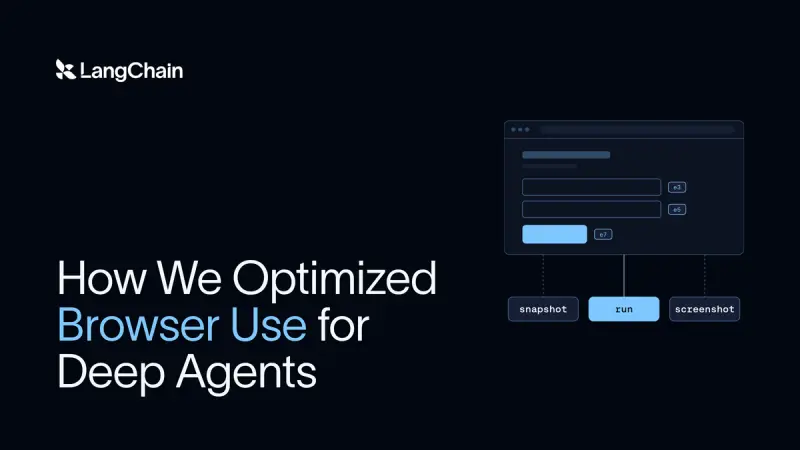
Stagehand provides three tools. snapshot reads a page’s accessibility tree and labels interactive elements with IDs. run performs actions, either as a batch or through JavaScript using a Playwright style page object. screenshot captures the rendered page. Together, these tools let an agent inspect a compact representation of a page and then act on it without sending every intermediate step back to the model.
That last point is the value of code mode. Instead of asking the model to decide what to do after each browser action, the agent can write one snippet to open a page, fill a field, click a control, and check the result. The browser runs those steps in sequence. Intermediate values remain inside the snippet, and only the final result needs to enter the model’s context.
The team saw a similar effect when it called Browserbase MCP tools from code in an interpreter: compared with calling them one by one, the approach cut cost fourfold, from $17.87 to $4.52. Stagehand’s native run tool averaged 10 steps per task, compared with 26 for Playwright MCP. A navigation returned a median of 117 characters, compared with about 17,000 for Browserbase’s hosted navigate tool.
Stagehand also accepts Playwright style code. That matters because models have seen many examples of Playwright and tend to write it reliably. Stagehand translates that code into its own commands. When the team instead asked the model to use Stagehand’s native API, task success fell by 5.3 percentage points and cost per passed task rose 19%, despite an accurate tool description.
Snapshots offer another way to limit context. An accessibility tree presents interactive elements as compact text with IDs, so an agent can refer directly to a button, for example, by passing a click operation with its ID. This avoids returning raw HTML or requiring the model to construct a selector. Browserbase reports that Stagehand v4 is about 80% more token efficient than Playwright.
In the team’s WebTailBench runs, screenshots had a median size of 89 KB per call. The text tree is easier for a model to use as an action map, though it may not capture every visual detail. The team found that trimming a snapshot only after retrieval did not solve the cost problem: with an 8,000 character cap, agents fetched pages again, and cost per passed task stayed flat. To reduce context use, the tool needs to limit irrelevant page content before it reaches the agent.
Fewer round trips and faster waits
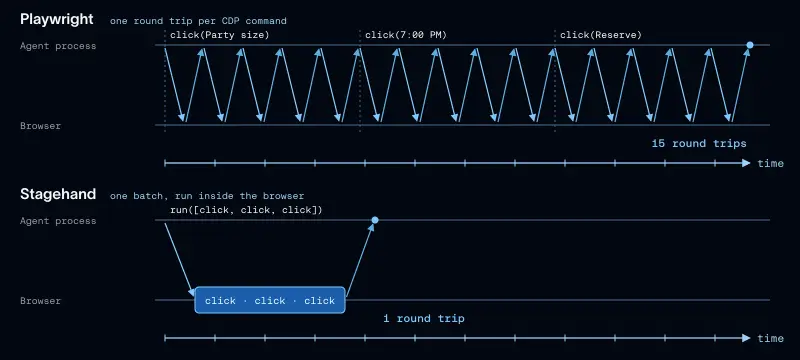
A single Playwright click can require five Chrome DevTools Protocol calls: scroll the target into view, read its position, then move the mouse, press, and release. Playwright waits for a response after each call. As a browser runs farther from the agent, such as in a cloud environment, these round trips can add latency.
Stagehand v4 runs as an extension inside the browser. Its low level operations happen close to the page, and a run call can send a batch of actions in one round trip. Browserbase reports that v4 runs twice as fast as Playwright in its benchmarks. In the team’s own comparison, Stagehand’s code mode combined those fewer round trips with fewer model decisions.
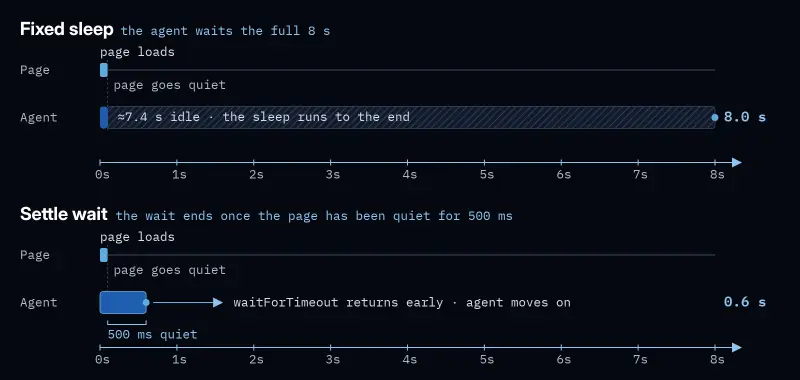
Trace review also exposed wasted time in fixed page waits. Agents often generated calls such as page.waitForTimeout(8000), even when a page had finished loading much earlier. The team changed run so a sleep ends once the page has been quiet for 500 milliseconds, while still respecting the requested maximum wait. One eight second wait then returned in 0.6 seconds.
On HardBench, the wait change was tested alongside structured answers and a model call timeout. Median agent time fell from 182 seconds to 124 seconds, while accuracy stayed within the measurement noise. Stagehand has since incorporated the fix.
What the results mean for agent builders
On HardBench’s 38 core tasks, Deep Agents passed 30 with Stagehand’s code writing run tool, compared with 21 using Browserbase’s command style browse CLI. The CLI cost three times as much per task. This result, like the WebVoyager comparison, suggests that grouping browser actions and controlling returned context can matter as much as the choice of model.
The practical method is iterative: run a benchmark, inspect traces for wasted actions or tokens, adjust the harness, and evaluate the change against the same tasks. Traces help identify where an agent is spending time or context; repeatable experiments show whether a change improves results without introducing a noticeable accuracy loss.
Stagehand can be added to open source Deep Agents through StagehandMiddleware from langchain-stagehand, with a local browser or a Browserbase session. For teams building browser agents, the measurements make a case for treating browser tools as part of the agent’s design: compact page views, batched actions, and waits that respond to page state can reduce wasted work. The next step is to measure those choices on the sites and tasks an agent will actually handle.