Managed Deep Agents Adds Browser Sessions for Web Tasks and App Testing
- Cargo
- Machine Learning
- Shipped
- Shipper
- Thomas Davis
- Readers
- 995
Managed Deep Agents can navigate rendered websites, hand sessions to users for sign-in, and test sandboxed apps. Its tools passed 90% of WebVoyager tasks.
Managed Deep Agents now gives agents a managed browser for navigating rendered websites and testing web apps. The practical change is that agents can interact with pages that lack usable APIs: they can inspect what a site displays, fill fields, click controls and check results. A person can also take over the browser to sign in, then return it to the agent with the session intact.
That extends agents beyond tasks that fit neatly into API calls. Travel bookings, restaurant reservations and subscription changes often happen through interfaces designed for people, and a plain HTTP fetch may miss content rendered by JavaScript or provide no way to interact with the page. When an API does cover the task, it remains the better route; browser use is useful where the interface is the only practical path.
Browser sessions and user handoff
Developers add browser support by exporting a browser definition from browser.py in a managed agent project. The definition sets a session scope and an idle timeout:
from managed_deepagents import define_browser

browser = define_browser(
    scope="thread",
    idle_ttl_seconds=600,
)
With the default thread scope, each conversation receives its own browser without cookies or logins from other threads. Setting scope="user" shares browser state across a signed-in user's threads, while keeping a separate window for each conversation. A login completed in one thread can therefore be reused in a later one without making simultaneous conversations control the same window. Browsers stop after the configured idle period; the default is 600 seconds.
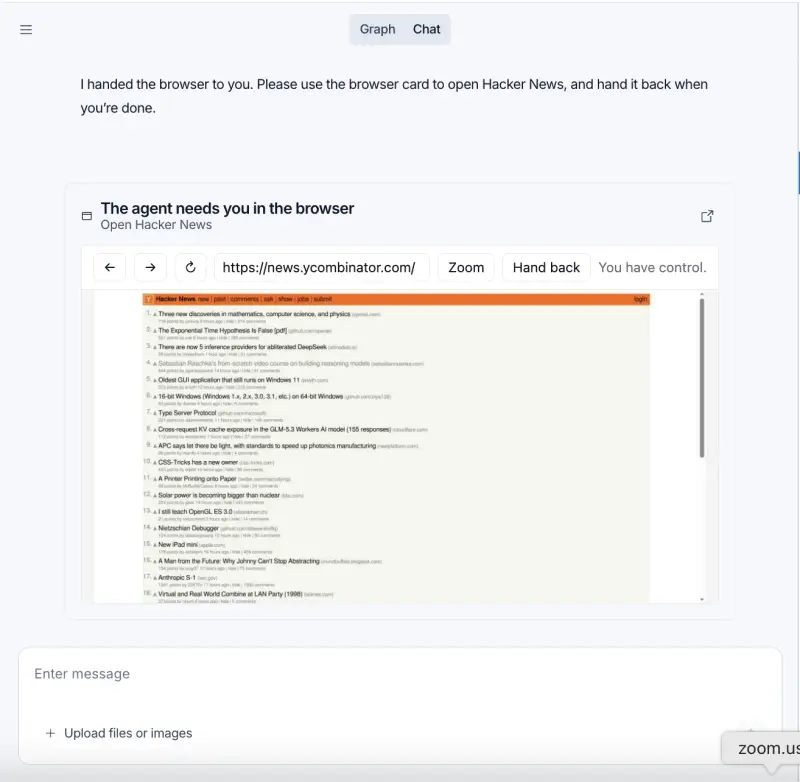
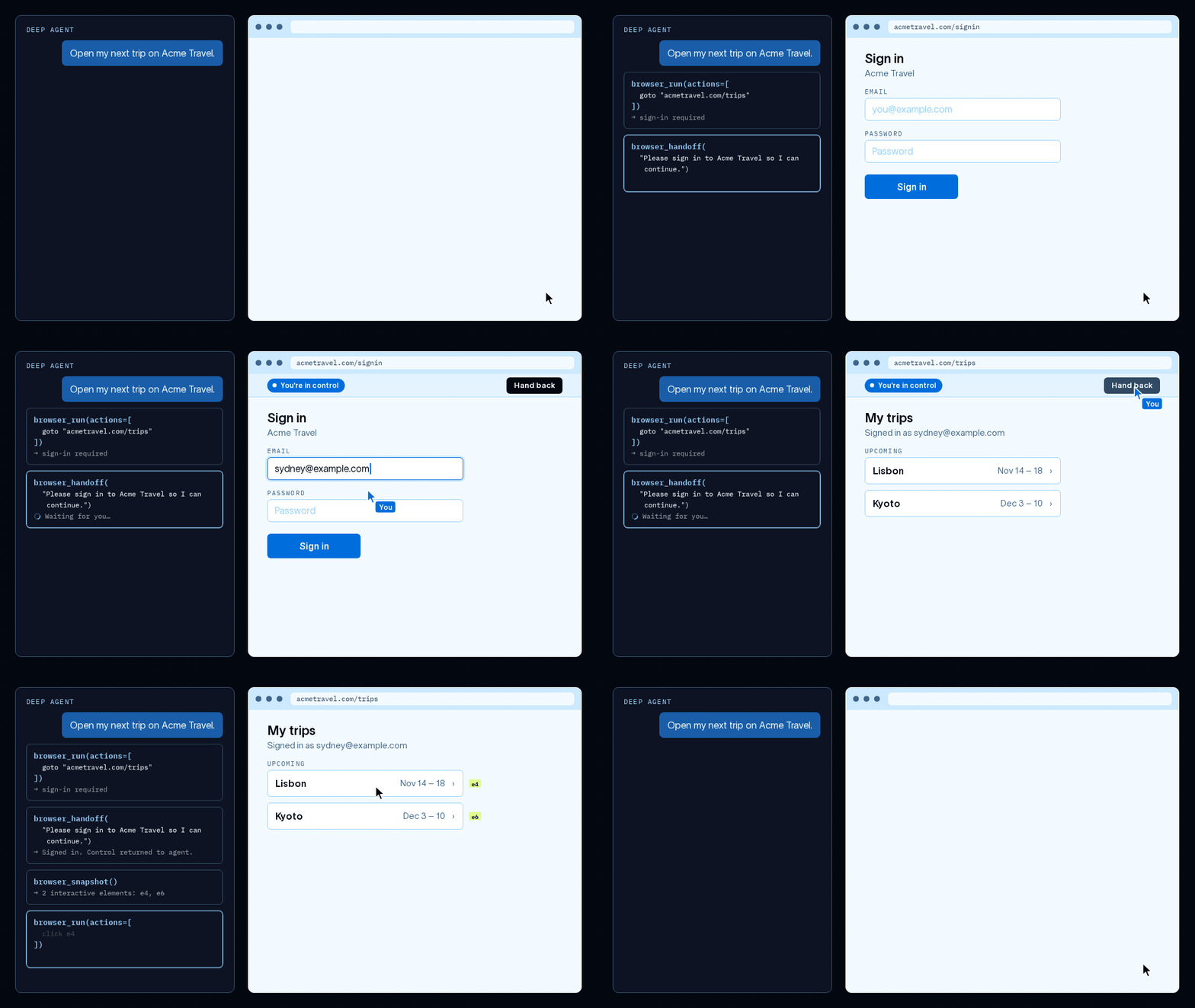
Sign-in is a common point where automation needs human input. Instead of asking someone to put a password into the agent's conversation, the agent can call browser_handoff with a reason. In LangSmith Studio, the person gets an interactive view of that browser, completes sign-in, and selects “Hand back.” The agent then resumes with the signed-in page. Handoff is included with managed browsers and works in Managed Deep Agents channels such as Slack. With user scope, the resulting login can carry into later threads.
Tools built for browser work
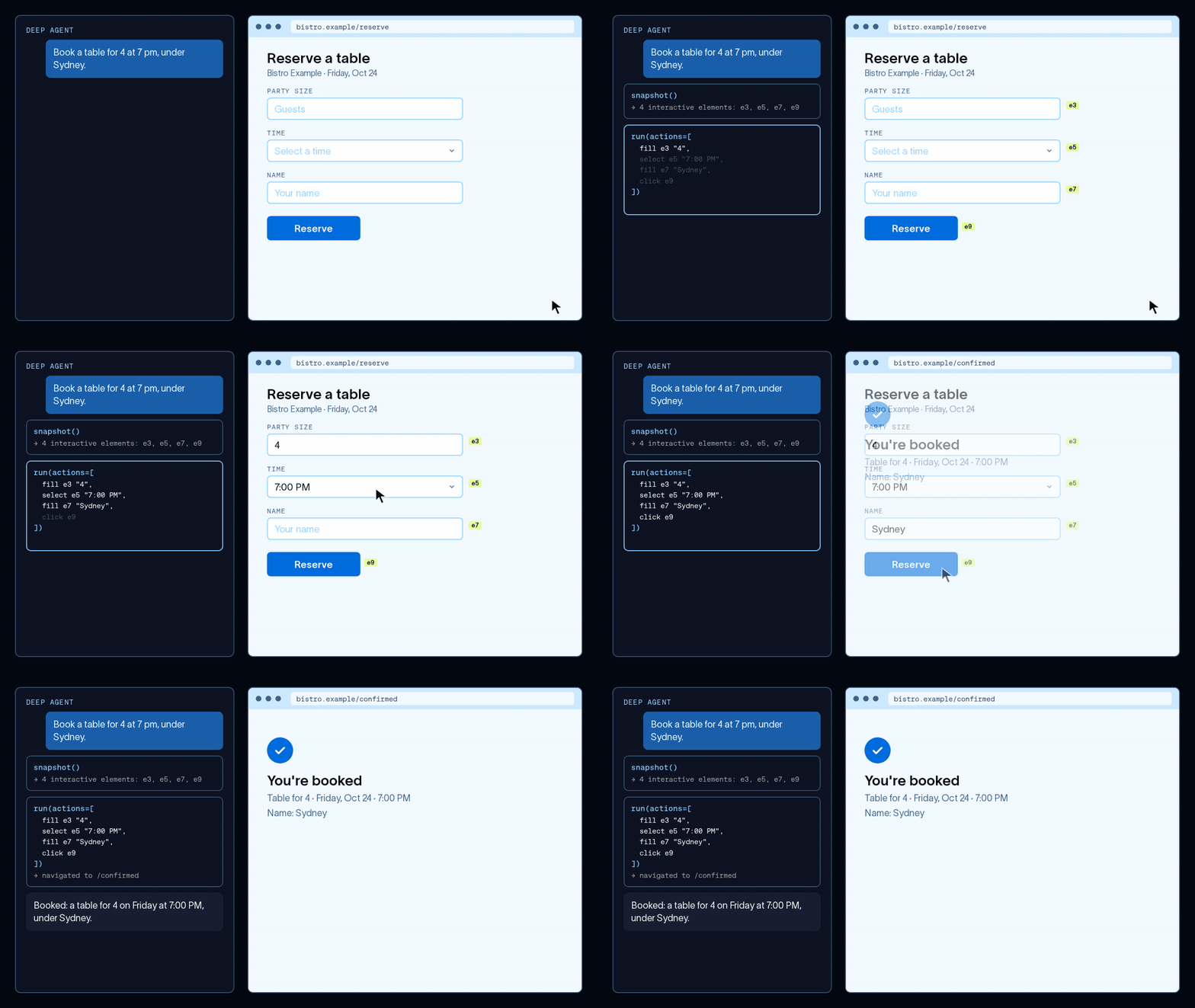
The browser runs in a LangSmith sandbox separate from the agent, so it isn't running on the developer's machine. The agent controls it through four tools: browser_snapshot reads the page's accessibility tree and labels interactive elements; browser_run performs actions; browser_screenshot captures the rendered view; and browser_handoff transfers control to a person.
browser_run can send several actions in one call, such as opening a page, filling a form and clicking a button. It also accepts JavaScript using a Playwright-style page object, which Stagehand translates into browser commands. Combining steps and returning only relevant results can reduce both the time spent on a task and the page content sent into the agent's context.
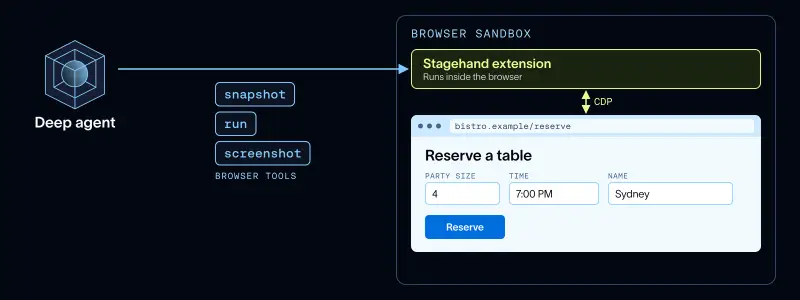
The tools are built on Stagehand, Browserbase's open source SDK for browser agents. In tests on 100 tasks from the WebVoyager benchmark of everyday work on live websites, the toolset passed 90% of tasks for a total cost of $1.98. That was the highest pass rate among seven tested toolsets. Browserbase's MCP server was closest, passing 89% at nine times the cost. These figures describe the reported benchmark run; they don't establish how every site or task will perform.
Two paths: web actions and app testing
For a web task such as booking a reservation, the agent's tools send commands to the browser sandbox, which drives the page. This is the more direct use: the site is already available to the browser, and the agent works through its interface.
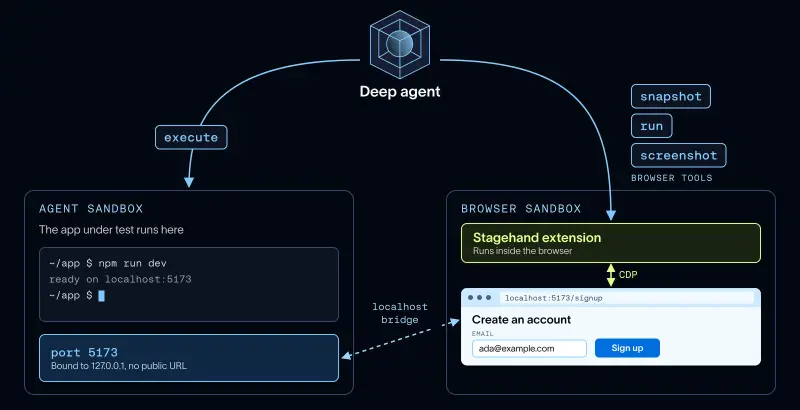
End-to-end testing adds a connection between the browser and the app under test. The agent starts the app in its own sandbox, and a private link routes browser requests to that sandbox. For example, when the browser opens localhost:5173, the request reaches port 5173 in the agent sandbox; the app doesn't need a public URL. The agent can open a signup form, complete its flow and inspect what the page renders.
After a test succeeds, the agent can save the steps as a test file. Each browser_run call corresponds to ordinary Playwright-style code, so saved steps can be replayed later without model calls until the page changes. This makes the browser useful both for checking an app during development and for turning a successful interaction into a repeatable test.
Deployment choices and limits
Managed Deep Agents runs the browser and agent runtime, so developers configure the agent's instructions and tools rather than operating that infrastructure themselves. The thread or user scope determines whether browser state is isolated or reused, while the idle timeout limits how long an unused browser keeps running. User-scoped sessions are convenient for repeat access, but they also mean browser state persists across that user's threads.
The feature addresses sites where APIs are unavailable or insufficient, and it supports local app testing through the sandbox bridge. The reported benchmark offers a cost and pass-rate comparison, though the results are tied to the 100 WebVoyager tasks and toolsets tested. For teams adopting browser agents, the key implementation choices are which tasks truly require a browser, how login handoff should fit the workflow, and whether session reuse matches the task's needs.
Managed Deep Agents users can add a browser with define_browser. Open source Deep Agents can also use a browser, with developers supplying their own browser service; setup details are in the browser use guide.


