Inside Content Studio: The Tools and Feedback Loops Behind a Slack Design Agent
- Cargo
- Machine Learning
- Shipped
- Shipper
- Robert Johnson
- Readers
- 810
Content Studio combines brand guidance, code-based media tools and async collaboration to create more than 3,000 assets at a median model cost of about 50 cents per request.
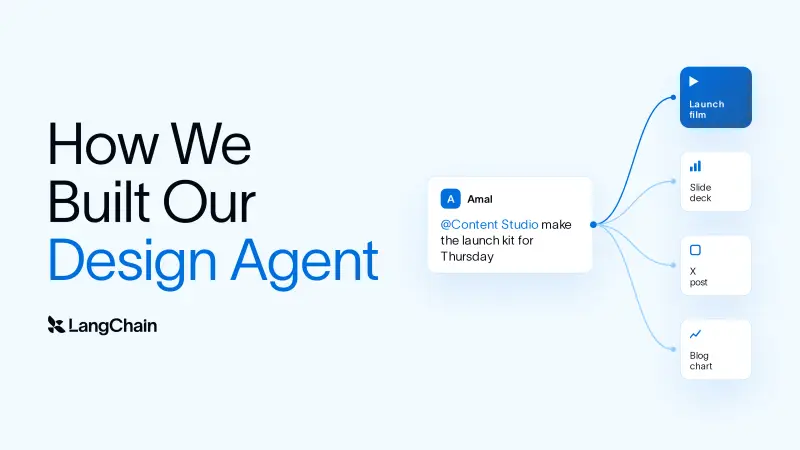
Content Studio turns a Slack request into a finished design asset, from a social graphic or slide deck to a motion piece. Its development offers a practical lesson for teams building creative agents: model capability matters, but brand context, an editable work environment and a way to gather human feedback matter just as much.
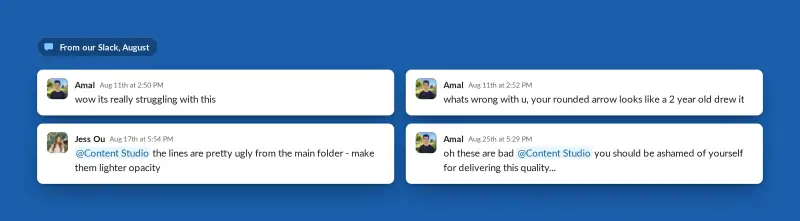
The agent was built in-house by LangChain’s GTM Engineering and design teams and has been used across the company. In four months, the team moved it from work that drew poor internal reactions to a system producing assets people return to weekly. The change came from teaching it the company’s design judgment and giving it tools to make, inspect and revise work.
The promotional film above was made by Content Studio. Its outputs are built in code, including videos, social graphics, recreated interface images and slide decks. A colleague describes a request in Slack and can attach the source material or brief; the agent works through the project and returns files for review.
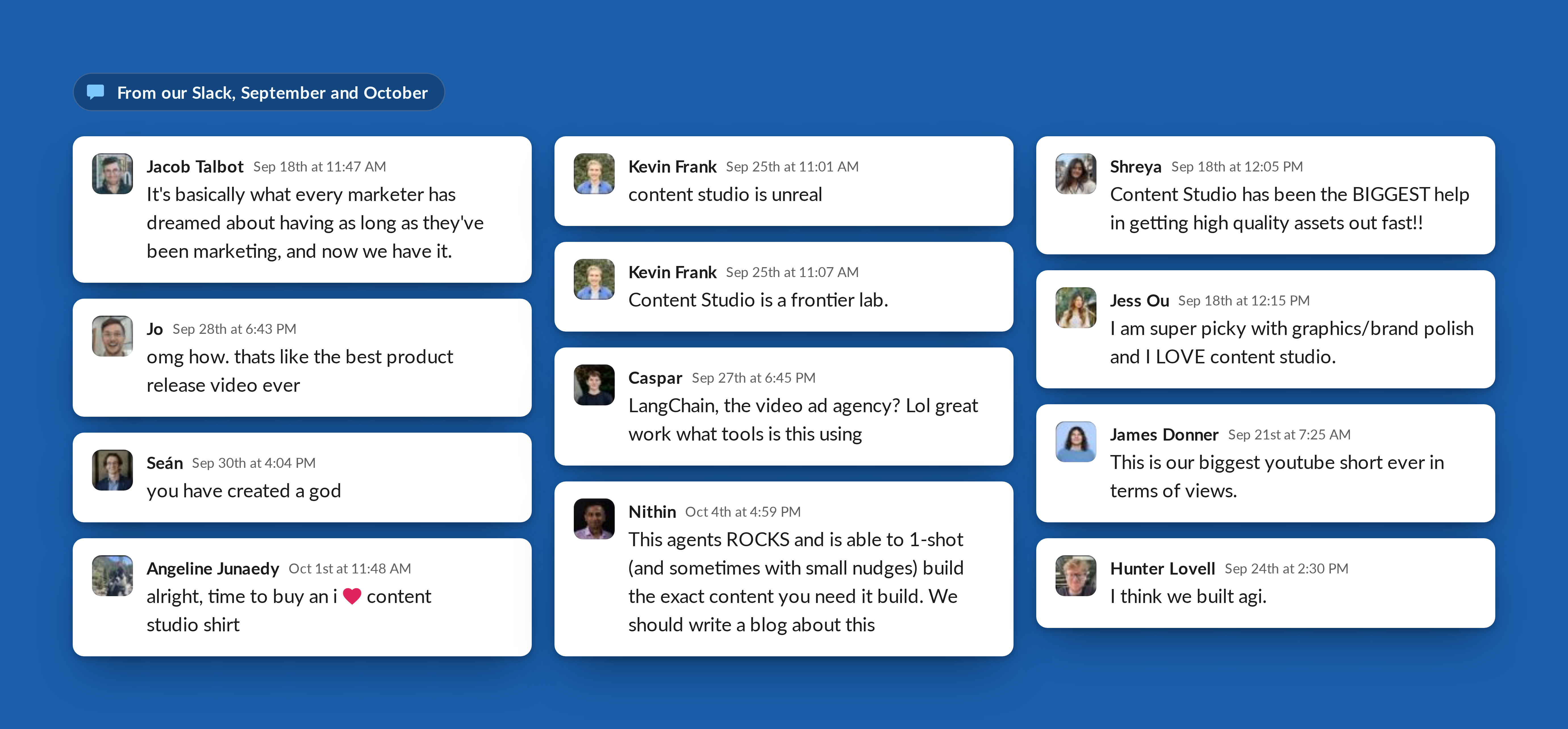
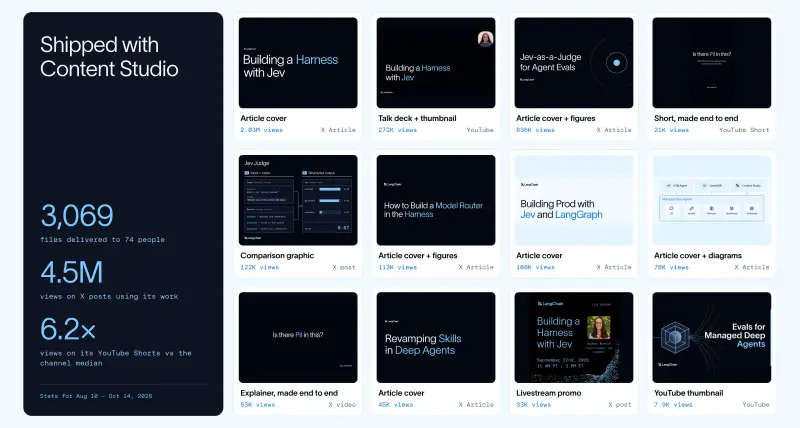
The team reports more than 3,000 assets delivered, including over 80 slide decks. Posts using its work drew about 4.5 million views on X. On the LangChain account, posts with its visuals earned about twice as many likes and 3.7 times as many bookmarks as other posts. Three in four requests now come from outside marketing, while 75% of users return each week.
There’s a cost and maintenance result, too. Median model spend per request fell from about $8 in mid-September to roughly 50 cents. After moving to Managed Deep Agents, the team says its own codebase shrank by about 80%. Those figures describe this deployment; they don’t establish what another team will spend or what it will take to adapt the system to a different brand.
Good execution needs a point of view
The underlying models could already produce HTML and CSS, chart specifications and animation timelines. The weakness was not simply execution. Given incomplete direction, they tended to fill gaps with familiar patterns. The result could look polished but generic, or move attractively without making its message clear.
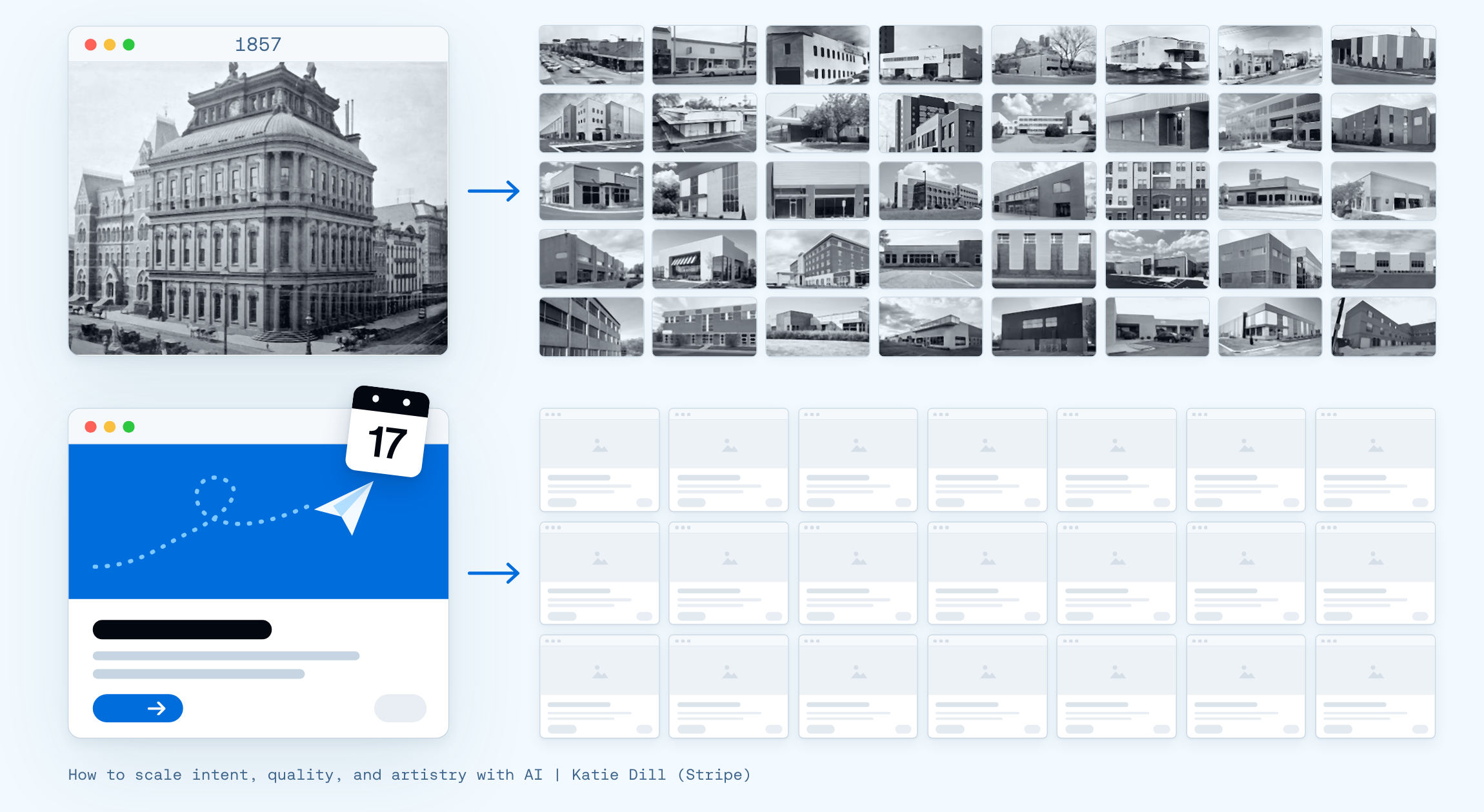
That’s the practical problem often described as “distributional convergence”: a system draws on patterns it has encountered frequently, so its outputs can resemble one another. Stripe Head of Design Katie Dill has described a related failure mode as “zombie UI”—work that retains the surface appearance of a design style while losing the thinking behind it. Content Studio’s team concluded that a model needs a supplied point of view if its choices are to reflect a particular organization.
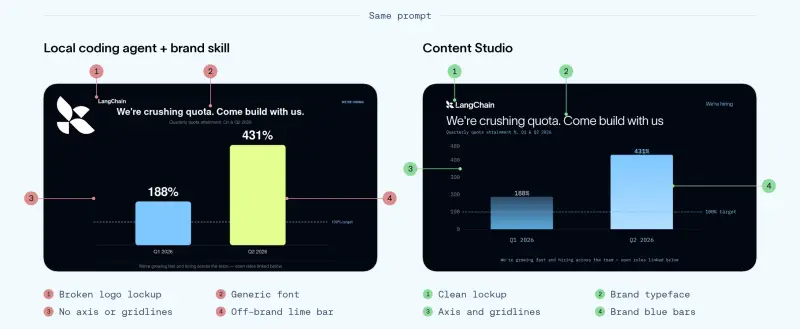
The team’s first step was to encode visible brand rules: color tokens, fonts, spacing, alignment and logo use. But supplying those details wasn’t enough. Two designs can use the right colors and type and still differ in whether they direct attention well or communicate the intended idea. The team needed to capture principles and the reasoning behind design feedback, too.
A comparison made the gap clear. A local coding agent received the company’s brand skill and the same prompt as Content Studio. It still missed the correct logo lockup, text alignment and distinction between primary and secondary colors. The difference, as the team describes it, was how each system resolved decisions the brief left open: one defaulted to patterns it had seen, while Content Studio had been taught the company’s preferences.
Feedback also had to become teachable. In an early animation, a bird flew off screen with a ribbon of light trailing behind it. A request for “no sharp edges” produced clumsy, rounded edges. The intended direction was more specific: soften the edges, then taper and fade the tail opposite the bird’s direction of travel.
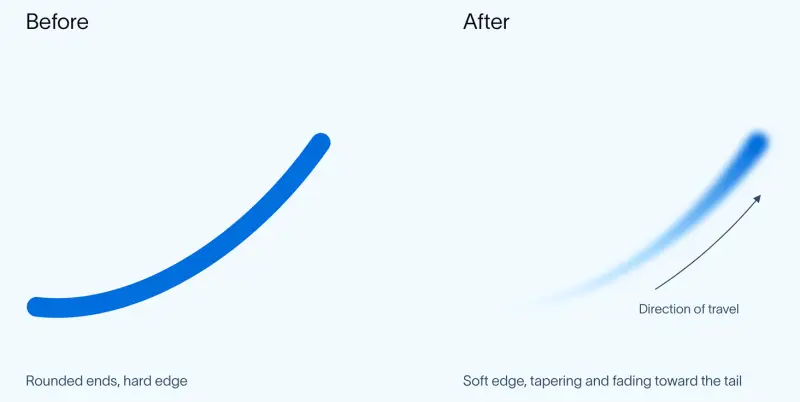
Later, the agent used a sketch to locate the bird’s tail and built a frame-by-frame check to verify that the ribbon stayed attached. That kind of detail is easy to overlook when it works, but a visible break can make motion feel wrong. The example shows the distinction between repeating a phrase from feedback and turning the underlying intent into a useful review method.
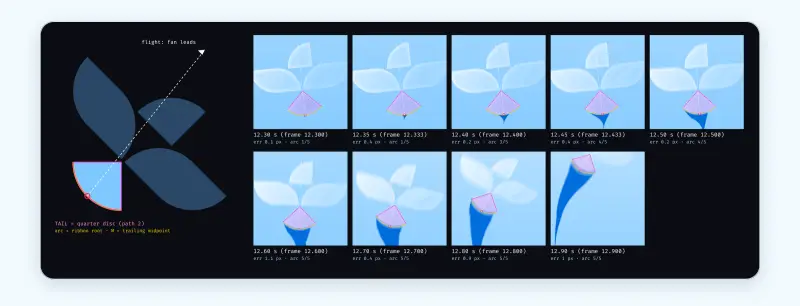
Some review problems are straightforward to automate. The team added a deterministic check for capitalization, which catches a recurring issue. Other decisions—whether an idea is strong, the message is clear or the execution suits its audience—require judgment. When a designer makes such a call, the team records the reasoning in a skill so it can guide later work.
This changes the designer’s role as well as the agent’s. Colleagues in product, engineering and leadership can brief the system and receive work aligned with the brand. Designers can spend more time setting creative direction and reviewing results, rather than personally producing every asset. That doesn’t remove the need for design expertise; it moves more of that expertise into guidance and review.
A project environment built for iteration
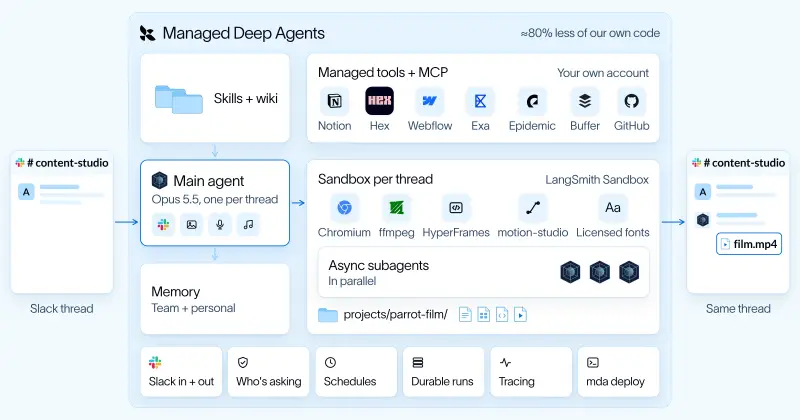
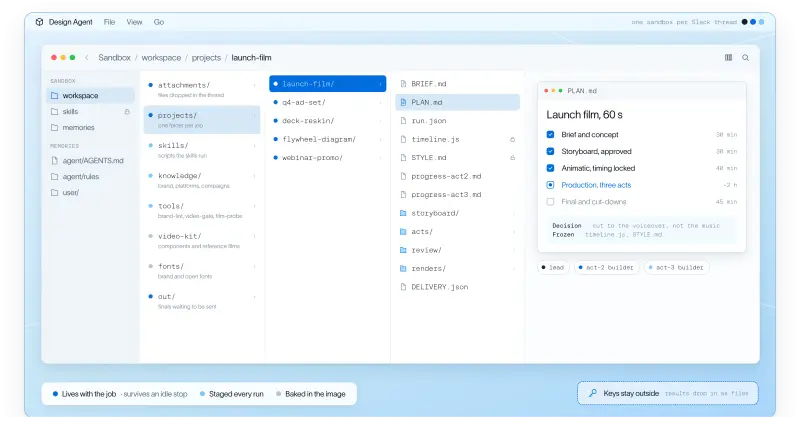
Creative work rarely ends with the first render. A designer makes something, inspects it and revises it, often repeatedly. Content Studio therefore gives each Slack thread its own LangSmith Sandbox: an isolated Linux machine with a filesystem and shell where the project persists for the duration of the thread.
The agent represents its work in editable code. A slide can be an HTML page, a chart can be a data specification, and a video can be an animation timeline. If someone asks for the parrot to appear earlier, the agent can adjust a timing value and render again without rebuilding the artwork or copy. The same change to a flattened image or generated video clip could require recreating much more of the asset.
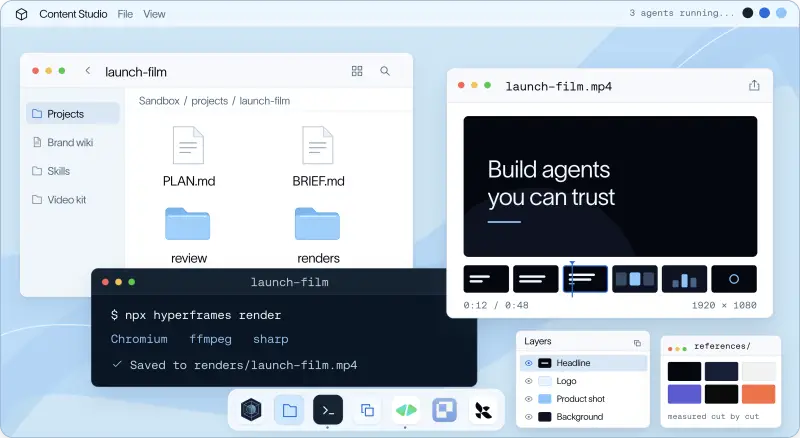
The project folder holds the brief, plan, scene code, audio and renders. Subagents working on different parts of a job use that shared project space, with file ownership helping prevent conflicting changes. The sandbox supplies the agent’s working computer; the tools installed there cover different parts of the production process.
The system uses two engines for motion. HyperFrames, an open-source video framework from HeyGen, represents video as a web page. Clips, screen recordings, captions and text become page elements, and GSAP timelines control their movement. The agent can edit a composition, run its command-line checks, extract a frame for inspection and render the result. The team also installs HeyGen’s HyperFrames skills to help the agent work with the framework.
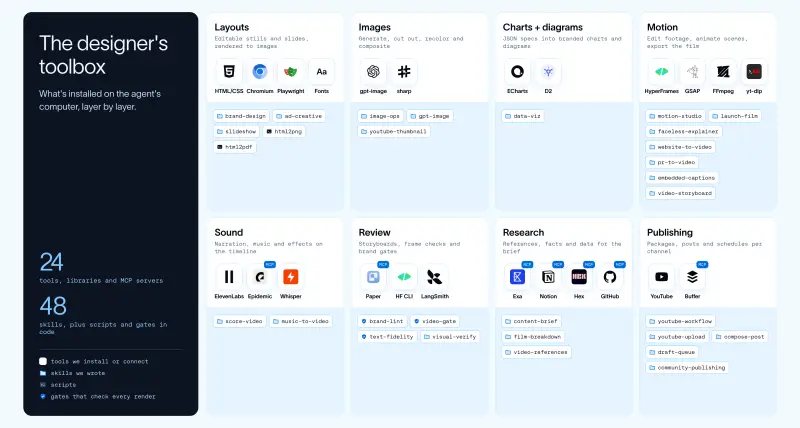
For original animation, the team built motion-studio. A web page can move elements, but it can’t provide every desired effect, such as motion blur, glow or a logo turning in three dimensions. In this engine, the agent writes code to draw each pixel in each frame. The renderer blends up to 16 moments into a frame to create blur, like a camera shutter integrating movement over time. The parrot film used this approach.
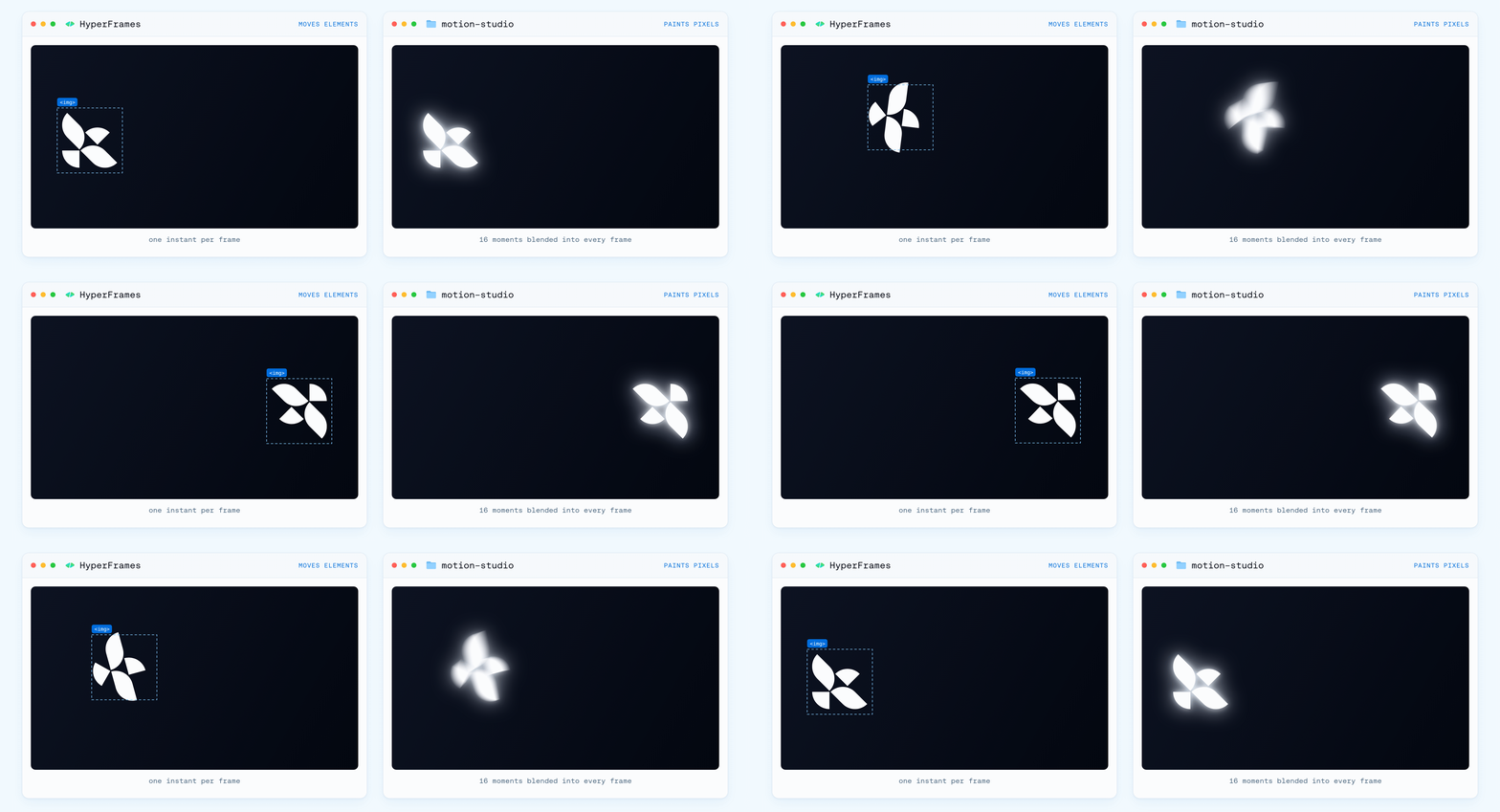
Both engines render from timestamps, so a frame at a given point in the timeline is consistent regardless of when it’s generated. The agent can inspect a moment without rendering the entire film, and frames can be rendered in parallel. Audio follows the same timeline, keeping narration, music and sound effects aligned with the visuals.
The broader agent harness comes from Deep Agents, which provides the agent loop, planning, file handling, subagents and context management. Managed Deep Agents packages and runs the system in production, including Slack integration, sandbox management, tools, scoped memory and run scheduling. The team built its creative environment and process on top.
Why the first harness did too much
Early models needed more help to create motion graphics and launch films that the team wanted to ship. The first harness responded by prebuilding many of the design choices. It included 115 reusable interface components for titles, layouts and animation, with instructions on when to use each one.
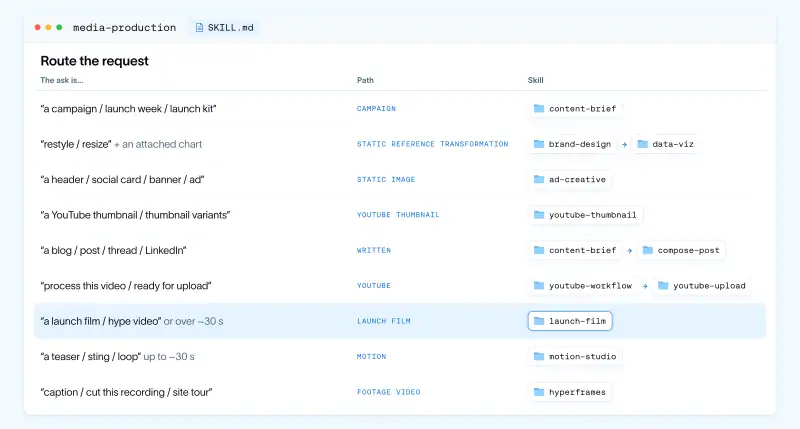
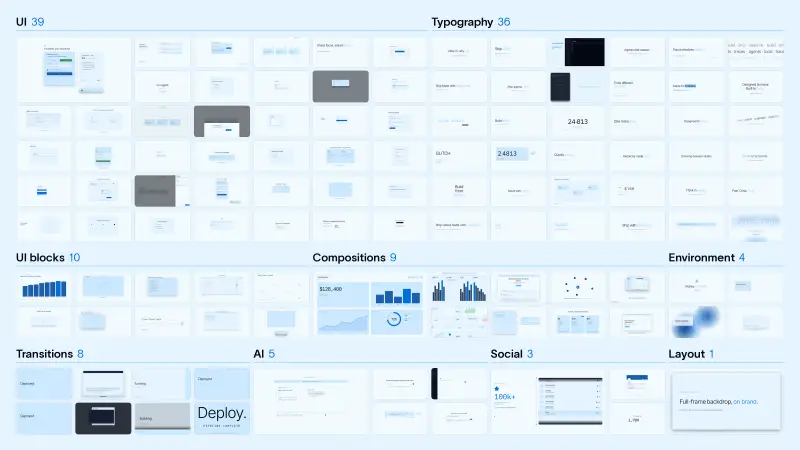
The components helped keep outputs on brand, but the agent repeatedly used the same layouts and motion. More instructions, references, animation code and components could compensate for specific weaknesses, yet each addition increased the engineering burden and constrained variety.
The team says an update it identifies as “Opus 5.5” brought an immediate improvement in quality. It revisited the skills and removed most of the hard-coded rules while retaining design principles and higher-level guidance. The resulting work became more varied and less repetitive, as the model handled creative choices that the team had previously tried to encode in advance.
This is an instance of the “Bitter Lesson” described by computer scientist Richard Sutton: hand-built solutions to limitations can lose value as learning systems improve. For this agent, the durable investment was not a growing library of prescribed compositions. It was the environment, context, tools and feedback process that let a stronger model make better choices. The account doesn’t establish how the same approach will perform with other models or brands, but it does point to a useful maintenance rule: revisit compensating instructions as model capabilities change.
Skills, references and enforceable checks
Content Studio separates its knowledge into four functions. Skills explain how to carry out a type of job. A wiki supplies company and design context. Code-based gates handle measurable requirements. Memory stores preferences and lessons learned over time.
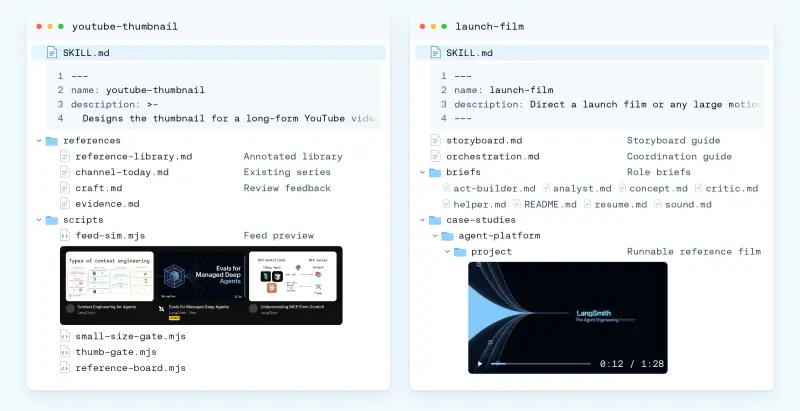
A media-production router skill first classifies the request. Its route table maps asks such as campaign work, restyling, thumbnails, social posts, YouTube packages, launch films and short animations to a process and specialist skill. It also determines whether the job needs a shared visual canvas and keeps small edits from triggering the full workflow.
For a launch film, the router selects a skill designed to direct a larger motion production. The team has 48 skills, spanning close to 1,000 files. Each skill is scoped to a job, and its description states when it should—and should not—be selected. The skills are designed to work together: the launch-film skill directs the production, while motion-studio handles picture and sound. That keeps animation guidance in one place rather than duplicating it across every type of job.
The launch-film skill also defines roles for subagents and draws on a case study of an 88-second film rebuilt shot for shot in code. That example taught the agent how to split work at clear scene changes, keep a continuous camera move with one subagent and freeze shared code before parallel work begins.
Tool discovery is also controlled. MCP tools sit behind a built-in search, so the agent starts with the team’s own tools and loads other tool descriptions when they are relevant. Searching names and descriptions on demand helps limit the context consumed by tool schemas.
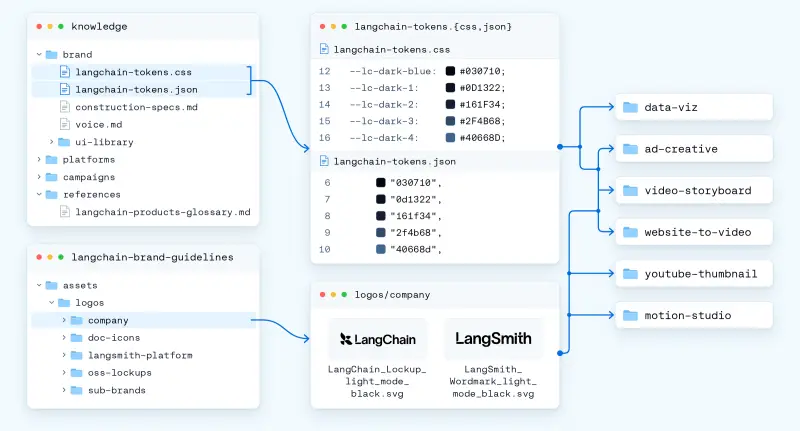
The wiki holds information that applies across jobs: brand tokens, graphic language, voice, platforms, campaigns and product details. A dedicated motion section covers direction, craft, sound and review, with breakdowns of 70 reference films. Skills link to this shared material rather than copying it, so a change to a font rule or brand standard can be made in one place.
Approve the idea before paying for the film
Motion work is expensive to explore at full resolution. A storyboard frame takes about 50 milliseconds to render, while a second of finished film takes between 8 and 40 seconds. When several subagents are writing, rendering and reviewing different acts, early creative mistakes can consume substantial time and model spend.
Content Studio therefore develops the direction in a storyboard before moving into production. The agent can draw on a library of reference films, much as a designer might use a mood board. If those references don’t fit, it can generate new visual references with an image model, first producing quick drafts and then refining promising options. The references guide the look; the storyboard and final film are still built in code using real typography and brand assets.
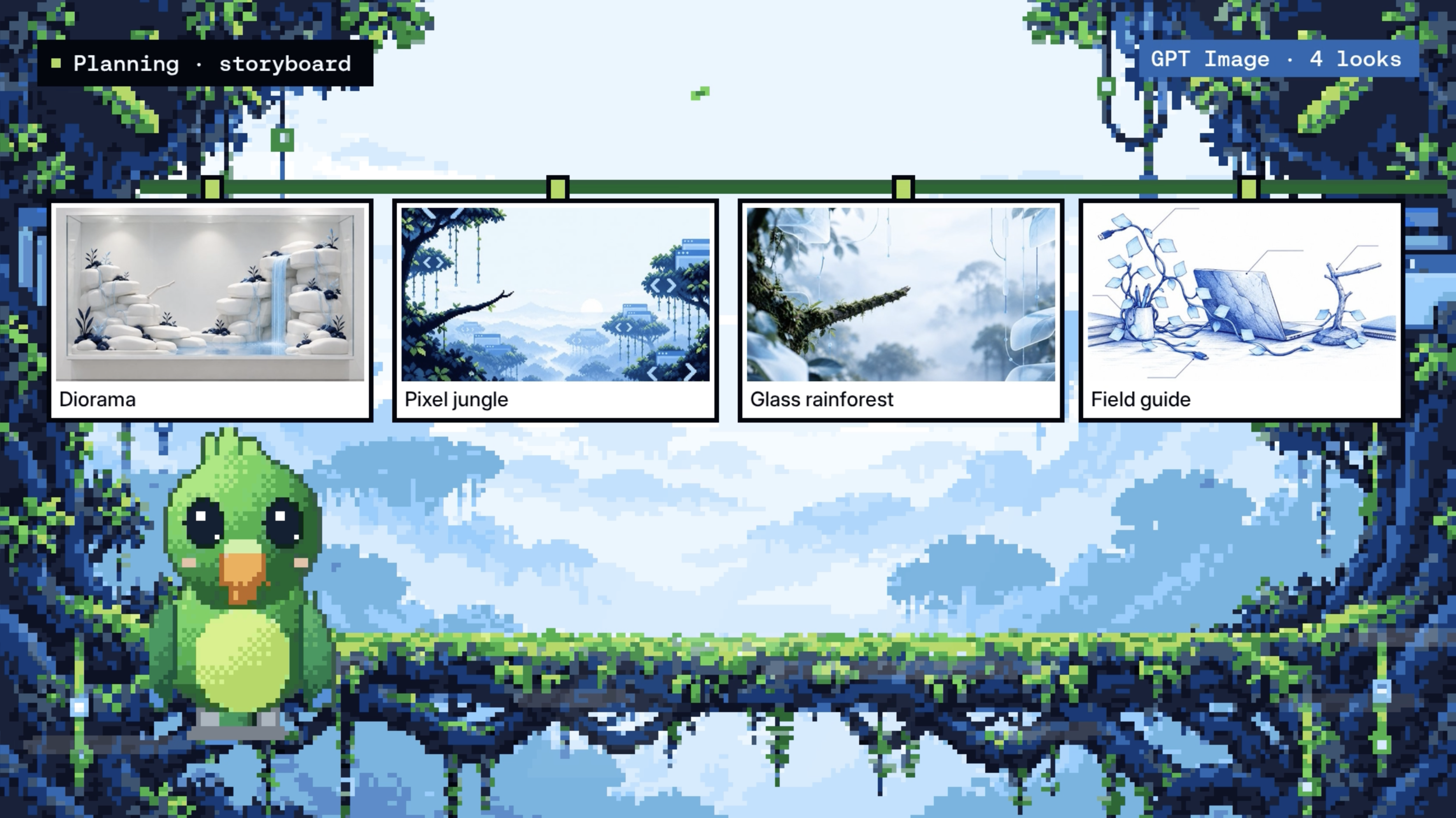
Once the team approves a direction, the storyboard becomes the specification for the rest of the film. Production then moves through three stages: the storyboard establishes the visual idea, copy and shots; an animatic combines rough visuals with audio to test pacing; and production builds, checks and renders the approved shots.
At first, the sequence lived in instructions, and the agent sometimes skipped a review to save time. The team moved the required ordering into code: assembly waits until each act passes review. The distinction is deliberate. Code enforces steps that must always happen; prompts guide decisions that require creative judgment.
A shared canvas gives feedback a place to land
Slack works for requesting a project and receiving updates, but a text thread is a poor place to discuss a spatial object such as a storyboard. People have to describe where an issue appears, and even a small correction has to be sent back as another prompt.
The team uses Paper, a design canvas with an MCP server that lets the agent work directly with a file. Colleagues can compare directions, comment on a particular frame or edit the canvas themselves. The agent can then return to that shared file and use the changes and comments to guide another pass.
There was an infrastructure challenge: Paper’s agent tools run inside its desktop app, while Content Studio works in a cloud sandbox. The team connects them by running Paper Desktop headlessly on an always-on Linux worker, with a virtual display and an authenticated bridge. One setup serves the team.

Long projects need a team-facing agent
After a storyboard is approved, making a film can still take hours. Multiple pieces need to be produced in parallel and assembled. A synchronous subagent model would leave the main agent waiting for each task to finish, limiting the team’s ability to respond while work is underway.
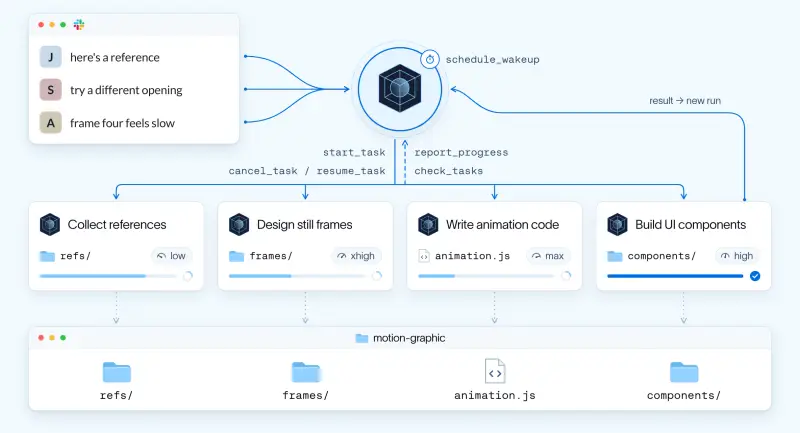
Content Studio instead runs subagents asynchronously. The main agent behaves more like a coordinator: it breaks a project into tasks, assigns them to subagents and keeps the team informed while they work. Each subagent receives a profile with its role, relevant context, file ownership and validation requirements. The main agent chooses a model and effort level for the task’s complexity.
Coordination tools let the main agent start a background task, inspect running work and read completed reports. It can cancel or resume a task, while subagents can send progress updates. A scheduled wake-up lets the main agent continue a project in a later run. Under the hood, each subagent runs as a background Deep Agents task; when it finishes, the system queues another main-agent run with the result.
People can also steer the main agent mid-run. A new Slack message is inserted before its next model call. Subagents use the shared project folder to coordinate and write only the files they own, with progress recorded on disk.
The Slack thread acts as the project’s status view. It shows the plan and estimated completion time, a live line for subagents and render progress, spend, acknowledgments for edits and an approval card before anything is made public. That visibility lets colleagues contribute while the work continues.
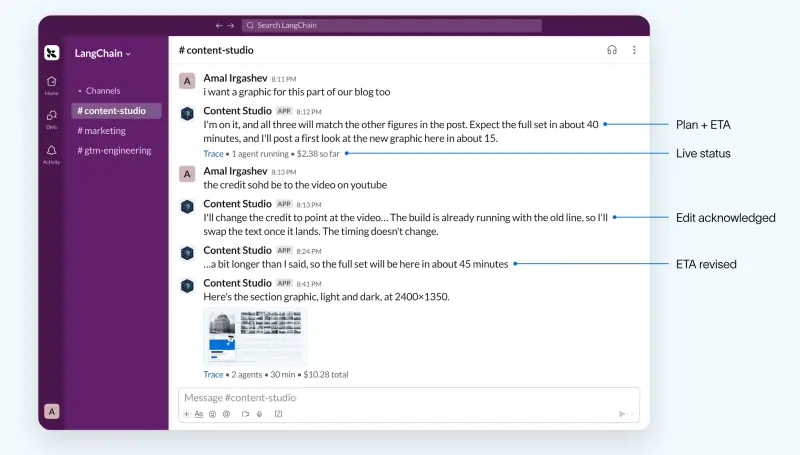
A 52-slide presentation reskin illustrates the approach. The agent first created three sample slides and reviewed them before continuing through the deck in numbered batches for approval. It added two slides during the work. The main agent ran for about an hour overnight, while its subagents worked for more than six hours in total, without blocking the Slack conversation.
Memory turns feedback into a learning loop
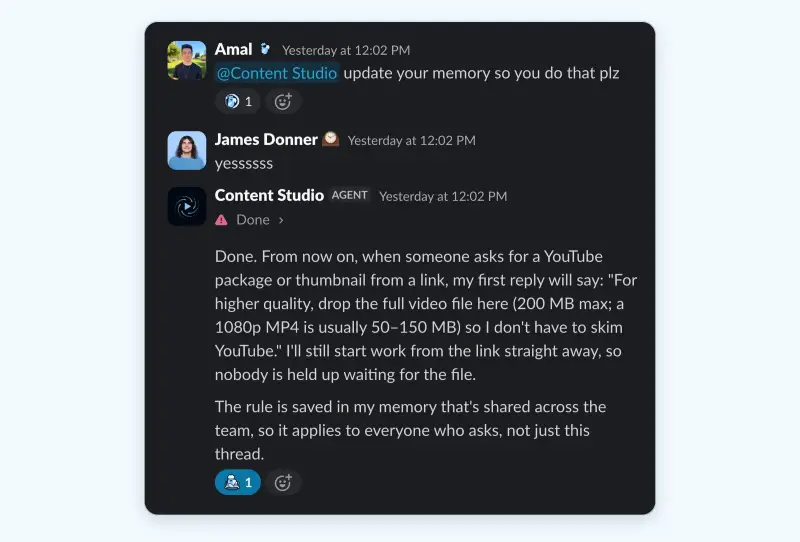
Without memory, every new thread would begin with the same context gap. Content Studio uses a fast loop for direct feedback and a slower loop for lessons extracted from completed jobs.
In the fast loop, when someone states a preference or rule, the agent saves it during that same turn. Managed Deep Agents stores memory as plain files in two layers: one shared by the team and another for an individual. Personal preferences can carry across threads, while shared standards take priority. Work for a company channel follows the company voice.
Each layer has an AGENTS.md file loaded with every model call. An early version grew to 500,000 tokens, so the team now limits these files to a 200-line index. This is a concrete reminder that persistent context needs curation: memory that is too large can burden every request.
In the slow loop, a learn_from_job tool starts a lightweight subagent after each task. It captures up to five lessons supported by evidence and associates them with the skill used. Later jobs read and rate those lessons; once a week, a background agent promotes useful ones into the skills and wiki.
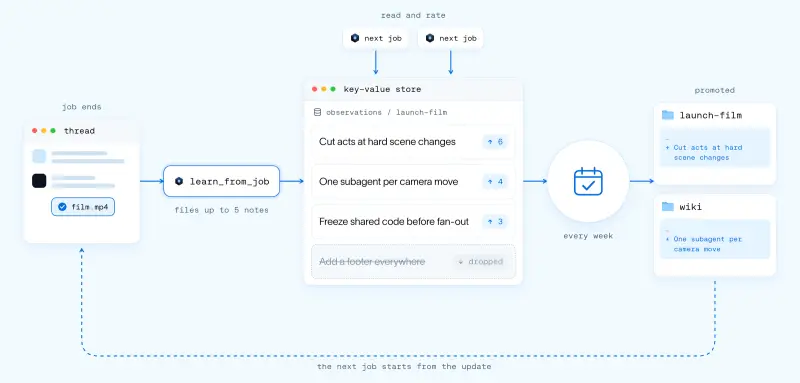
This arrangement gives feedback somewhere to go. Immediate preferences can shape the next interaction, while broader lessons have to prove useful across later jobs before they become shared guidance. The team’s account describes the mechanism, though it doesn’t report a controlled measurement of how much each learning loop contributes to quality.
What the team plans to extend
Content Studio already handles parts of the social publishing workflow. After an approver signs off, it can publish company social posts through Buffer, draft posts for employees to share on their own accounts and run scheduled routines. One daily routine suggests posts that may be worth quoting.
The longer-term aim is to carry one approved creative direction through a full campaign from a single Slack thread: write the brief, create channel-specific assets, schedule posts, help colleagues amplify them and use performance data to inform the next campaign. Human review and approval remain part of the described process.
The team’s implementation is available in the open-source design-agent repository. It includes the sandbox setup, skills, wiki and memory, asynchronous subagents and Slack experience. Teams can adapt it with their own brand tokens, fonts and skills, then deploy through Managed Deep Agents.
The useful takeaway is architectural: a creative agent needs more than a prompt and a capable model. It needs editable work, relevant context, checks for measurable requirements, a place for people to give precise feedback and a process that can keep running without losing the team. As models improve, the durable work is likely to be the environment and learning system around them—and the discipline to revise instructions that have outlived their purpose.


