Scheduled Runs Give Managed Deep Agents a Path to Proactive Work
- Cargo
- Machine Learning
- Shipped
- Shipper
- Thomas Davis
- Readers
- 443
Managed Deep Agents uses scheduled runs for memory, monitoring, reminders and orchestration, with static schedules or runtime tools.
Scheduled agent runs turn a familiar operating system mechanism into a practical way to make agents act without waiting for a user prompt. In Managed Deep Agents, schedules can trigger recurring work such as reviewing information, updating memory, sending reminders or checking on other tasks. The design is simple; the product challenge is deciding what should run, how often, and with which permissions.
The approach is already common in Managed Deep Agents: more than 70% of runs tracked in LangSmith come from scheduled runs rather than a person entering a message. That figure points to a change in how these systems are used. For some tasks, the agent’s value comes from showing up at the right time, not from answering a question in a chat window.
What scheduled runs can do
One use is maintaining long-term memory. A background task can review earlier conversations, condense useful facts and update the agent’s stored memory. The source calls this process “dreaming.” A daily run is one possible cadence, though the appropriate frequency depends on how quickly the user’s context changes.
Schedules can also give an agent a reason to initiate contact. A general assistant might look for upcoming deadlines, revisit an unfinished thread or surface information related to a user’s work. A specialized agent can instead work toward a defined goal: the example given is Hone, where an hourly run prompts the agent to consider actions that advance its objective and report useful ones to the user.
Monitoring is another fit. An agent can periodically inspect an information stream such as Slack or email, then notify the user when it finds something relevant. For this kind of triage, the schedule controls how often the agent checks. A ten-minute interval is one example, not a universal recommendation; frequent checks also mean more runs and more opportunities to surface noise.
Not every scheduled task needs to repeat. A user may ask for a reminder at a particular time, which can be implemented as a one-time run. Schedules can also support orchestration: a coordinating agent can pause while an asynchronous subtask runs, then wake periodically to check its progress and decide what to do next.
Two building blocks
First, developers need a scheduling service that accepts a cadence and the prompt to run. The service should also account for the skills or permissions an agent needs for that work. When many tasks are due at the same moment, it can add small timing variations, known as jitter, to spread runs over time and reduce load spikes.
Second, agents need a clear, governed way to manage schedules. A reminder feature, for example, should let the agent create and modify a reminder in response to a user’s request. The interface exposed to an agent can be narrower than the full scheduling service: a simple one-time check-in may be all a particular agent needs.
Schedules in Managed Deep Agents
Managed Deep Agents, hosted through LangSmith Deployments, includes a cron service that can trigger agent runs. Each scheduled run consists of a prompt, a schedule, and the thread and memory associated with the user who created it. This gives developers a base for recurring tasks without having to build the trigger mechanism themselves.
Schedules can be declared in the agent’s code or created at runtime by the agent through tools in the Schedules SDK.
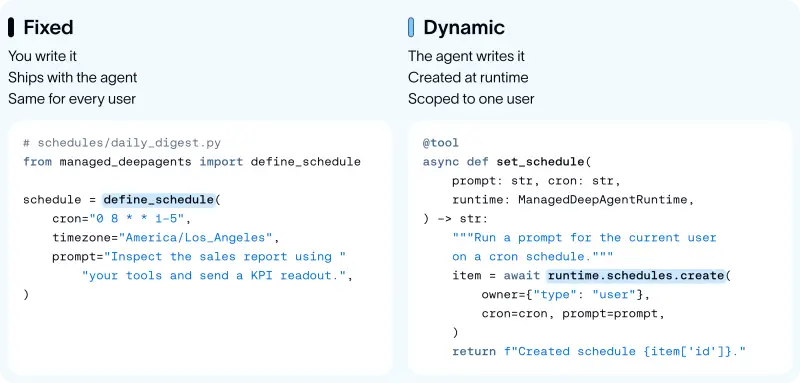
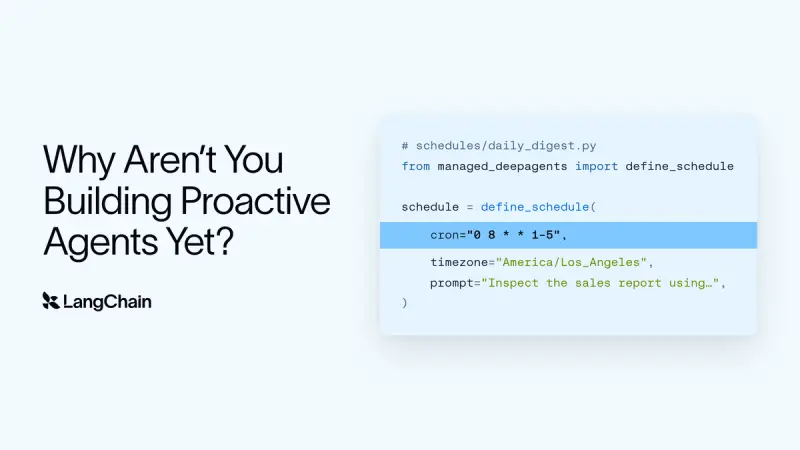
For a task that belongs in the agent’s design from the start, a schedule can live in a file under schedules/. This example runs a sales report prompt at 8 a.m. on weekdays in the America/Los_Angeles time zone:
# schedules/daily_digest.py
from managed_deepagents import define_schedule

schedule = define_schedule(
    cron="0 8 * * 1-5",
    timezone="America/Los_Angeles",
    prompt="Inspect the sales report using your tools and send a KPI readout.",
)
Runtime schedules handle requests developers couldn’t enumerate in advance. The SDK can be wrapped in agent tools to create, list and delete schedules. The example below scopes those operations to the current user, giving the agent a direct interface for managing that user’s recurring tasks:
from langchain.tools import tool
from managed_deepagents import ManagedDeepAgentRuntime

@tool
async def set_schedule(prompt: str, cron: str, runtime: ManagedDeepAgentRuntime) -> str:
    """Run a prompt for the current user on a cron schedule."""
    item = await runtime.schedules.create(
        owner={"type": "user"}, cron=cron, prompt=prompt
    )
    return f"Created schedule {item['id']}."

@tool
async def list_schedules(runtime: ManagedDeepAgentRuntime) -> str:
    """List the current user's schedules."""
    page = await runtime.schedules.list(owner={"type": "user"})
    return str(page["items"])

@tool
async def delete_schedule(schedule_id: str, runtime: ManagedDeepAgentRuntime) -> str:
    """Delete one of the current user's schedules."""
    await runtime.schedules.delete(
        schedule_id, owner={"type": "user"}
    )
    return f"Deleted schedule {schedule_id}."
Developers can expose smaller tools when recurring schedules are unnecessary. For example, a check_in_later tool can accept a prompt and a number of minutes, calculate a future time in UTC, and create a one-time run. That keeps the agent’s scheduling interface aligned with the task it needs to perform.
from datetime import datetime, timedelta, timezone
from langchain.tools import tool
from managed_deepagents import ManagedDeepAgentRuntime

@tool
async def check_in_later(
    prompt: str, minutes: int, runtime: ManagedDeepAgentRuntime
) -> str:
    """Run a prompt once for the current user, a number of minutes from now."""
    at = datetime.now(timezone.utc) + timedelta(minutes=minutes)
    item = await runtime.schedules.create(
        owner={"type": "user"}, at=at, prompt=prompt
    )
    return f"Scheduled a check-in {item['id']}."
Schedules make proactive behavior a matter of choosing triggers, prompts and suitable agent tools. The next design decision for each team is operational: which tasks warrant a background run, and what should the agent be allowed to do when it wakes?


