Minisforum Elite Mini M2 Air-304 Review: Compact, Quiet, and Limited by Its Graphics
- Cargo
- Machine Learning
- Shipped
- Shipper
- Mark Tyson
- Readers
- 461
The M2 Air-304 handles everyday work quietly in a tiny chassis, but its weak graphics and uncertain pricing narrow its appeal.
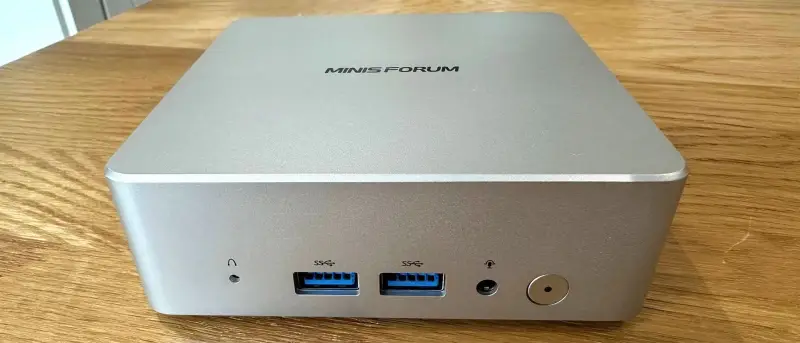
The Minisforum Elite Mini M2 Air-304 is built around a clear tradeoff: it puts a current, low-power Intel processor in a particularly small and quiet mini PC, but offers little headroom for demanding workloads or modern games. For browsing, writing and older game emulation, it feels capable. Its value depends heavily on the price, especially because memory and storage are already installed in only one of the two configurations.
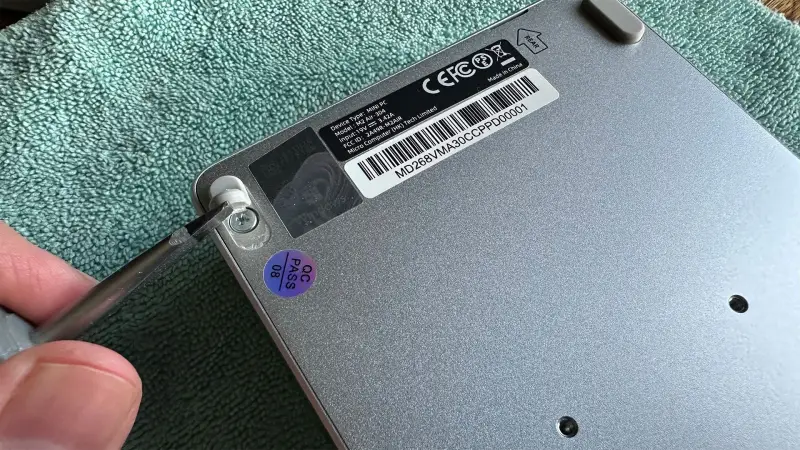
The system uses Intel’s Core 3 304, a 15W Wildcat Lake processor with five cores and five threads: one Cougar Cove performance core and four Darkmont low-power efficiency cores. Its integrated graphics have a single Xe3 core. That is a steep reduction from the higher-end processors in Minisforum’s M2 line, which include 16-core, 16-thread chips and graphics with more Xe3 cores. The Air-304 is the smallest and least expensive model in the family, though its low price applies most clearly to the barebones configuration.
Price and configuration shape the value
Minisforum lists a barebones system for $263, discounted from $329. The tested setup, with 16GB of DDR5-5600 memory, a 500GB SSD and Windows 11 Pro, was listed for $559 as an introductory price. The product page gives $699 as the regular price, while B&H Photo had listed the same configuration at $729. Those figures change the buying calculation: at the lower price, the barebones unit could suit someone with compatible memory and storage on hand. At $699 or more, the processor’s limited multicore and graphics performance make the system much harder to recommend.
There are only two U.S. configurations: barebones, without an operating system, and the tested version with memory, storage and Windows 11 Pro. The configured version adds $296 to the listed barebones price. That is a substantial premium for components that can be upgraded separately, although buyers also receive the Windows license. Minisforum provides a two-year warranty and a 30-day money-back guarantee.
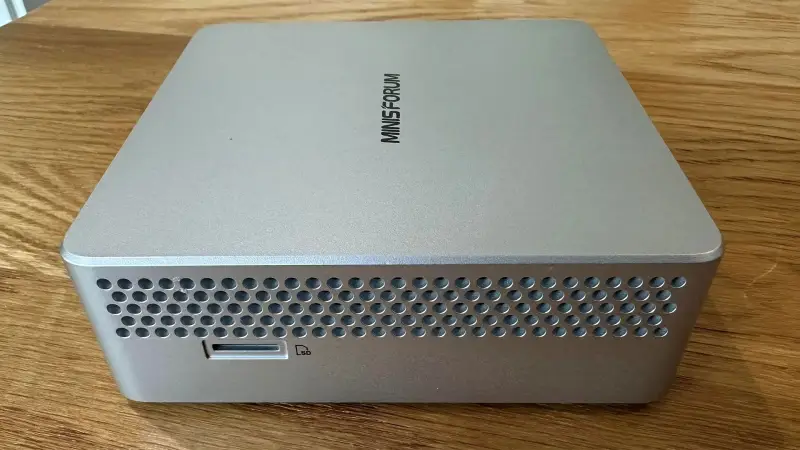
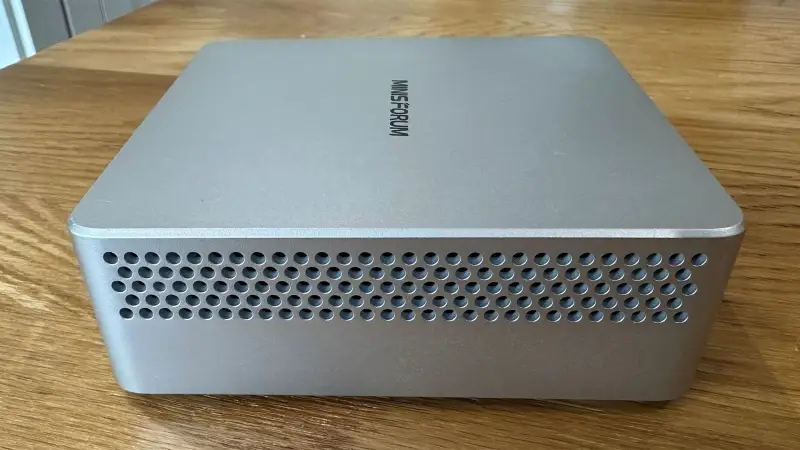
A sturdy 0.47-liter chassis
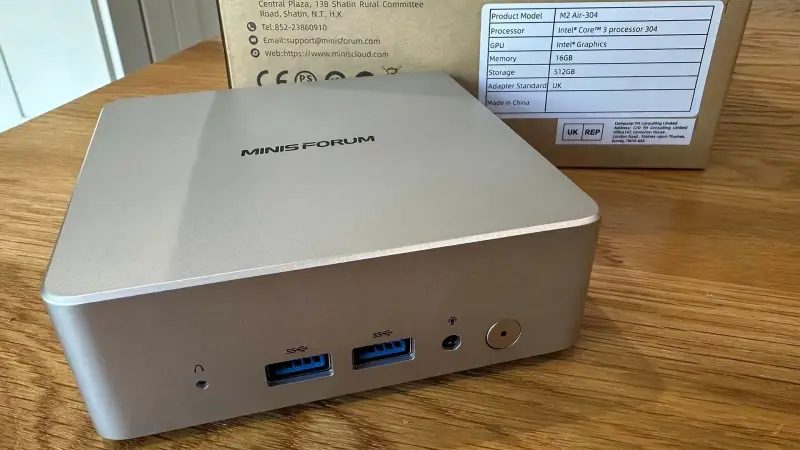
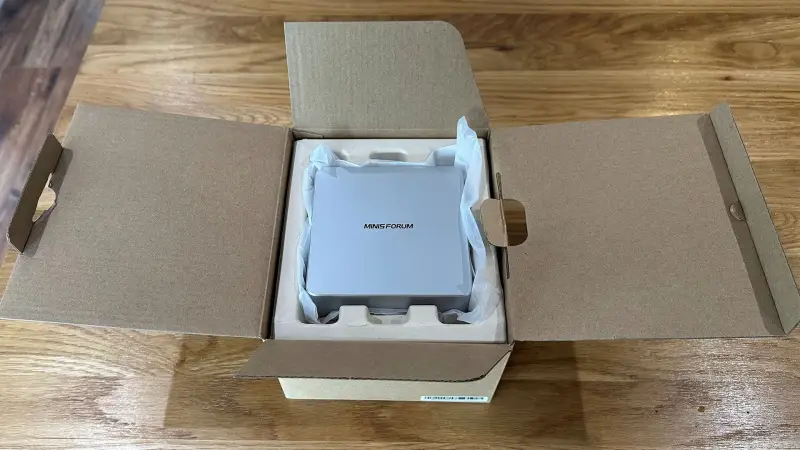
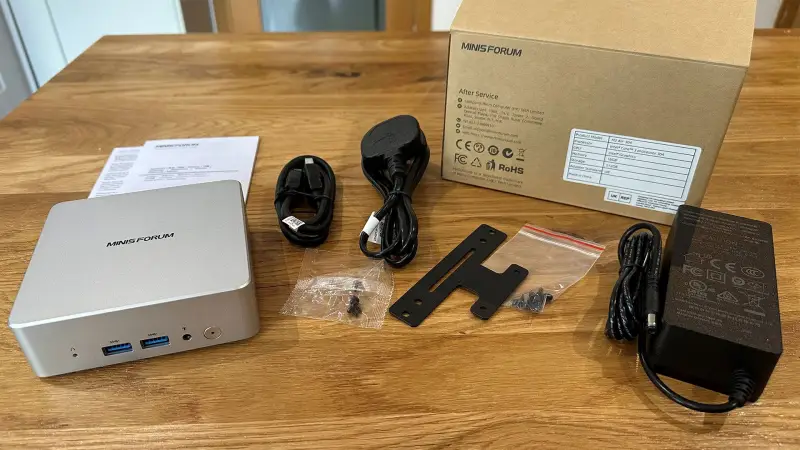
The enclosure measures 112 × 112 × 37.15mm, for a volume of 0.47 liters, and weighs 440 grams. Its silver-colored top is plastic rather than metal, but the case feels solid. A metal bottom plate sits beneath the installed memory and SSD; thermal pads connect those components to the plate. A VESA bracket comes in the box, allowing the computer to be mounted behind a display or elsewhere out of sight. There is no remote power switch, so mounting it somewhere hard to reach may be inconvenient.
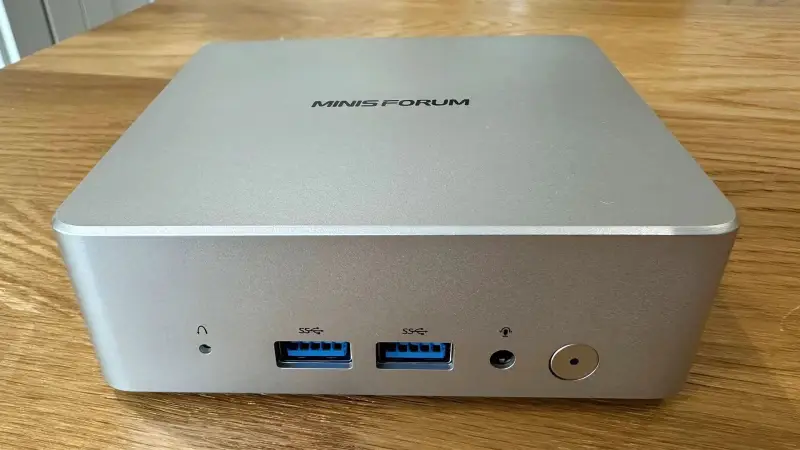
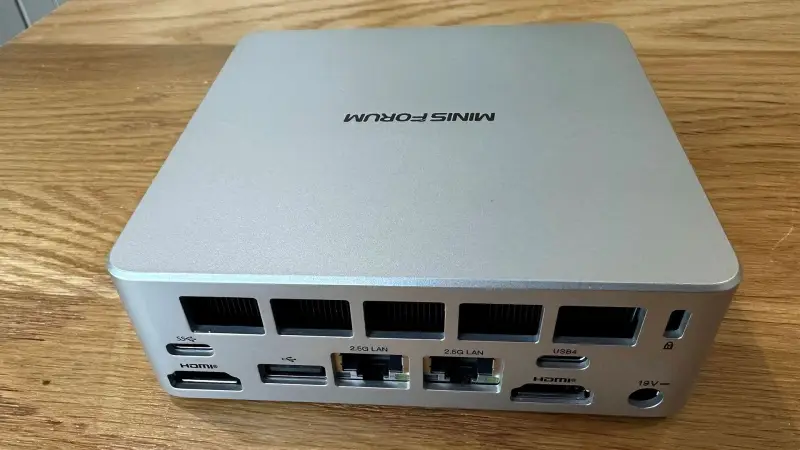
The front has an LED-lit power button, a reset and clear-CMOS pinhole, two USB-A 3.2 Gen 2 ports and a 3.5mm audio jack. The sides add a microSD slot. At the rear are USB4 at 40Gbps with DisplayPort Alt Mode and power delivery, a 10Gbps USB-C port, USB 2.0, two HDMI 2.0 ports, two 2.5GbE Ethernet ports and the DC power input. That is a generous selection for this size, even if some users might prefer a front-facing USB-C connection. A USB4 dock can expand the setup when the built-in connections aren’t enough.
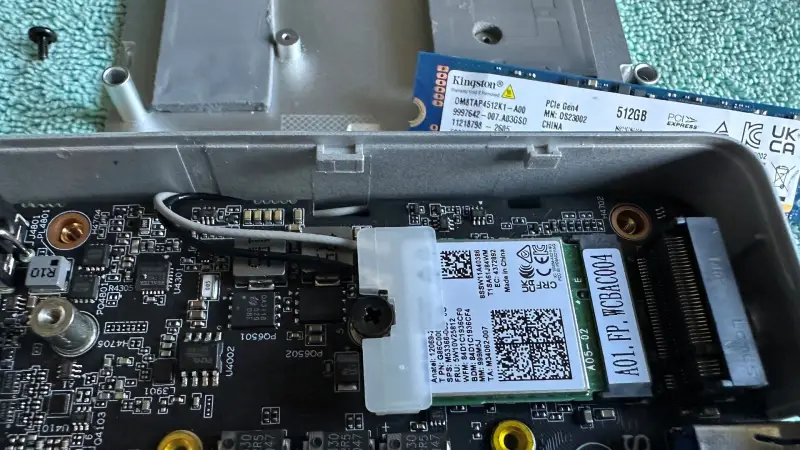
Wireless networking and Bluetooth come from a socketed M.2 2230 card, with Wi-Fi 6E and Bluetooth 5.4. The card worked without problems during testing and sits beneath the SSD, where it can be replaced or upgraded. Power comes from a 65W external adapter with a detachable figure-eight cable. The Air-304 can also run from USB-C power, which may be more convenient for travel than carrying the included brick.
Memory and storage are replaceable, but limited
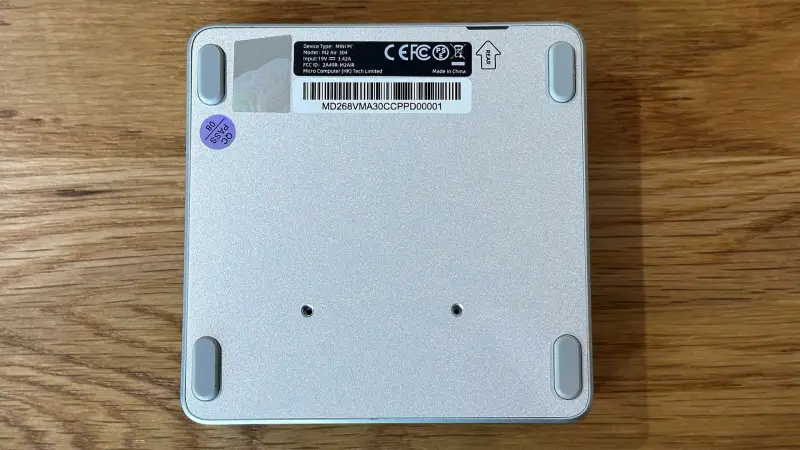
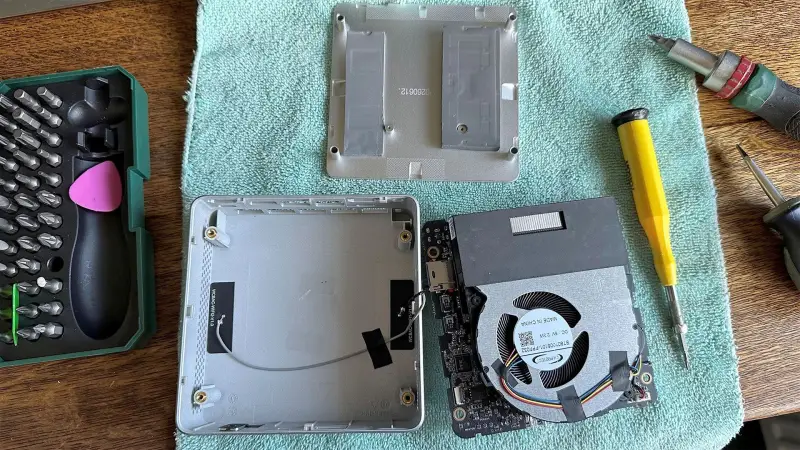
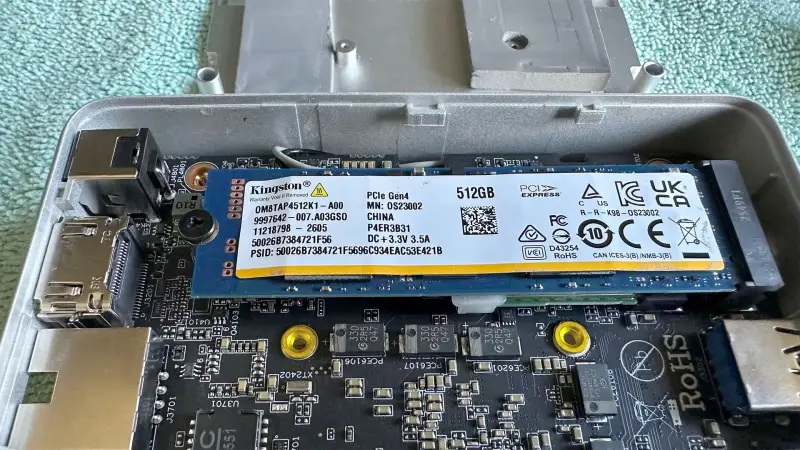
Opening the case takes a little care. Four long screws sit beneath the rubber feet; remove them, then lift the metal base plate. Thermal pads hold the plate in place, so it may take a gentle pull to free it. Inside, there is one M.2 2280 PCIe 4.0 x4 slot, supporting SSDs up to 2TB, and one SODIMM slot. Both were occupied in the review unit.
The supplied 16GB DDR5-5600 module can be replaced with a module up to 64GB, and the system supports memory speeds up to DDR5-6400. Because there is only one slot, adding capacity means swapping the existing module rather than adding a second one. The single M.2 slot similarly means storage expansion requires replacing the installed drive; microSD provides another option for less demanding storage needs.
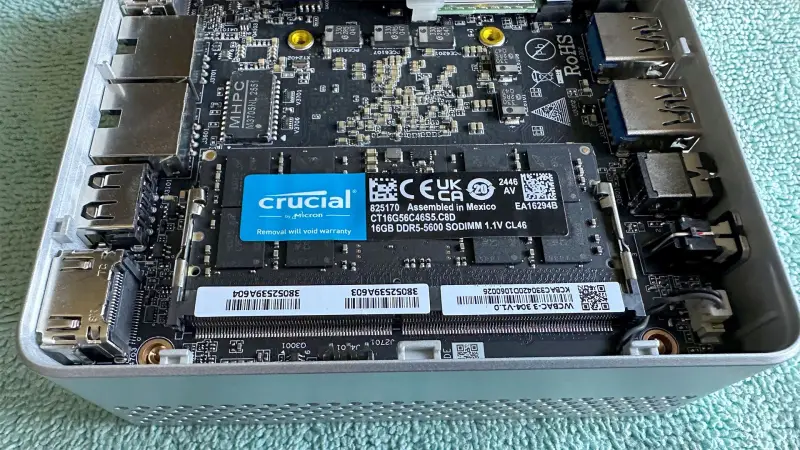
These choices keep the machine small and leave some room for later upgrades, but the single-channel memory arrangement also affects performance. It matters particularly for integrated graphics, which shares system memory. The Air-304’s modest graphics core therefore faces both a low core count and a memory configuration that offers less bandwidth than a multi-channel setup.
Responsive for everyday work, slow under sustained loads
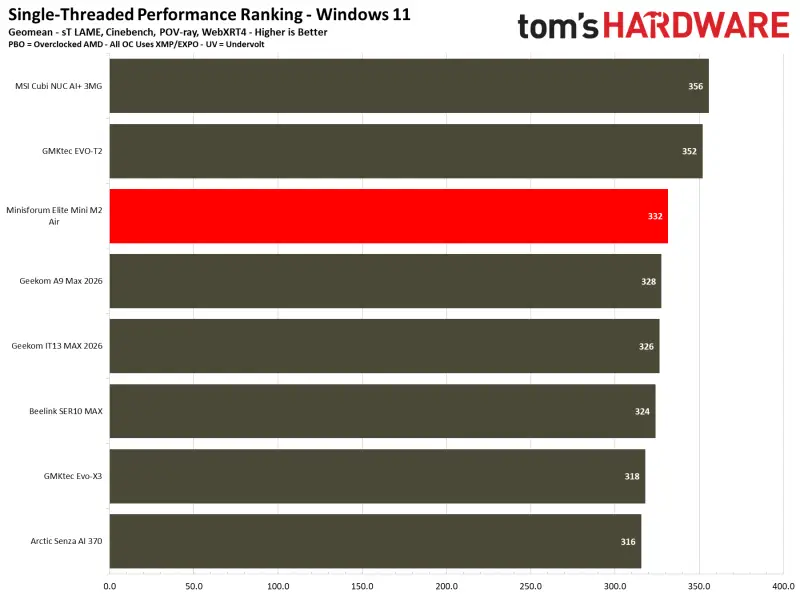
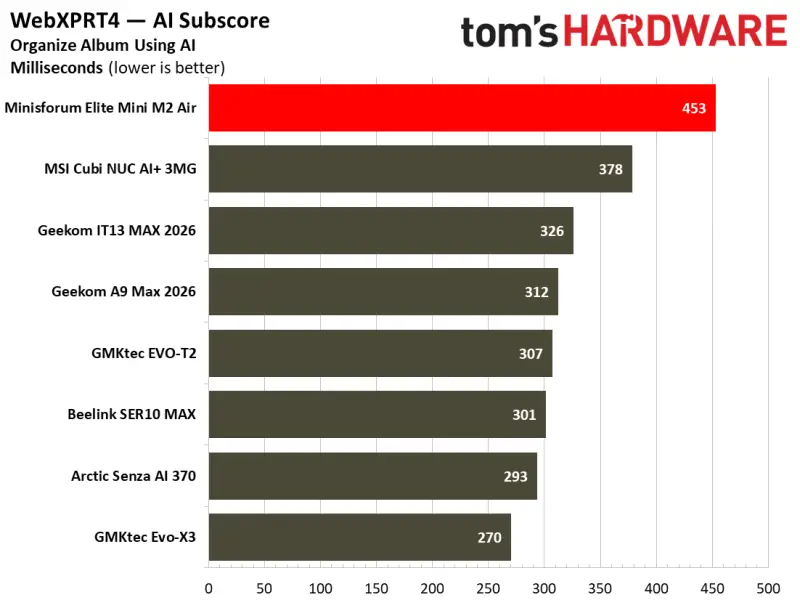
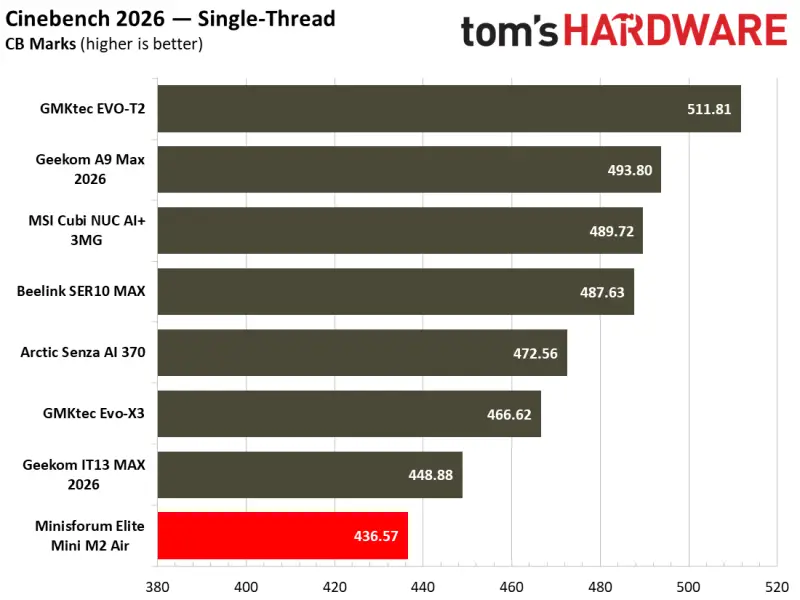
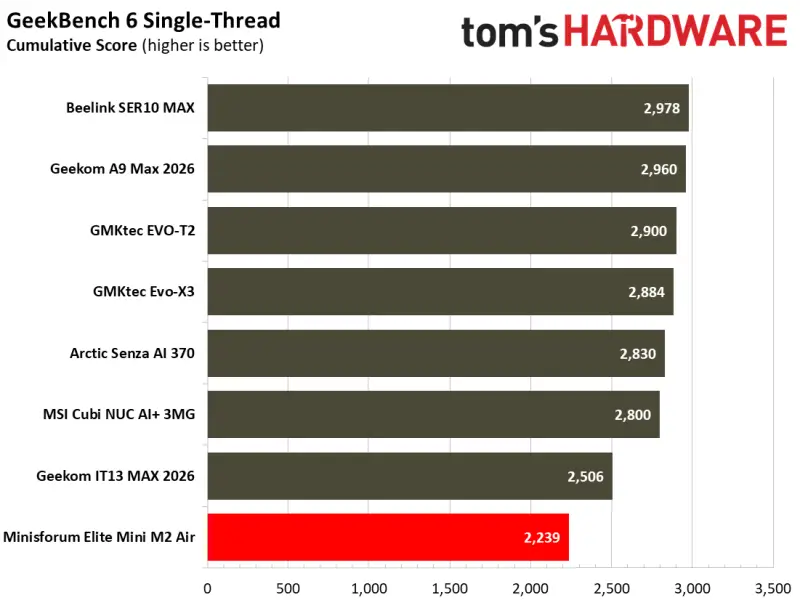
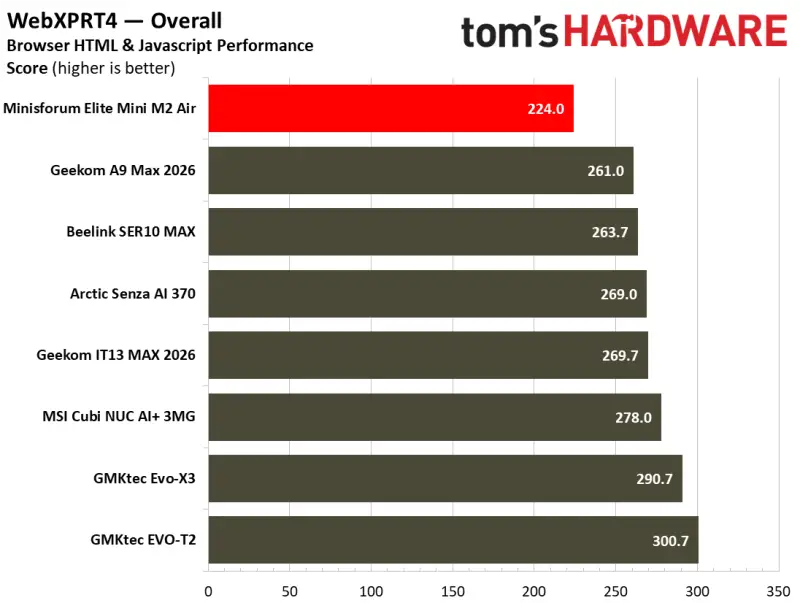
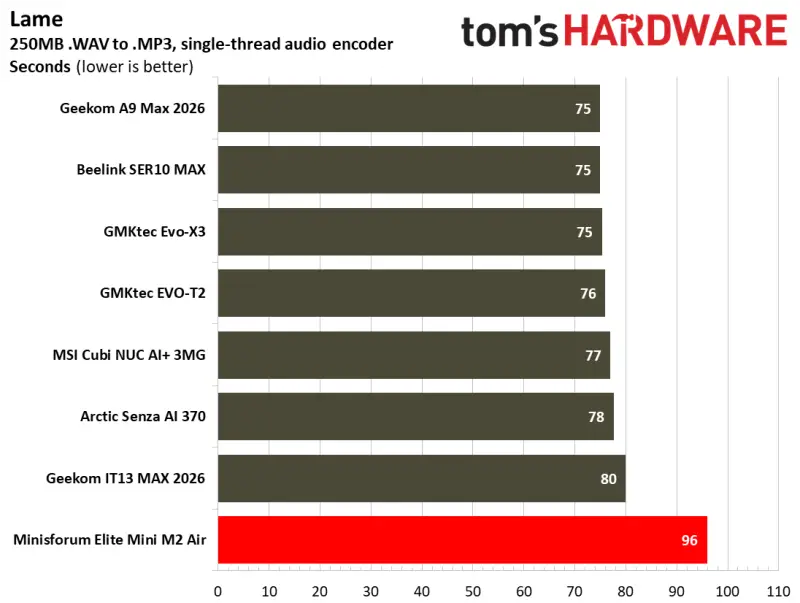
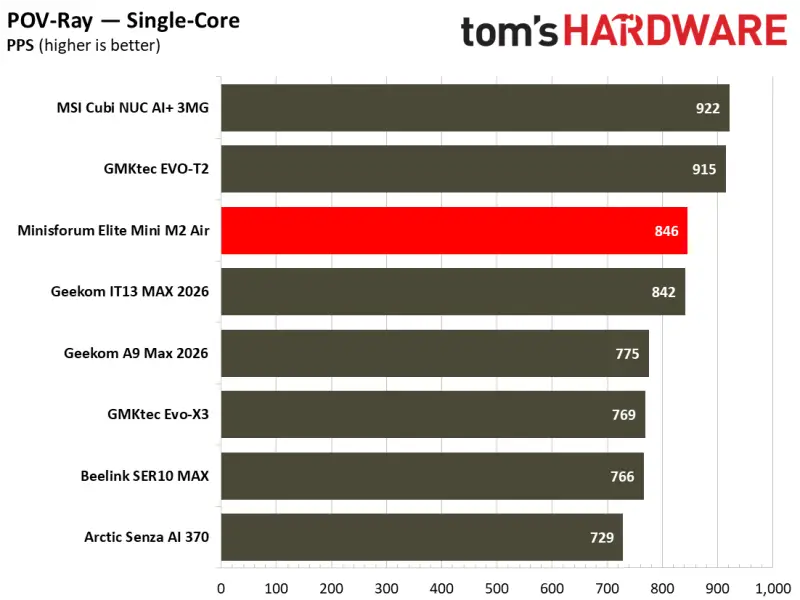
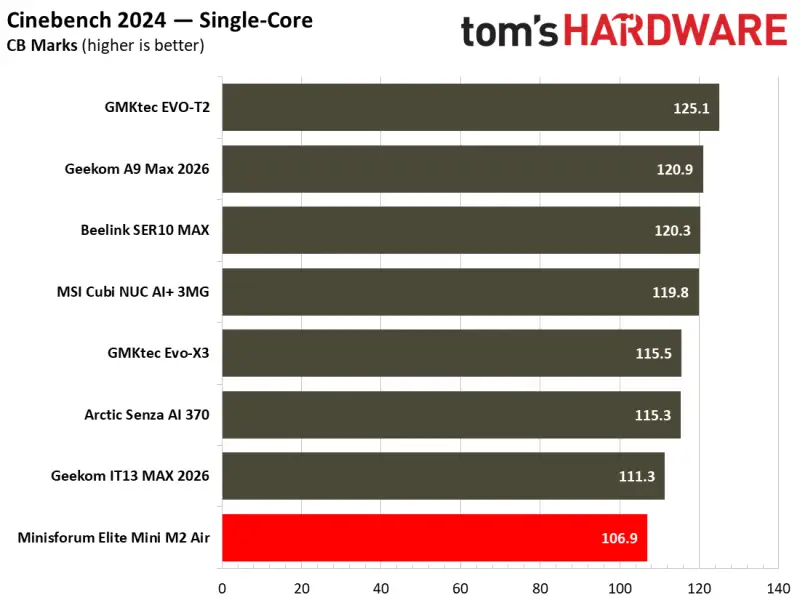
The Core 3 304 reaches 4.3GHz, and its single performance core helps keep routine desktop work responsive. The review system felt comfortable running Windows 11, web browsers and word-processing software. In Cinebench 2024’s single-core test, it scored about 107 points, close to the roughly 120 points achieved by the Beelink SER10 MAX and MSI Cubi NUC AI+ 3MG. The Air-304 also beat AMD-based rivals in the POV-Ray single-core rendering tests.
That showing doesn’t carry over to tasks that use many cores. With five cores and five threads, the processor falls well behind mini PCs equipped with 12-core, 24-thread AMD chips or 16-core, 16-thread Intel chips. Rendering and video encoding expose the gap most clearly. Occasional short video transcoding may be manageable if speed is not a priority, but frequent work of that kind calls for a more powerful system. The 15W chip can still improve on older desktop processors such as the Core i7-7700K or Core i5-10400 in both single-core and multicore performance, according to the review’s comparison.
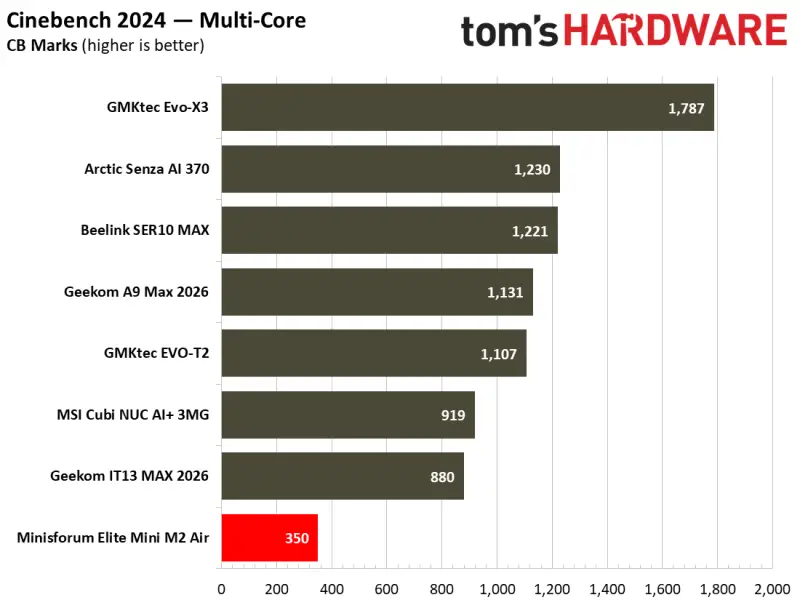
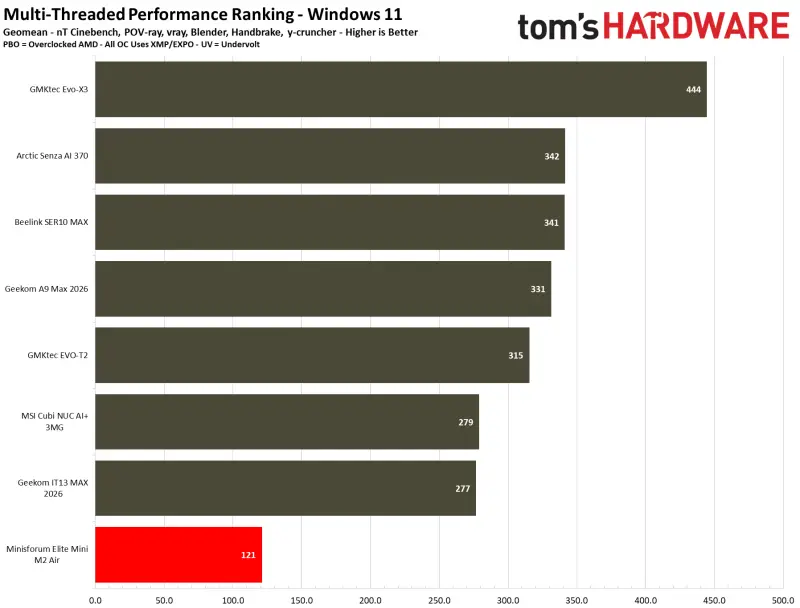
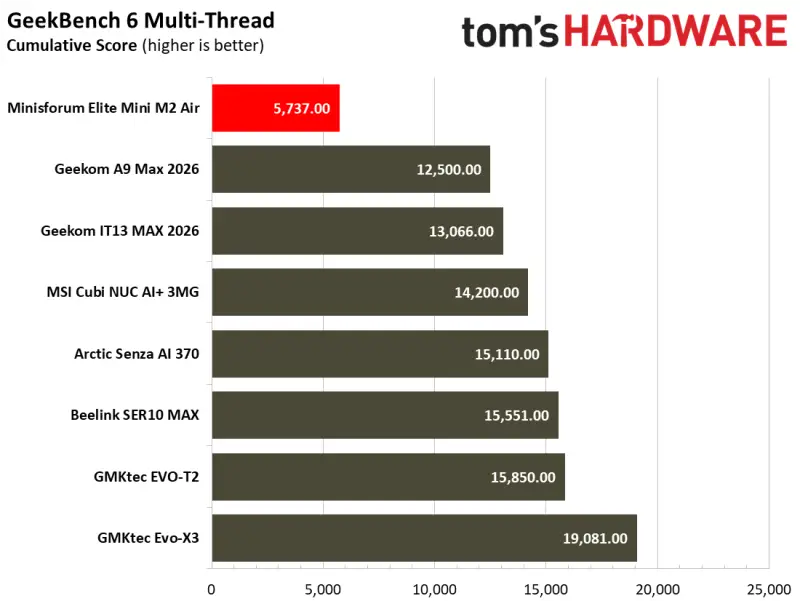
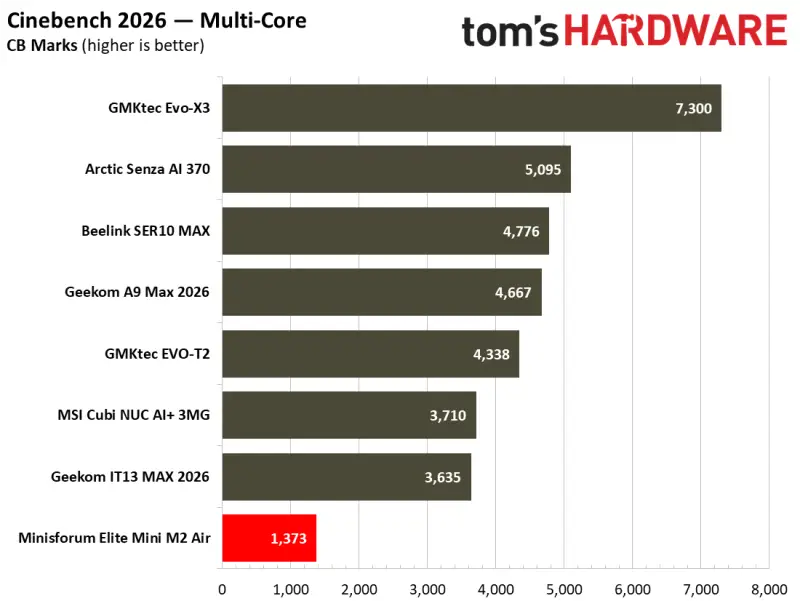
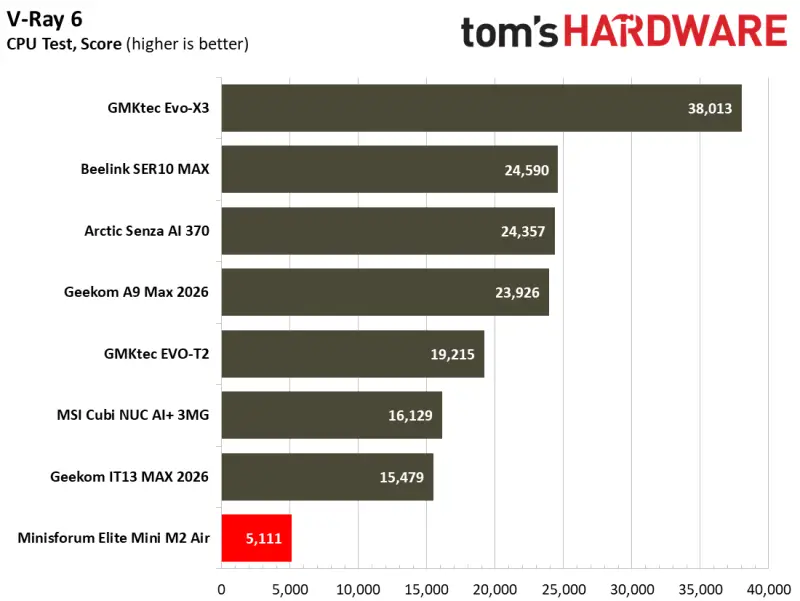
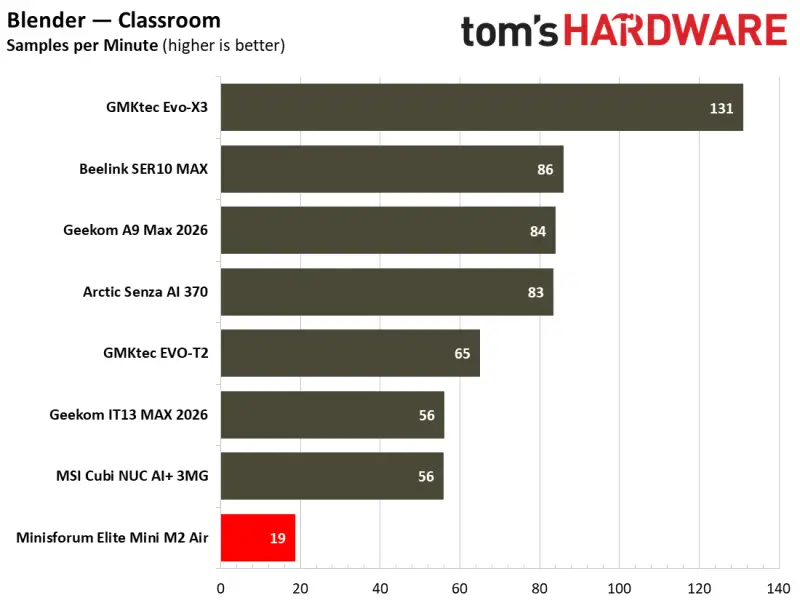
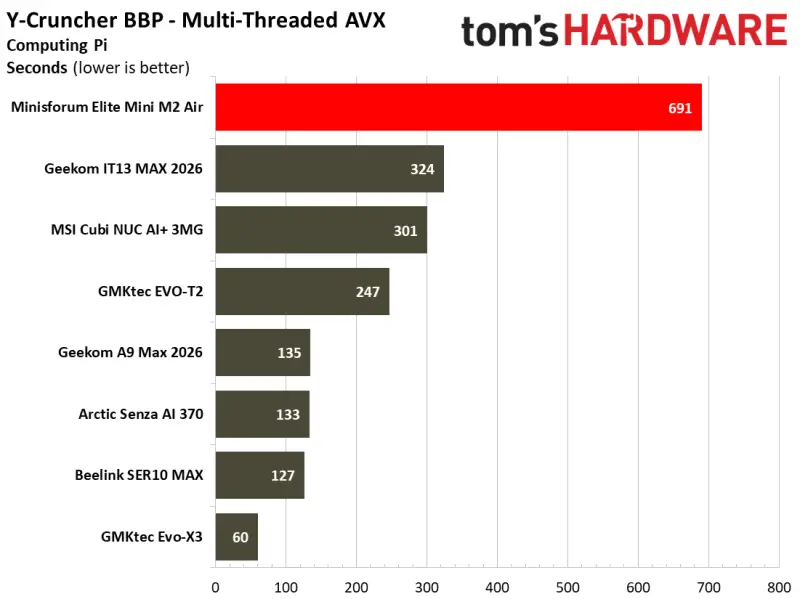
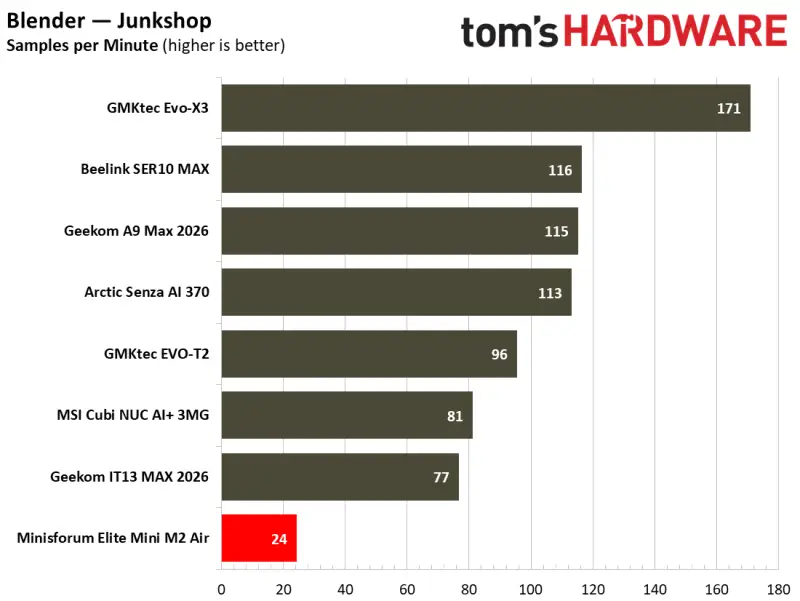
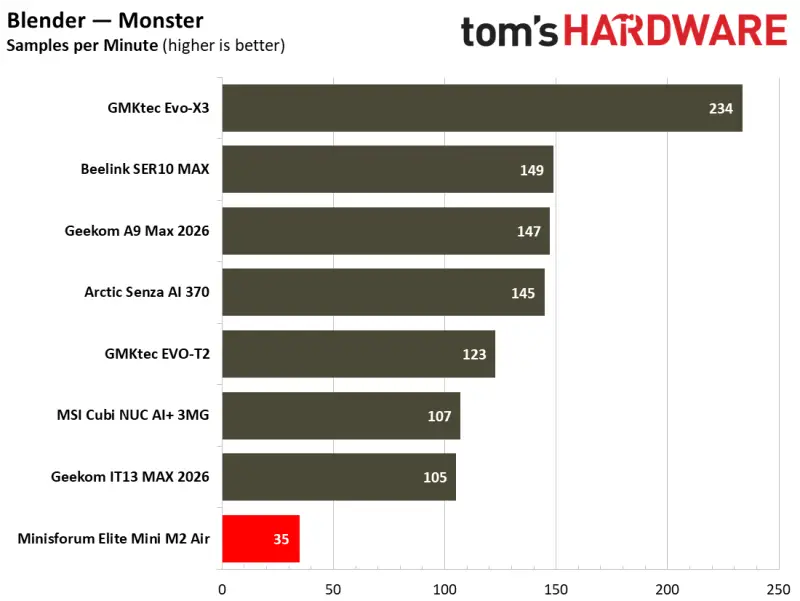
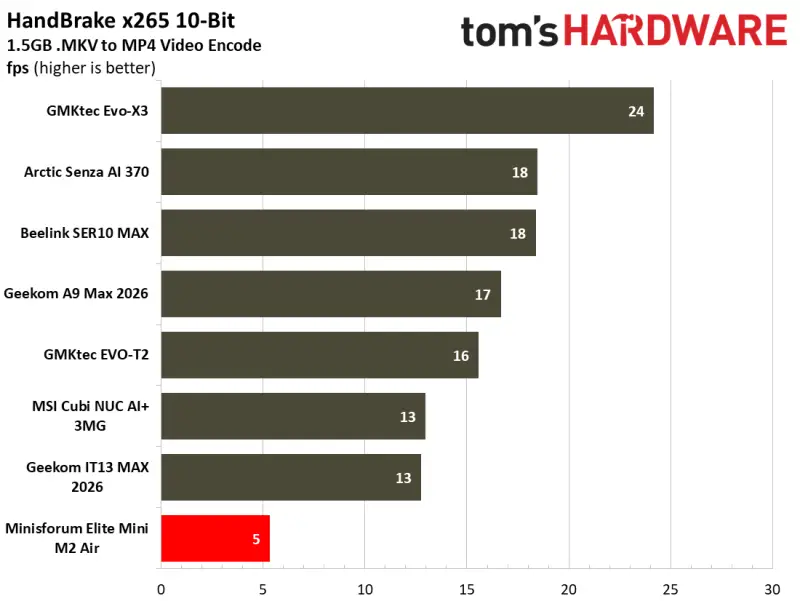
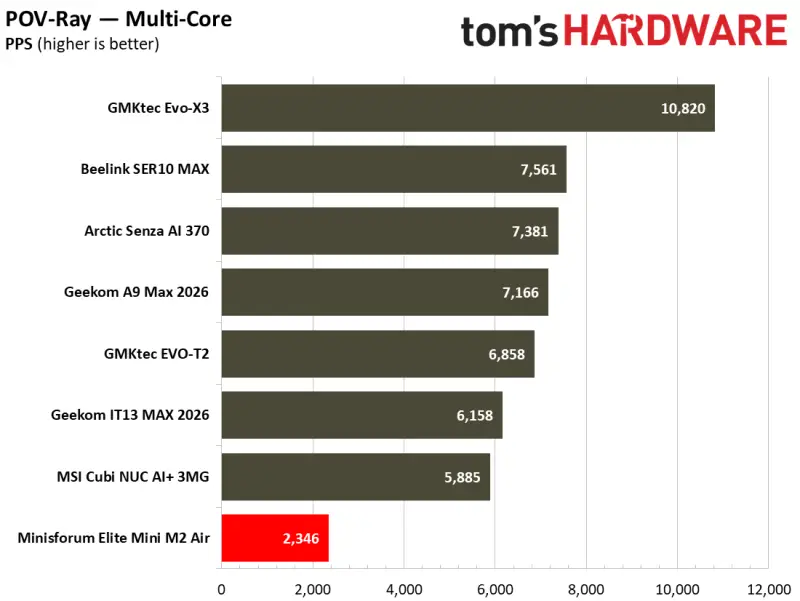
For ordinary office and web use, this is a usable, quiet desktop. The benchmark results matter when the workload changes: long rendering jobs, heavier encoding or many concurrent tasks leave little reason to choose this configuration over a larger mini PC with more cores.
One Xe3 core sets a low ceiling for games
The graphics processor is the Air-304’s clearest constraint. Its single Xe3 core is a fraction of the graphics resources in other Intel 300-series mini PCs cited in testing: the GMKtec Evo-T2 has 12 Xe3 cores, while another tested system has four. The Air-304 also shares single-channel system memory with its graphics, further limiting performance.
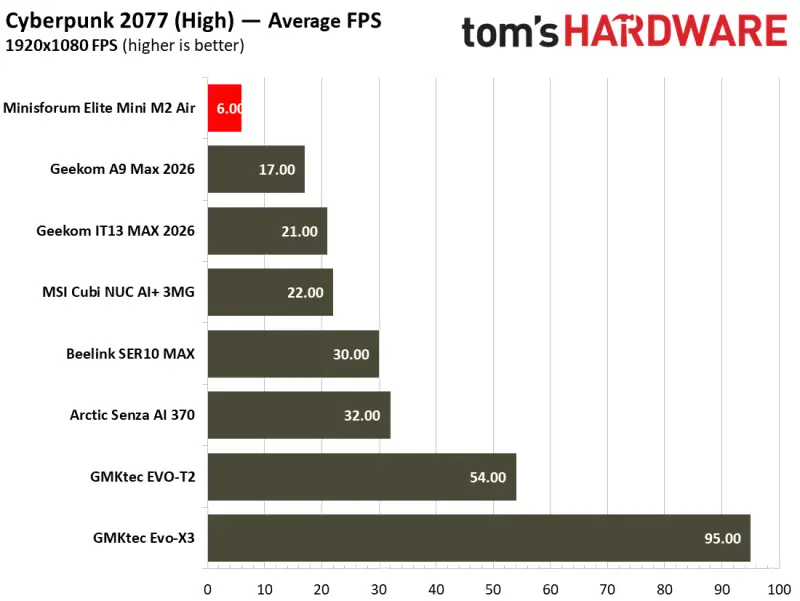
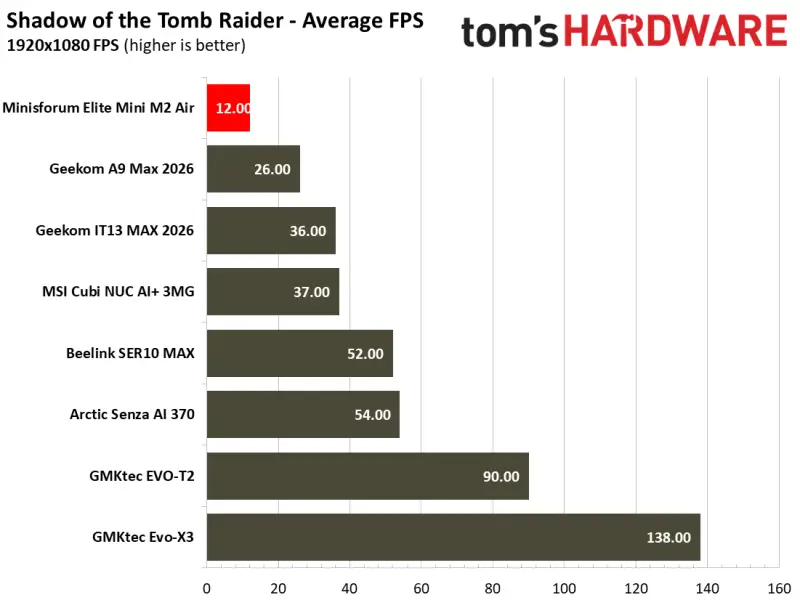
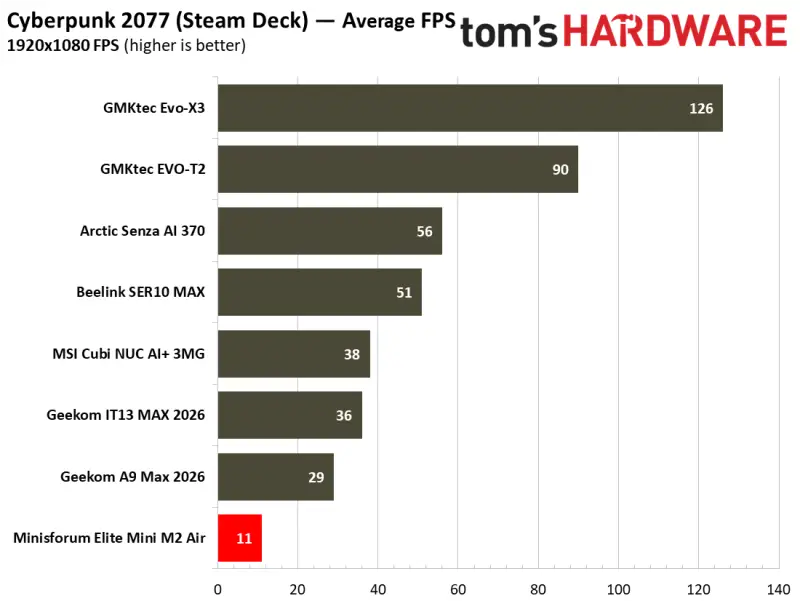
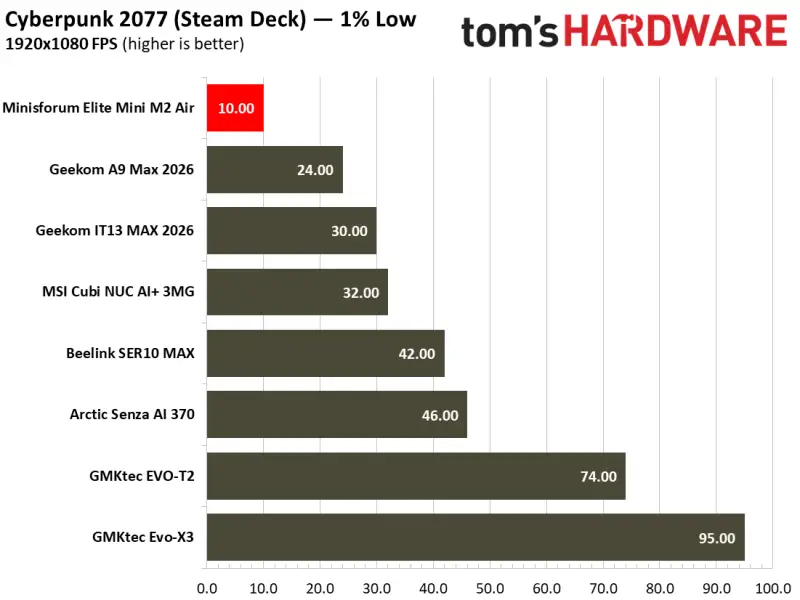
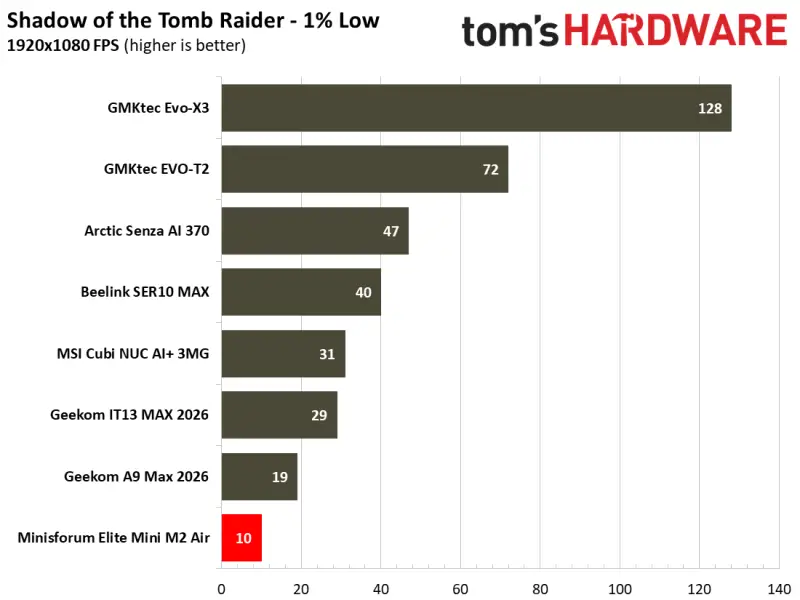
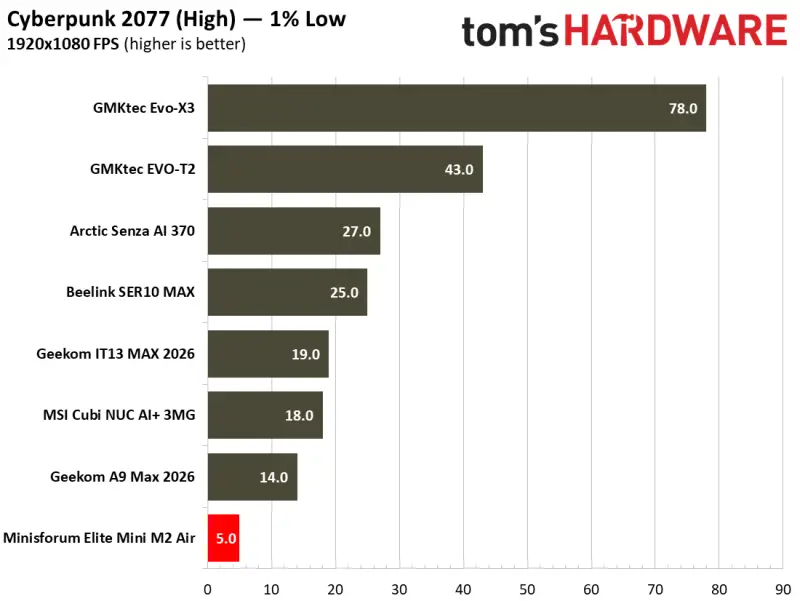
Some graphics tests would not run. 3DMark Solar Bay and Speed Way returned unsupported-hardware errors, reflecting the limited resources exposed by this integrated GPU. Steel Nomad did run, with a score of 135. The GMKtec Evo-T2, using a Core Ultra X7 358H and 12-core B390 graphics, scored 1,624—almost 12 times higher. On the Air-304, that Steel Nomad result corresponded to just over one frame per second.
Shadow of the Tomb Raider and Cyberpunk 2077 reached no more than 10 or 12 frames per second in the tested settings. Reducing resolution to 720p and using low or lowest graphics settings brought performance to around 25 or 30 frames per second. That is a sizable compromise for games designed to push modern graphics hardware.
Older games and emulation tell a more favorable story. The PPSSPP emulator ran Wipeout Pure at a 6× render resolution on a 1440p monitor, maintaining a steady 60 frames per second. That result points to a practical use for similarly aged console games and older home-computer software. Treat the Air-304 as a small desktop with retro gaming potential, rather than a general-purpose gaming PC.
Low power use, low noise
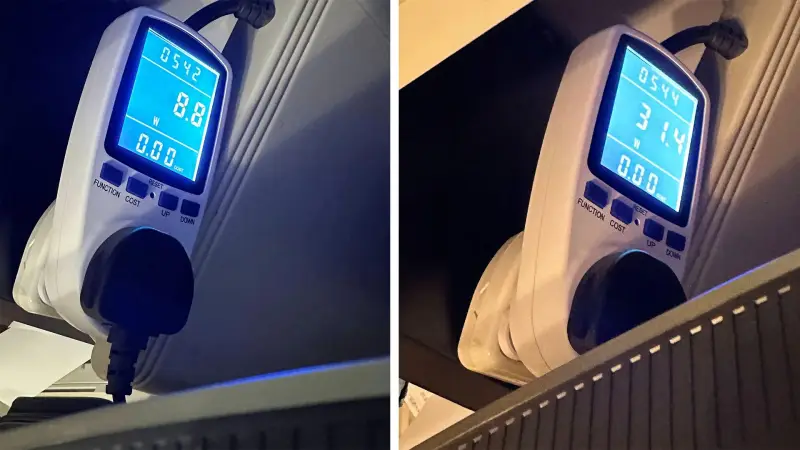
In everyday use, the system drew around 9W while idle at the desktop. The highest measured system draw during demanding loads was about 31W. CPU temperatures stayed in the low 30s Celsius during light browsing and did not exceed the low 70s during extended gaming and benchmark runs. The 15W processor and cooling system kept the computer comfortable and quiet under these conditions.
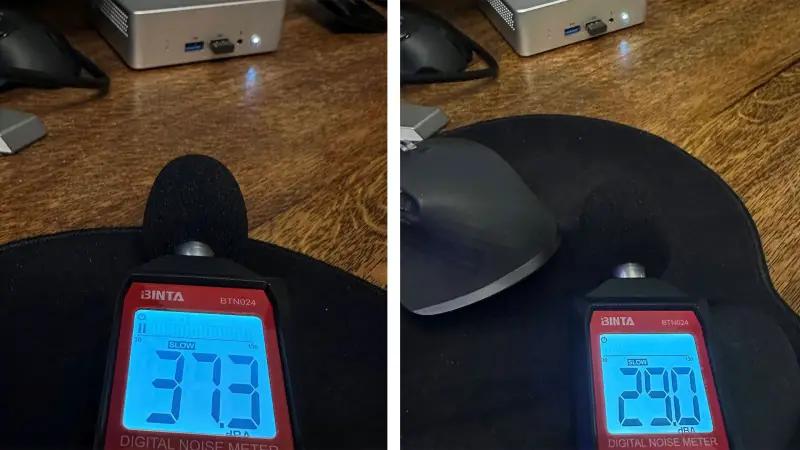
Noise readings were below 30 dBA at idle, beneath the meter’s measurement threshold. Under simultaneous CPU and GPU stress, the reading rose to just over 37 dBA from about half a foot in front of the device. The fan is audible under pressure, but the test system remained a quiet presence during both light use and heavy runs.
A niche fit whose price matters
Windows 11 Pro came installed on the tested configuration, with no pre-installed bloatware observed. Minisforum’s specifications don’t describe compatibility with other operating systems such as Linux. Buyers considering a different operating system should check support for their intended setup before choosing this model.
The Air-304 makes a coherent case when the priorities are a small footprint, low power use and quiet everyday operation. It offers a solid-feeling chassis, VESA mounting, replaceable memory and storage, Wi-Fi 6E, Bluetooth 5.4, USB4 and two wired network ports. Its limits are just as concrete: one memory slot, one SSD slot, a five-thread CPU and a single-core integrated GPU.
At $263 barebones, it could be an inexpensive way to reuse a spare DDR5 module and SSD. At $559 with 16GB of memory, a 500GB drive and Windows 11 Pro, the value is less clear. If the configured price reaches $699, stronger older-generation systems may be available at comparable sale prices. The Air-304 is best judged as a quiet, compact desktop for light work and older software; its appeal fades quickly when the price rises or the workload needs more cores and graphics power.


