PancakeSlicer Brings Curved 3D Printing to a Self-Hosted Workflow
- Cargo
- Machine Learning
- Shipped
- Shipper
- [email protected] (Jhet Borja)
- Readers
- 878
PancakeSlicer pairs non-planar slicing with printer management, aiming to make curved, three-axis printing easier to try across supported machines.
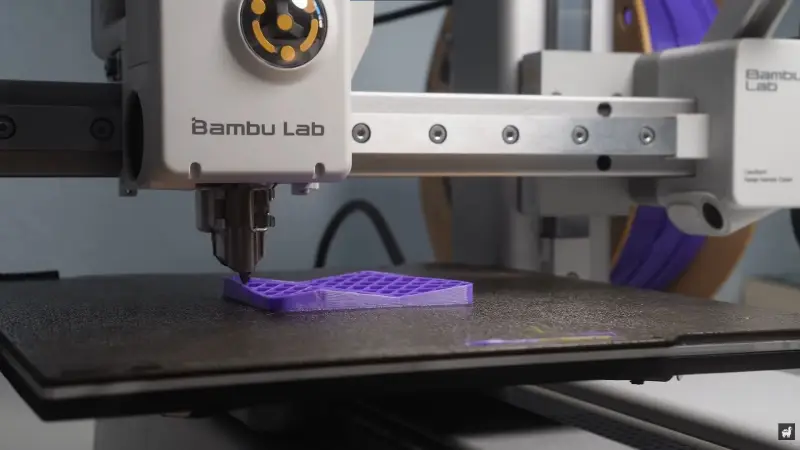
Non-planar 3D printing has drawn attention through striking demonstrations, but most printer owners still lack a straightforward way to try it. PancakeSlicer, a self-hostable slicer from Alpaca Engineering, is designed to close that gap by fitting non-planar slicing into a workflow that also handles printer profiles and print jobs.
In a demonstration video, Alpaca Engineering describes a familiar pattern: experiments with printing across three axes attract interest, while practical use remains limited. Non-planar printing changes the usual approach of building an object from horizontal layers, allowing the print path to follow curved surfaces. But a compelling demonstration is only a starting point. For people to explore the technique, they need software that can prepare a print and work with the machines they already own.
Making non-planar slicing usable
The project’s aim is to make its slicing algorithm accessible through a familiar interface, rather than requiring owners to handle G-code manually or piece together an incomplete research tool. That addresses a practical hurdle: even when a general-purpose algorithm exists, setup and printer operation can make it difficult to use outside a controlled experiment.
Non-planar paths also introduce physical constraints that ordinary horizontal layers don’t present in the same way. As the toolhead changes angle and height, it needs enough clearance to move without hitting the object already being printed. PancakeSlicer uses 3D models of printer heads to account for their shapes while generating paths. This lets the slicer consider collisions, but it also ties compatibility to the specific toolhead model it knows about.
That constraint means support for a printer doesn’t imply identical results across machines. Different toolhead shapes provide different clearance, so one printer may handle a steeper angle or tighter curve than another. Alpaca Engineering lists support for a range of machines from Bambu Lab, Prusa, Creality and Voron, among others. The useful question for a prospective user is therefore not just whether their printer appears on the list, but what its geometry will allow the slicer to produce.
A shared interface for printers and jobs
PancakeSlicer also includes printer management, extending the project beyond its original goal of making non-planar slicing easier to access. Users can host the software on a desktop, network-attached storage device or home server, then open its web interface from other devices. That setup can let multiple users submit jobs without installing the slicer separately on each machine.
Printer profiles help bring different brands into one operating workflow. The intended benefit is practical: owners of several printer types can manage them without switching between separate slicer applications. The video also describes LAN-only use with Bambu Lab printers as an option for replacing Bambu Studio and Bambu Connect in that local workflow.
The slicer can handle two slice jobs at once, which may help when more than one person is preparing a print. That capacity is a specific feature, rather than evidence of unlimited simultaneous use; the source describes two concurrent slicing jobs. For a shared home setup, it gives users a way to work in parallel while keeping printer access and slicing in one interface.
What to watch as the project develops
The combination of slicing and printer management could make experimentation easier to repeat: users can prepare a model, work with a supported printer profile and send jobs through a shared interface. That removes some workflow friction around trying non-planar paths. It doesn’t remove the mechanical limits of a printer, and the value of the collision checks depends on having an appropriate model of the print head.
Alpaca Engineering’s video includes animations of the slicing algorithms and demonstrations of how they shape a path for non-planar printing. Those visual explanations matter because the technique is harder to assess from a finished object alone: the path determines how the nozzle moves around the part and where clearance becomes a concern.
PancakeSlicer’s practical impact will depend on how well its supported profiles match real machines and how easily users can put its output to work. For now, its clearest contribution is packaging a specialized printing method with the conveniences users expect from modern printer workflows. If that lowers the effort required to test curved paths, more owners may be able to explore where non-planar printing works—and where toolhead geometry still sets the limit.


