Coway Airmega IconS Gets Local Home Assistant Control Through Community Firmware
- Cargo
- Machine Learning
- Shipped
- Shipper
- Shane Downing
- Readers
- 764
A developer replaced the purifier’s cloud connection with a local Home Assistant setup, though the experimental project drops Coway app control.
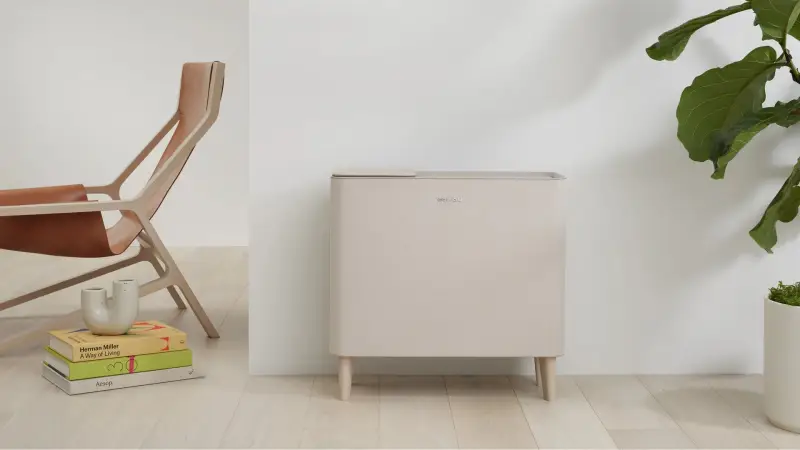
A Coway Airmega IconS can be redirected from the manufacturer’s cloud to a local Home Assistant server, giving its owner a way to control the purifier without relying on Coway’s IoCare+ service. Developer Scott J. Goldman built the project after a cloud-based community integration repeatedly failed. His approach uses the device’s certificate setup process to establish a local connection, then routes its commands through a broker running on Home Assistant.
The project, called coway-local, makes the purifier available in Home Assistant and, through it, Apple Home. Goldman’s immediate goal was modest: have an Apple Home “Good Night” scene switch on the purifier. Getting there required replacing the cloud-dependent control path and reconstructing parts of the device’s setup and command protocols.
Why the cloud integration kept breaking
The IconS, model AP-1022K, has Wi-Fi but no native Home Assistant integration. Owners instead depended on a community integration that signed in to Coway’s IoCare cloud. That arrangement brought several points of failure: Coway first blocked the integration over server load, later allowed it after a community dispute, and subsequently changed its app and cloud branding from IoCare to IoCare+. The branding change required a rewrite, while changes to the web pages the integration read could also disrupt it. Coway’s servers experienced outages as well.
Goldman says his account was banned because he was using an older integration version, leaving him without remote control for weeks. That experience illustrates a practical weakness in cloud-dependent smart-home gear: an owner may have the hardware at home yet lose access when a service, account, or third-party integration stops working. The IconS itself had replaced an earlier Airmega that Goldman described as “an overpriced box fan with a HEPA filter and an air quality sensor.”
His response involved a mix of network analysis and AI assistance. One model declined to help with intercepting the purifier’s traffic, while ChatGPT generated firewall rules. Another unnamed AI helped reconstruct the Bluetooth setup process, which Goldman estimated could have taken hours or days to work through manually. He also used Android Debug Bridge, or adb, to collect Bluetooth logs from a phone and map the setup exchange.
A certificate download exposed the route in
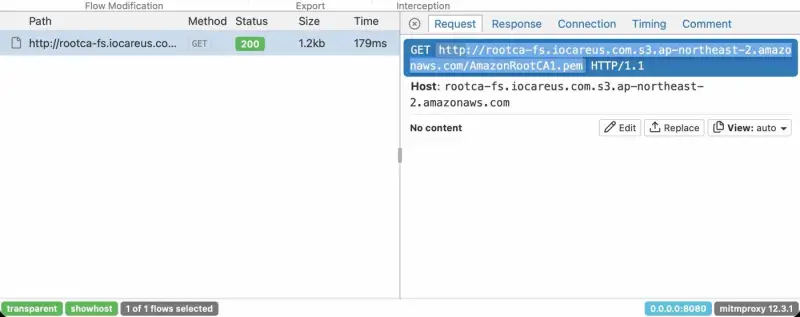
The key finding was in the purifier’s initial trust setup. It downloads a root certificate over plain HTTP, leaving that request open to interception on the local network. Goldman observed a request for AmazonRootCA1.pem from an S3 bucket in AWS’s Seoul region. With mitmproxy or mitmweb and nftables port redirection, he could substitute a certificate under his control for the one the purifier expected to retrieve.
After receiving the substituted certificate, the device made HTTPS requests to Coway’s certificate server, including requests for a device certificate and private key. A proxy plugin replaced the key in that response as well. This gave Goldman a way to make the purifier establish an encrypted connection to his local setup. The method relies on a weakness in how the certificate is delivered; it doesn’t require decoding the encrypted MQTT messages themselves.
The purifier sends control messages using MQTT, a lightweight messaging protocol used in smart-home devices. Those messages normally travel over TLS on port 8883 and pass through AWS IoT. Goldman’s proxy exposed the raw data stream without translating MQTT, and an AI system helped associate messages with button presses in the app. He had considered forging a certificate by exploiting weaknesses in private keys associated with eMudhra, but the unencrypted certificate download made that route unnecessary.
Local setup and its limits
Once the device’s Bluetooth setup protocol was understood, coway-local provided a more direct enrollment method. A Web Bluetooth page, opened in Chrome on a Mac or Android device near the purifier, sends it the Wi-Fi details and certificate URLs. Those URLs point to the Home Assistant server, so this setup avoids ongoing traffic interception. The purifier receives the Wi-Fi password over Bluetooth; Home Assistant does not store it, and the setup link expires after 15 minutes.
From then on, the purifier connects to a local MQTT broker run by the integration instead of AWS. The project requires Home Assistant Core 2026.10.2 or newer, a fixed address on the local network, and 2.4 GHz Wi-Fi. It has been tested only with the IconS AP-1022K. Other Coway models might complete Bluetooth setup but still fail to operate correctly.
There are also missing features. Coway-local does not yet implement PM10 and other air-quality readings, filter alerts, or firmware updates. Connecting the purifier this way disconnects it from Coway’s cloud, which means Coway’s app can no longer control it. The project is experimental, so owners should weigh those tradeoffs against the reliability problems they are trying to solve.
Goldman sees local control as a safeguard against a cloud service becoming unavailable or eventually requiring a fee. For now, the clearest benefit is simpler: Home Assistant can operate the IconS without depending on Coway’s servers. As the project develops, the main questions are whether it can add the missing device features and whether its setup can be made to work reliably with more models.


