Gears of War: E-Day Uses NVMe Storage to Save RAM and Smooth Performance
- Cargo
- Machine Learning
- Shipped
- Shipper
- Dan Mateescu
- Readers
- 659
Testing found that NVMe drives cut RAM use by about 2GB and improve frame time consistency on a 16GB system, while SATA can delay textures and lighting.

Gears of War: E-Day uses fast storage as part of its plan for fitting a visually dense game onto memory-limited hardware. Testing across four SSD generations suggests that the approach can save about 2GB of system RAM when the game is installed on NVMe. On a laptop with 16GB of memory, NVMe also improves 1% lows at higher graphics presets, even though average frame rates stay nearly the same.
The results point to a practical role for storage in game design: a fast SSD can help supply assets when RAM is constrained. But drive speed matters. On a SATA SSD, textures, lighting and shadows can appear late, and the frame time advantage seen on the 16GB system disappears.
Streaming game data from the SSD
The Coalition described its approach in an interview with Digital Foundry, explaining how it uses the Xbox Series S’s NVMe drive to support a system with limited memory. The game brings scene data in from storage as it’s needed, then clears data that is no longer required. This lets the SSD act as a fast source for assets without keeping every detail resident in RAM.
The scheduling is central to the technique. The game uses heuristics to decide which assets to fetch and when. Reading too much data from storage can interfere with performance, so the system has to balance asset availability against the cost of those reads. E-Day also supports DirectStorage, though that feature alone does not guarantee heavy or sustained SSD use.
PC players have reported unusually high drive activity. YouTuber Mostly Positive Reviews described a system running at about 80% CPU usage with 16GB of RAM full and disk reads around 120MB/s, with spikes to 500MB/s. The game held 60 frames per second on the selected settings, but shader compilation caused occasional large stutters. That report prompted a closer look at storage behavior.
Read rates exceed earlier game tests
To capture rapid changes in drive activity, testing used HWInfo with a 20 millisecond polling period; Task Manager’s polling interval was considered too slow for accurate measurement. The game was tested at 4K with DLSS Quality across all graphics presets.
| Graphics preset | Peak bandwidth | Average bandwidth |
|---|---|---|
| Ludicrous | 3.7GB/s | 1.3GB/s |
| Ultra | 2.8GB/s | 1.2GB/s |
| High | 2.5GB/s | 1.05GB/s |
| Medium | 1.5GB/s | 824MB/s |
| Low | 858MB/s | 359MB/s |
At the higher presets, average reads stay above 1GB/s. That is substantially more sustained throughput than earlier tests of other games that leaned heavily on SSDs: the highest average recorded in those tests was 366MB/s in Forspoken at 4K and maximum settings. Peak bursts can be much higher than a game’s typical read rate, but they may last only milliseconds; sustained bandwidth gives a clearer picture of how actively storage is being used.
NVMe saves memory; SATA can delay assets
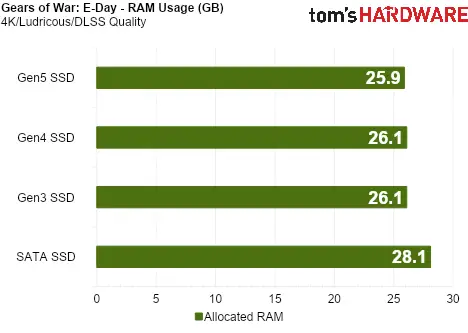
On the high-end desktop, the game used a substantial amount of system memory. Installing it on any of the tested NVMe drives, from Gen3 through Gen5, reduced RAM use by about 2GB. The tests indicate that the streaming system can lower memory pressure without depending on the newest NVMe generation.
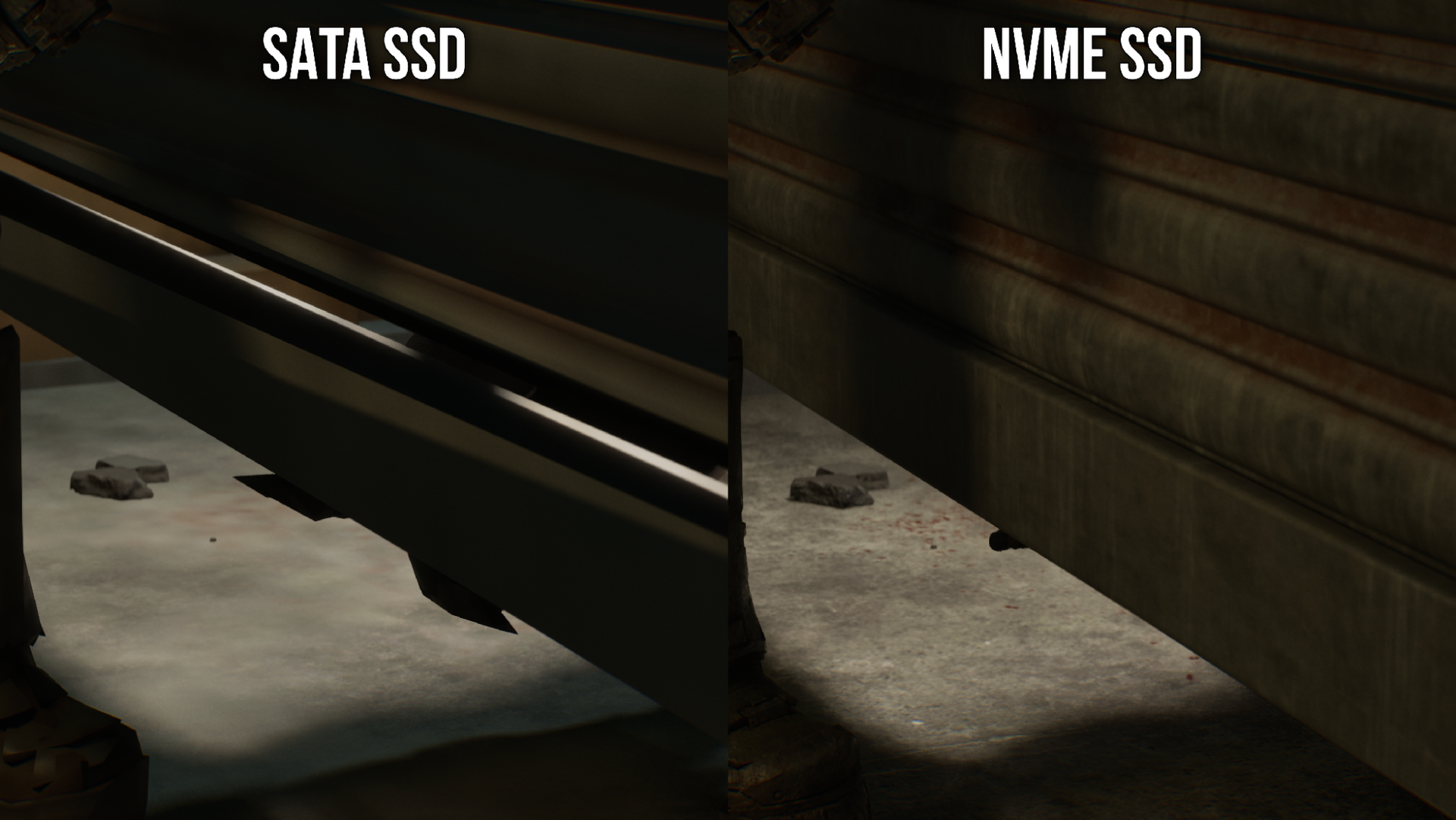
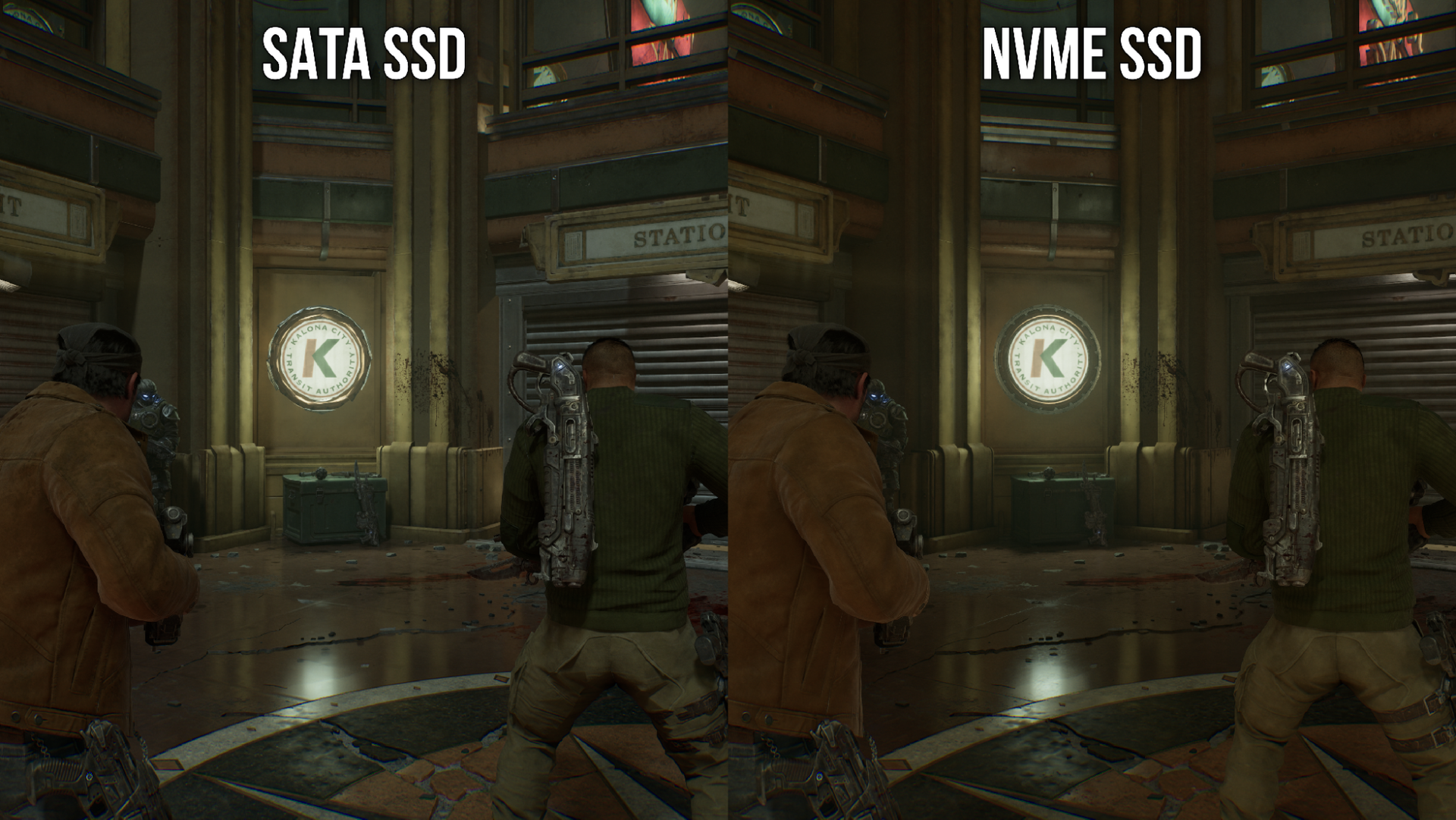
SATA’s lower throughput showed up in what the player sees. Textures took longer to load in one comparison, while lighting and shadows appeared late in another. The assets eventually loaded, but the delay was visible enough to affect immersion.
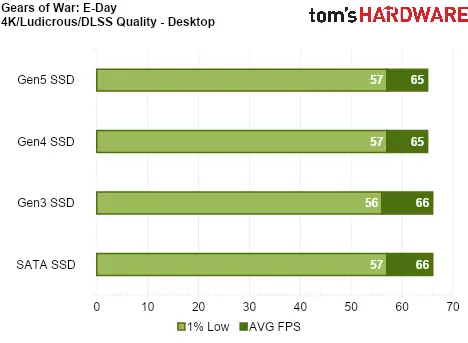
The performance cost depended on available memory. On the high-end desktop, which had 64GB of RAM, a SATA installation produced no measurable performance loss, despite the visual delays. The comparison also covered a laptop with an RTX 4060 Laptop GPU, an Intel Core i7-13620H, 16GB of DDR5 and a PCIe Gen4 NVMe drive, tested against SATA storage.
16GB systems benefit most at higher settings
On the 16GB laptop, average frame rates remained virtually identical between NVMe and SATA. The difference appeared in the 1% lows as graphics settings rose: the NVMe drive produced smoother frame times and a more responsive feel. This is the more relevant measure for intermittent slowdowns that an average frame rate can conceal.
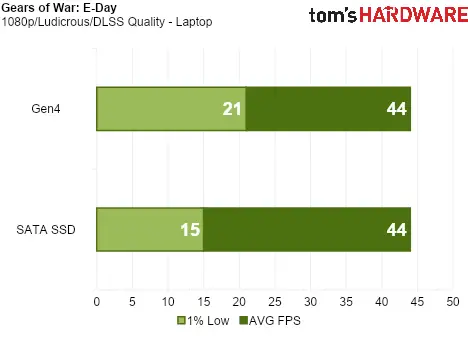
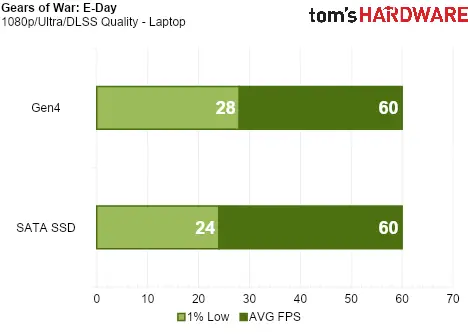
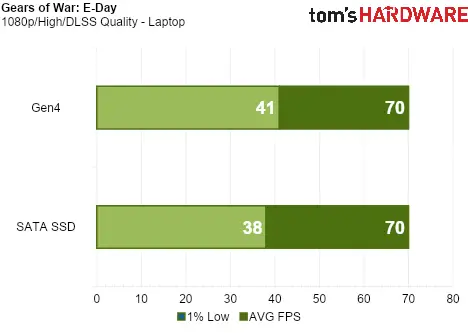
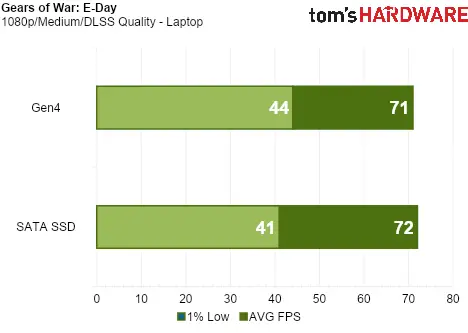
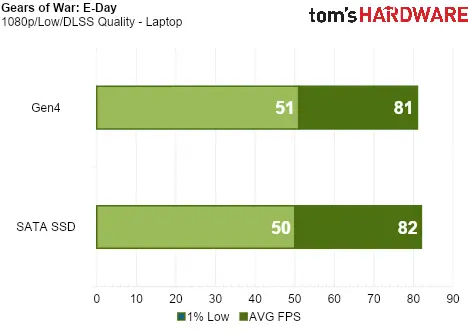
That distinction matters for players with less memory to spare. The tested configuration suggests that fast storage can help maintain smoother delivery of a demanding scene, while a SATA drive may struggle to provide assets at the rate the game requests them. The benefit is most apparent under heavier graphics settings, where the game’s storage demand rises.
A targeted tool for memory-limited PCs
Windows already pages data to storage when physical memory runs short, but E-Day’s approach is tuned around the game’s asset needs and the timing of its reads. The testing indicates that this can reduce RAM use on NVMe and preserve frame time consistency on a 16GB system. It also shows the limits: a SATA drive can cause visible asset delays, and the work does not prevent shader compilation stutters reported during play.
For visually dense games, fast storage is becoming part of the performance equation alongside memory capacity and graphics hardware. In E-Day, an NVMe drive helps extend what a 16GB system can handle; the useful next question is how consistently other games can schedule storage reads without introducing stutter or late-loading assets.


